Year-End Guide for Google and AI Search

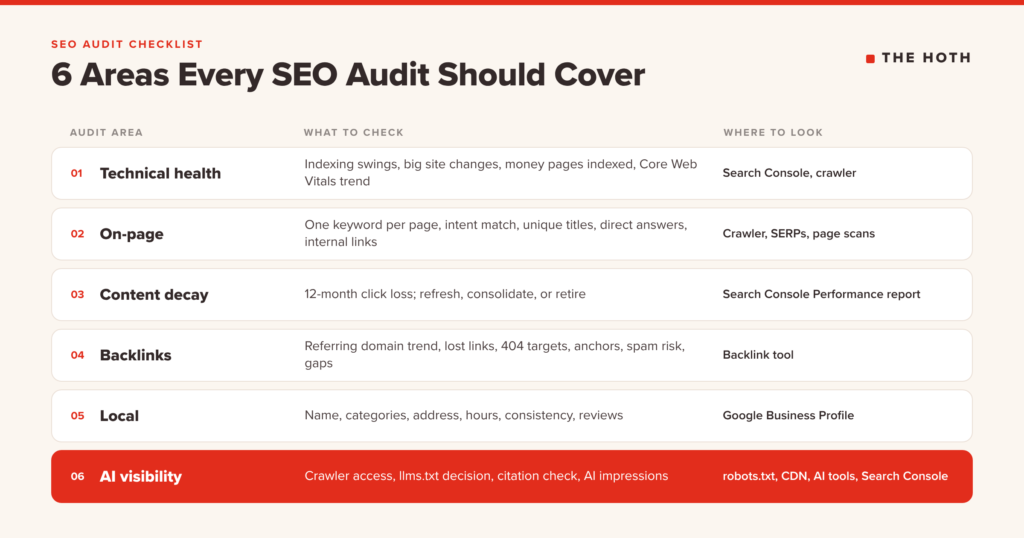
An SEO audit checklist is a repeatable list of checks that shows whether your site can be found, understood, and trusted by search engines and AI tools. A complete year-end audit covers six areas: technical health, on-page SEO, content decay, backlinks, local SEO, and AI visibility.
The end of the year is when every client, boss, and budget meeting asks the same question: what’s the plan for next year?
You can’t answer that well if you don’t know what’s broken right now. Maybe traffic slipped a few months ago and nobody dug in. Maybe a redesign quietly wrecked your indexing. Maybe ChatGPT recommends your competitor every time someone asks about your service, and you have no idea why.
An SEO audit fixes the guesswork. It gives you a clear list of what’s working, what’s leaking, and what to fix first.
This checklist is built for that year-end review. It covers the classic Google checks and adds a section most audit templates still skip: whether AI search tools can reach your site and whether they cite it. Work through it in order, log what you find, and you’ll walk into January with a prioritized plan instead of a hunch.
What Is an SEO Audit, and Why Run One at Year-End?
An SEO audit is a structured review of everything that affects how your site performs in search. Running it at year-end gives you a full 12 months of data to compare and lets you build next year’s roadmap on real problems instead of assumptions.
Think of it as a physical for your website: you’re measuring and recording, not fixing yet.
Year-end timing has three advantages:
- You have a full year of data. Search Console and GA4 let you compare this year to last year, which smooths out the noise of any single month.
- Budgets are still open. Findings that show up in an audit become line items in next year’s plan, not surprise requests in March.
- AI search changed a lot this year. If your last audit predates AI Overviews, AI Mode, and ChatGPT search, it’s missing a whole channel.
How often should you audit? A full audit once a year is the baseline. Lighter quarterly check-ins on traffic, indexing, and AI visibility catch problems before they snowball.
What Do You Need Before You Start the Audit?
You need access to Google Search Console, GA4, a site crawler, and a simple spreadsheet to log findings. Most small and mid-size sites can complete this audit in one to three working days.
Gather these before you open a single report:
- Google Search Console: your source for indexing, clicks, impressions, and now AI feature impressions.
- Google Analytics 4: traffic, engagement, and conversions by page and channel.
- A site crawler: any desktop or cloud crawler that lists your URLs, status codes, titles, and redirects.
- A backlink tool: to review referring domains, lost links, and anchors.
- A quick page-level scan: the free HOTH SEO Audit Tool grades a page in seconds and flags keyword use, link issues, and errors, which makes it a good first pass on your top pages.
- An audit log: a spreadsheet with columns for the issue, affected URLs, priority, owner, and status.
One rule before you start: log everything, fix nothing. Fixing as you go makes it impossible to see the full picture and prioritize.
Part 1: Is Your Site Technically Healthy?
A technical health check confirms that search engines can crawl, render, and index your important pages. For a year-end audit, focus on what changed this year: indexing drops, new redirects, site migrations, and speed regressions.
Technical SEO deserves its own deep dive, and we wrote one. Our 2026 technical SEO checklist walks through 32 checks, from robots.txt to JavaScript rendering. Use it for the detailed work.
For the year-end audit, you’re doing triage. Answer these questions and send anything that fails to the full technical checklist:
- Did indexed pages drop or spike this year? A sudden swing in Search Console’s page indexing report usually points to a template change, a noindex mistake, or a flood of thin URLs.
- Did anything big ship? Redesigns, CMS changes, new filters, and URL changes are where most technical damage starts.
- Are your money pages indexed? Run your top 20 revenue pages through URL Inspection and confirm each one is indexed and canonical to itself.
- Did your Core Web Vitals get worse? Compare field data now to the start of the year. New plugins and scripts tend to pile up.
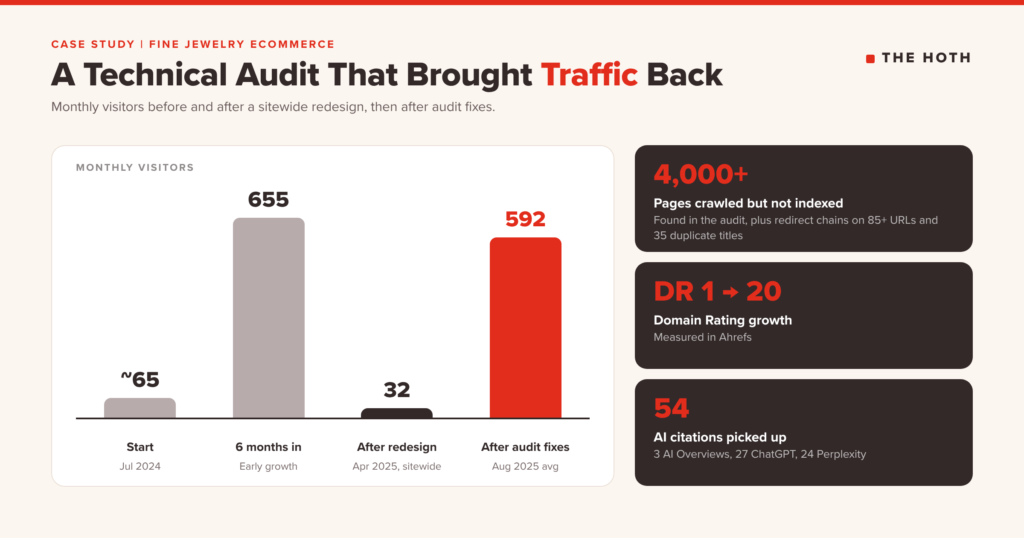
This step matters more than it looks. One of our clients, an Australian fine jewelry ecommerce site, went from about 65 to 655 monthly visitors in its first six months with us. Then a sitewide design change triggered technical problems, and by April 2025 traffic had crashed to 32 visitors a month.
The technical audit found more than 4,000 pages crawled but not indexed, mostly thin color and size variants. Category pages used a “load more” button Googlebot couldn’t click, so most of the inventory was hidden. Robots.txt rules created redirect chains for over 85 URLs, the sitemap listed URLs that didn’t exist, and 35 pages shared duplicate titles.
After canonical tags, noindex rules, real pagination, and a sitemap cleanup, organic traffic had all but recovered by August 2025, averaging 592 visitors a month. Domain Rating climbed from 1 to 20, and the site picked up 54 AI citations across Google AI Overviews, ChatGPT, and Perplexity. That recovery started with an audit.
Smaller technical fixes add up too. For an online apparel store, a technical audit in the first month of its managed campaign flagged unused JavaScript, layout shifts, and oversized images. After the fixes, the store saw a 121% traffic increase in three months.
Part 2: Do Your Key Pages Still Match What People Search For?
An on-page audit checks that each important page targets one clear topic, matches search intent, and has unique titles, headings, and meta descriptions. The goal is pages that answer the query better than the results around them.
Start with your top 25 pages by organic traffic or conversions. For each one, check:
- One primary keyword per page. If two pages target the same term, they compete with each other. Pick a winner and consolidate.
- Intent match. Search the target keyword and look at what ranks. If Google shows guides and your page is a product page (or the reverse), the page needs rethinking, not tweaking.
- Unique titles and meta descriptions. Your crawler will list duplicates. Duplicate titles on important pages are a quick win.
- A clear H1 and logical headings. Headings should read like an outline of the page.
- A direct answer near the top. AI Overviews and answer engines lift clear, self-contained answers. A one or two sentence summary under the H1 helps people and machines.
- Internal links to your money pages. Your highest-traffic posts should point readers toward the pages that convert.
Part 3: Which Pages Are Losing Ground to Content Decay?
Content decay is the gradual loss of traffic and rankings on pages that used to perform. Find it by comparing the last 12 months to the previous 12 in Search Console, then sort each declining page into refresh, consolidate, or retire.
Every site has pages that peaked and started sliding. The year-end audit is your chance to catch them before they disappear.
Here’s the process:
- In Search Console, open the Performance report, set the date range to compare the last 12 months against the previous 12, and switch to the Pages tab.
- Sort by the change in clicks. Export every page that lost meaningful traffic.
- For each page, search its main keyword and note what changed. Newer competitors? An AI Overview above the results? Outdated stats or screenshots?
- Tag each page with one action: refresh (still relevant, needs updates), consolidate (overlaps another page), or retire (no longer useful; redirect it to the closest match).
A warning: refreshing means changing the substance, not the timestamp. Google’s guidance on creating helpful, reliable content specifically lists changing page dates to look fresh, without substantially changing the content, as a sign of search-engine-first content. Update facts, examples, structure, and sources, then update the date.
Decay also works differently in AI search. A page can hold its Google rankings while AI tools stop citing it because its terminology or facts drifted from the current consensus. We explain how to spot that split in our post on content decay in Google vs. LLMs.
If your decay list is long, our Content Refresh service updates existing posts with new sections, current sources, and answer-ready formatting, which is usually faster and cheaper than rewriting from scratch.
Part 4: Is Your Backlink Profile Helping or Hurting?
A backlink audit reviews which sites link to you, which links you lost this year, and whether any links break Google’s spam policies. It also shows where competitors are earning links you are not.
Pull your backlink data and check:
- Referring domain trend. Are you gaining or losing linking sites year over year? A flat or falling line is a growth ceiling.
- Lost links. Check for valuable links lost this year. Many come back with a polite email if the linking page moved or was edited.
- Links pointing at 404s. Inbound links to deleted pages waste authority. Redirect those URLs to the closest live page.
- Anchor text mix. A profile dominated by exact-match keyword anchors looks manufactured. Branded and natural anchors should lead.
- Risky links. Google’s spam policies define link spam to include buying or selling links that pass ranking credit, excessive link exchanges, and automated link programs. Paid placements should carry rel=”sponsored” or rel=”nofollow”.
- Competitor gaps. List the domains that link to two or more competitors but not to you. That’s next year’s outreach list.
If the gap list is long and your team is short, HOTH Link Outreach places links on real sites you can filter by authority and traffic.
Part 5: Is Your Local Presence Accurate and Complete?
A local SEO audit checks that your Google Business Profile, website, and directory listings show the same accurate business information, and that your profile follows Google’s guidelines. Inconsistent or rule-breaking listings lose Map Pack visibility.
If you serve customers in a specific area, check:
- Business name. Google’s guidelines for representing your business say to use your real-world name, without taglines, keywords, or phone numbers stuffed in.
- Categories. Google advises choosing as few categories as possible and making them as specific as possible. Your primary category should describe what your business is.
- Address and service area. Service-area businesses without a storefront should hide their address.
- Hours. Confirm regular hours and add special hours for year-end closures before customers find a locked door.
- Consistency. Your name, address, and phone number should match across your site, profile, and major directories.
- Reviews. Check recent review volume and whether you’re responding. A slowdown this year is worth a plan.
Google also lists up-to-date Business Profile information among the basics for appearing in AI features, so local accuracy now affects AI answers too. For hands-on help, our local SEO services cover citation cleanup, review management, and managed local campaigns.
Part 6: Can AI Search Tools Find and Cite Your Site?
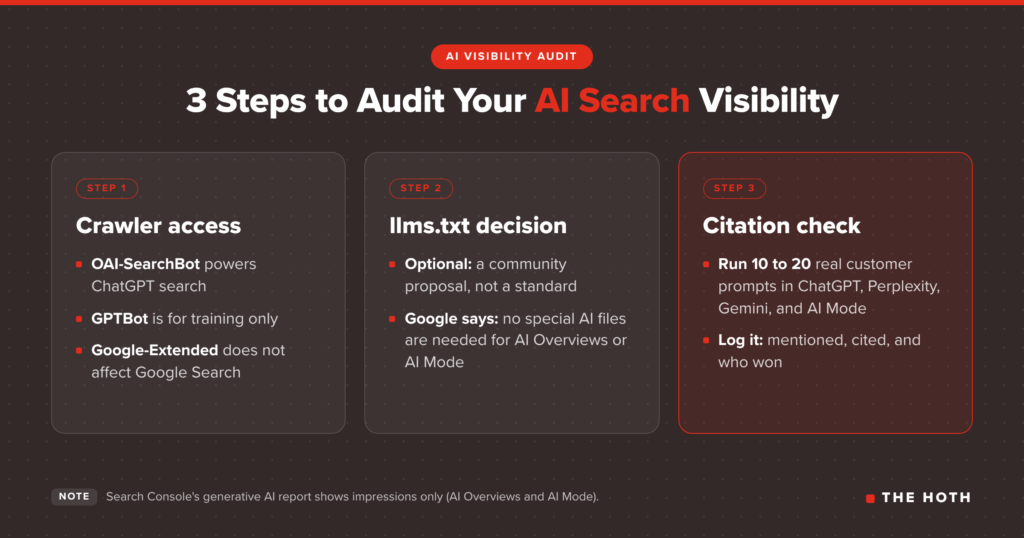
An AI visibility audit checks three things: whether AI crawlers can reach your content, whether you’ve made deliberate choices about which bots to allow, and whether AI tools mention or cite you for the questions your customers ask.
This is the section most SEO audit checklists still leave out, and it’s the one clients ask about most. Work through it in three steps.
Step 1: Confirm AI crawler access
Your technical checklist covers how to read robots.txt. For the audit, confirm which AI crawlers you allow and make sure each choice was intentional. The details matter, because blocking the wrong bot can remove you from AI answers:
- OpenAI: OpenAI’s crawler documentation separates OAI-SearchBot, which surfaces sites in ChatGPT search, from GPTBot, which collects training data. If you block OAI-SearchBot, your pages won’t appear in ChatGPT search answers. You can block GPTBot and still allow OAI-SearchBot.
- Google: Google’s documentation on common crawlers explains that Google-Extended controls whether your content is used for Gemini training and grounding. Blocking it doesn’t affect your inclusion or ranking in Google Search. AI Overviews and AI Mode rely on regular Googlebot crawling.
- Your CDN or host. Some security settings block AI bots by default. Check your firewall and bot management rules, not only robots.txt.
If you want the bigger picture on how AI tools read pages, see our guide to whether LLMs can read your site.
Step 2: Decide whether llms.txt is worth adding
llms.txt is a proposed Markdown file at your site root that gives AI agents a short summary of your site and links to your most useful content. It’s still a community proposal, not a ratified standard.
Be realistic about it. Google’s documentation on AI features and your website says you don’t need new machine-readable files, AI text files, or special markup to appear in AI Overviews or AI Mode. Standard SEO is what makes you eligible.
So treat llms.txt as optional. If you have documentation, a product catalog, or a knowledge base, it’s a low-cost addition. If it’s not on your site, don’t panic. Your audit time is better spent on crawler access and content quality.
Step 3: Run a citation check
This is where you find out if AI tools mention you. Write 10 to 20 prompts your customers would ask, such as “best [service] in [city]” or “how do I fix [problem],” and run them in ChatGPT, Perplexity, Gemini, and Google AI Mode. Log three things for each prompt:
- Mentioned? Does your brand appear in the answer?
- Cited? Does a link to your site appear as a source?
- Who won? Which competitors and which third-party sites get cited instead?
Then check Search Console. The generative AI performance report shows how often links to your site appeared in AI Overviews and AI Mode, broken down by page, country, date, and device. It rolled out to all websites as of August 31, 2026. Keep in mind it shows impressions only, so pair it with GA4 referral data to see visits from AI tools.
The third-party sites that keep showing up in your citation check are your roadmap. AI tools lean on sources they already trust, so earning mentions on those sites is often the fastest path in. That’s the work behind AI Discover, our service for getting brands cited in AI answers.
How Do You Turn Audit Findings Into Next Year’s Plan?
Score every finding by impact and effort, fix critical issues first, and schedule the rest across the year. An audit only pays off when each issue has an owner, a priority, and a date.
By now your audit log probably has dozens of rows. Here’s how to turn it into a plan:
- Critical: anything blocking indexing or crawling of money pages, or blocking AI search crawlers you meant to allow. Fix this month.
- High: decaying pages that drive conversions, duplicate titles on key pages, lost high-value links. Fix in Q1.
- Medium: broader content refreshes, competitor link gaps, local listing cleanup. Spread across the first half of the year.
- Low: nice-to-haves like llms.txt or minor template tweaks. Do them when there’s slack.
Use this summary as your year-end checklist:
| Audit area | What to check | Where to look |
| Technical health | Indexing swings, big site changes, money pages indexed, Core Web Vitals trend | Search Console, crawler, technical checklist |
| On-page | One keyword per page, intent match, unique titles, direct answers, internal links | Crawler, SERPs, page scans |
| Content decay | 12-month click loss by page; refresh, consolidate, or retire | Search Console Performance report |
| Backlinks | Referring domain trend, lost links, 404 targets, anchors, spam risk, gaps | Backlink tool |
| Local | Name, categories, address, hours, consistency, reviews | Google Business Profile, directories |
| AI visibility | Crawler access, llms.txt decision, prompt citation check, AI impressions | robots.txt, CDN settings, AI tools, Search Console |
Then re-run the AI visibility check and the content decay report every quarter. Those two areas change fastest.
Want a Second Set of Eyes on Your Audit?
If you do not have the time or tools to run a full audit, a professional technical audit gives you a prioritized findings report and a plan your developers can act on.
Some sites need a deeper crawl, and some teams don’t have the hours to run one before the year closes.
That’s what the HOTH Technical SEO audit is for. We crawl your full domain, review indexing, site structure, on-page elements, schema, and performance, and rank every issue from Critical to Low. You get a detailed report and a review call with a technical lead, and you can hand the fixes to your own developers or have us implement them. It also covers the AI side, so you’ll know whether technical issues are keeping you out of AI answers.
SEO Audit Checklist FAQ
How often should you do an SEO audit?
Run a full SEO audit at least once a year and a lighter check of traffic, indexing, and AI visibility every quarter. Also audit after any redesign, migration, or major CMS change.
How long does an SEO audit take?
A focused audit of a small or mid-size site takes one to three working days with the right tools. Large ecommerce sites with thousands of URLs can take several weeks, mostly because of crawl size and the number of templates to review.
Can ChatGPT do an SEO audit?
ChatGPT can help you interpret exported data, draft fixes, and brainstorm prompts for a citation check, but it cannot crawl your full site or see your Search Console data on its own. Use it as an assistant alongside real crawl and analytics data.
Do I need an llms.txt file?
No. llms.txt is an optional community proposal, and Google says no special AI files are needed to appear in AI Overviews or AI Mode. It can help AI agents navigate documentation-heavy sites, but crawler access and content quality matter more.
What is the difference between an SEO audit and a technical SEO audit?
A technical SEO audit focuses on crawling, indexing, speed, and site structure. A full SEO audit covers those plus on-page content, content decay, backlinks, local listings, and AI visibility.
The Bottom Line
A year-end SEO audit checklist turns a vague sense that something is off into a ranked list of fixes. Cover technical health, on-page, content decay, links, local, and AI visibility, then build next year’s plan around what you find.
Most sites don’t lose traffic in one dramatic moment. They lose it a little at a time: a redesign here, a decaying post there, a crawler blocked by accident. An audit catches all of it at once.
Block a few days, work through each section, and log everything. Start with the free SEO Audit Tool on your top pages, then go section by section. When you’re ready for a full crawl and a prioritized fix list, book a call with our team and we’ll walk through your site’s health in Google and AI search together.