
The 2026 Guide (GA4, AI Visibility & Automation)

Summarize this blog post with:
Clients don’t just want to know that SEO work was done. They want to understand whether it’s working, what changed since the last update, and what your team plans to do next.
That’s what a good SEO report should do. It should connect rankings, organic traffic, technical health, backlinks, conversions, and now AI visibility into a clear explanation of performance. The goal isn’t to include every possible metric, but to show the data that matters for the client’s goals.
This guide walks through what to include in an SEO report, how to structure it, which tools can help, and how to choose the right reporting workflow for scheduled reports, live dashboards, ad-hoc questions, and more advanced SEO or GEO analysis.
-
An SEO report for clients should cover core performance metrics like keyword rankings, organic traffic, site health, backlinks, and conversions. In 2026, it should also include AI visibility data (now trackable via GSC’s Search Generative AI tab, GA4’s AI Assistant channel, and SE Ranking’s AI Results Tracker).
-
SE Ranking’s Report Builder is best for scheduled monthly reports. It supports automated delivery, white-label branding, GA4 and GSC integrations, and AI-powered summaries for faster client-ready reporting.
-
SE Ranking’s MCP server works well for ad-hoc client questions. Once connected to Claude or ChatGPT, it lets you query rankings, audit issues, backlinks, and AI visibility conversationally without building a full report.
-
For more complex reporting workflows, the MCP connection can be paired with SE Ranking’s Claude skills. The skills can turn SE Ranking data into structured reporting outputs, such as content audit summaries, AI search share-of-voice analysis, backlink profile reviews, competitor gap reports, and SEO roadmap recommendations, without requiring teams to build long prompts from scratch.
-
Google Data Studio makes sense when clients need a live dashboard they can check on their own schedule. SE Ranking’s API is better suited for programmatic data access, including custom dashboards, internal tools, and automation workflows.
-
Reporting cadence matters. Monthly reports work for most retainers, weekly reports fit fast-moving projects, and live dashboards are useful for clients who want access between scheduled updates.
What is an SEO report?
An SEO report gives clients a clear view of how their website is performing in search. It connects rankings, organic traffic, technical health, backlinks, and conversions to explain what improved, what declined, and where the next opportunities are.
But in 2026, those metrics no longer tell the full story. SEO reports also need to show where a brand appears beyond traditional search results, including AI Overviews, AI Mode, and other generative search experiences that can influence both clicks and brand exposure.
For agencies, the goal is not to show every available metric. It’s to help clients understand progress, see the value of SEO work, and make informed decisions about what to prioritize next.
Why SEO reporting matters for client retention
Managing multiple clients at once is where most agencies feel the pressure most acutely. Each client has different priorities, different benchmarks, and different tolerance for data-heavy documents. Getting reporting right is one of the highest-leverage things an agency can do for retention.
Automated client reporting and standardized templates make the workflow easier to manage. They reduce manual work, lower the risk of errors, and help teams deliver updates on time. Just as importantly, a consistent reporting cadence keeps clients informed between strategy calls, so conversations shift from “What have you been doing?” to “What should we do next?”
Good reporting also builds trust. When clients can clearly see what changed, why it changed, and how your team plans to respond, they are less likely to question the value of the relationship. A report that combines data, explanation, and next steps creates transparency. A raw PDF export of metrics usually does not.
This is exactly the gap covered in SE Ranking’s SEO Reporting and Data Visualization for Agencies course, created in collaboration with SEO expert Lazarina Stoy. The course focuses on data storytelling — one of the most practical skills agencies can develop for stronger communication, better decision-making, and long-term retention.
AI visibility: the metric your SEO report is missing in 2026
AI search creates a measurement gap that traditional SEO reports don’t fully capture. A brand can appear in an AI answer, influence a user’s decision, and still generate little or no traffic that shows up as a standard organic session.
Our research shows how quickly this channel is growing. In fact, website traffic from AI search engines increased 16x from 2024 to 2026.
That share is still small (0.32% of all website traffic) compared to traditional organic search, but the growth rate is pretty impressive.
And for client reporting, the point isn’t to treat AI visibility as a replacement for organic search. It’s to show whether the client’s brand is starting to appear in AI search (which may influence future traffic, clicks, and brand demand).
This is why AI visibility deserves its own section in SEO reports. It helps explain what may be happening when organic traffic is flat, when informational pages lose clicks, or when a brand is being mentioned and cited in AI answers before users ever reach the site.
There are now three main data sources agencies can use to report on AI visibility:
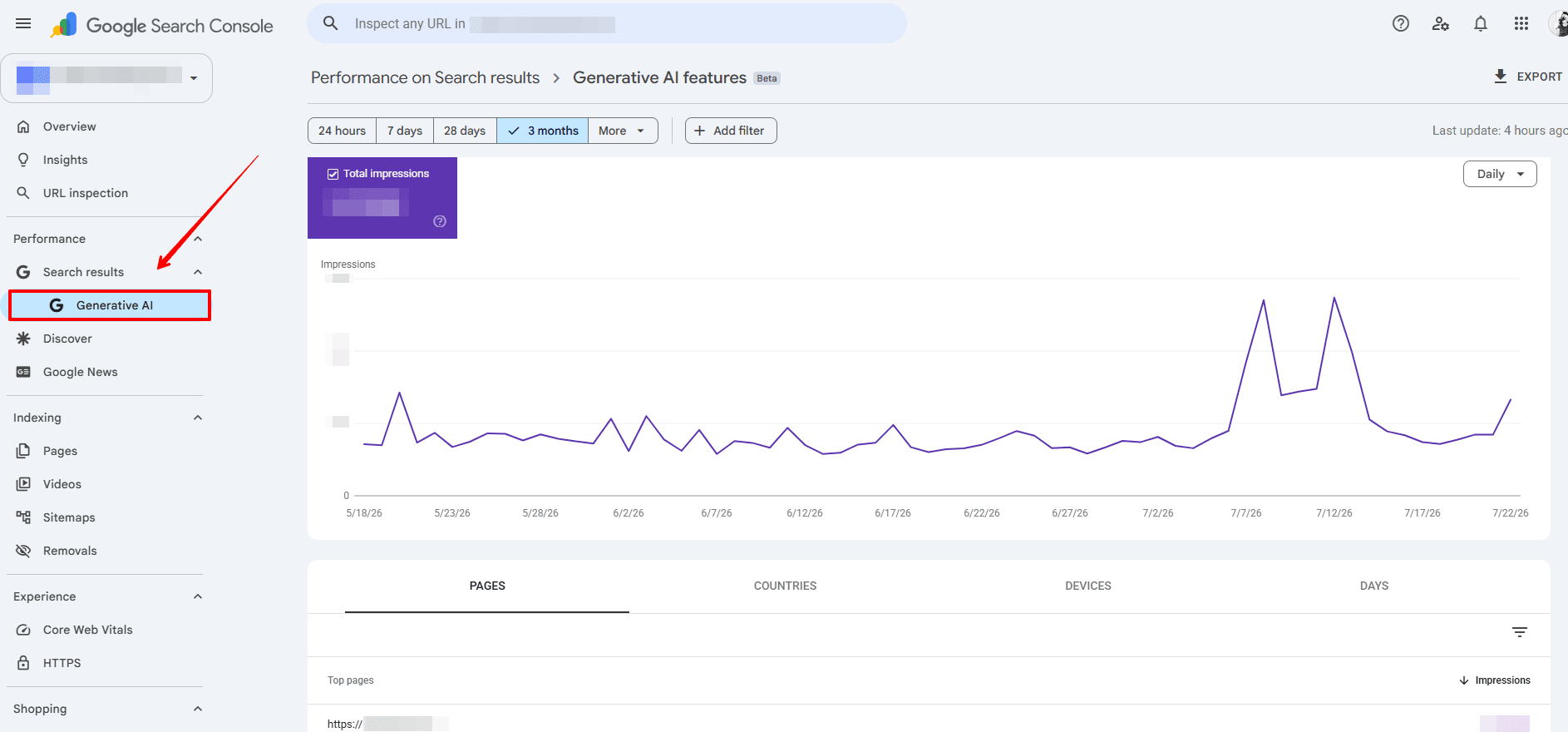
- Search Console’s Search Generative AI tab. Google launched a dedicated report in June 2026 (now rolling out globally after a UK-first release) that isolates how the site appears inside AI Overviews, AI Mode, and generative Discover features. It currently shows impressions only (no clicks or CTR yet), but it’s the first time agencies can point to a number that specifically represents AI visibility in Google’s own toolset.
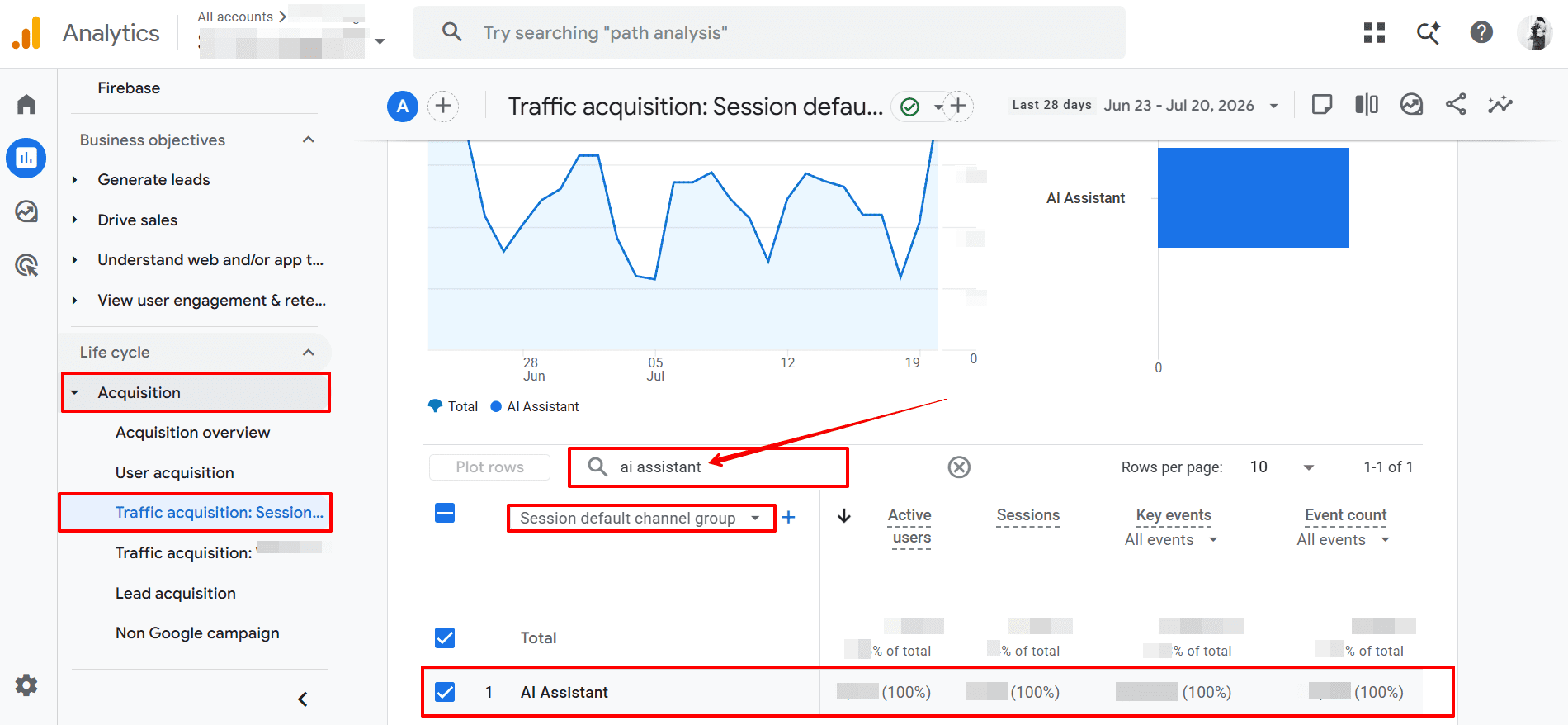
- GA4’s AI Assistant channel. Since May 2026, GA4 automatically routes traffic from AI assistants like ChatGPT, Gemini, and Claude into a dedicated “AI Assistant” channel in Default Channel Group reports. If your client’s content is being cited in AI answers, this is where the traffic shows up.
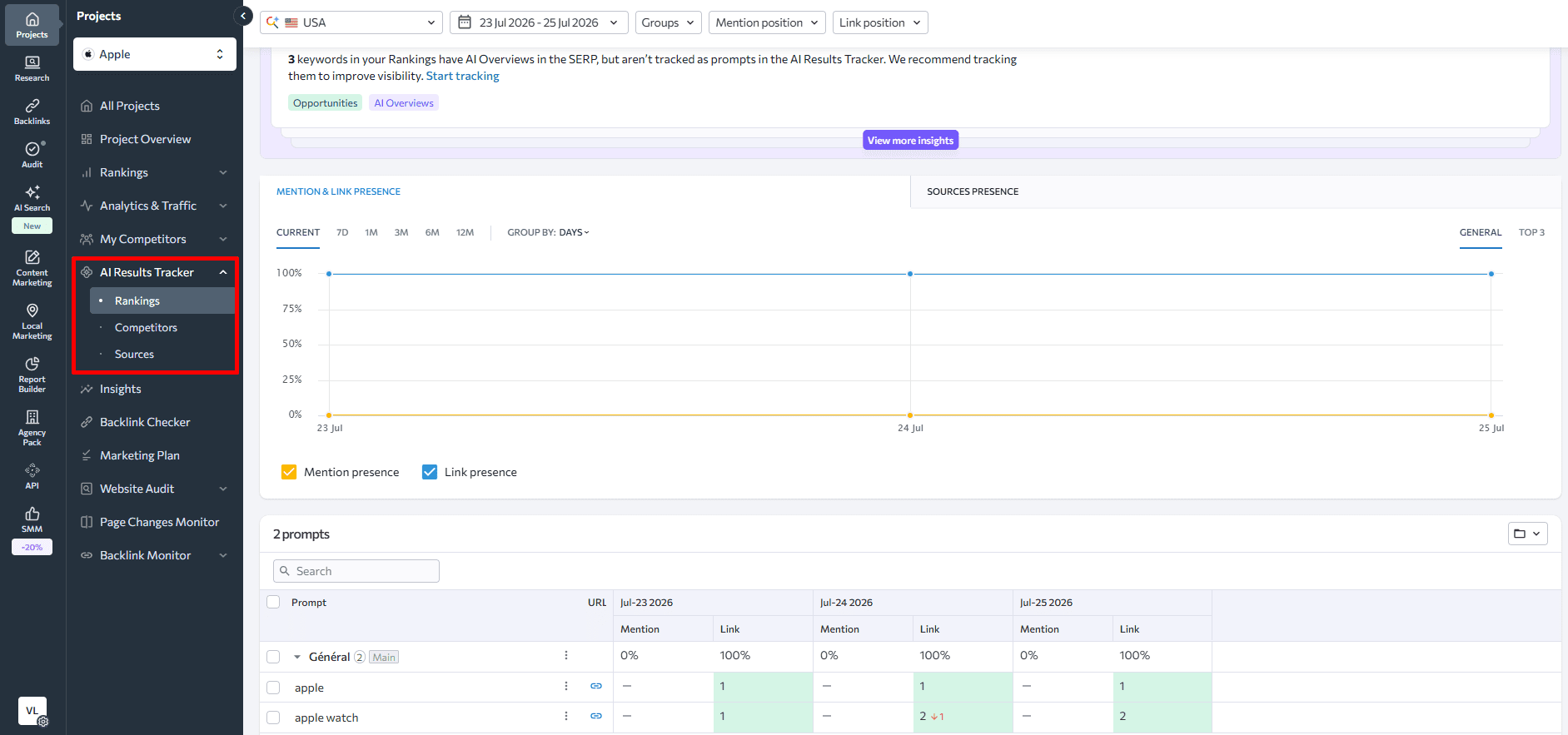
- SE Ranking’s AI Results Tracker. SE Ranking’s AI Search Toolkit tracks keyword-level AI visibility across Google AI Overviews, AI Mode, ChatGPT, Gemini, and Perplexity. It shows which of your client’s target queries appear in AI answers, whether their domain is cited, and how that citation rate compares to competitors.
Including AI visibility in reports doesn’t require a complete overhaul of your existing structure. Add a section after traditional organic traffic, frame it as an emerging channel, and set client expectations around what the data means and what it doesn’t yet tell you.
That honesty builds credibility. And even if clients aren’t demanding AI visibility data yet, the ones who get it first will remember that you were ahead of the question.
Tools for creating SEO reports
The right tool depends on what you’re trying to accomplish: scheduled delivery to clients, custom dashboards for internal use, rapid answers to ad-hoc questions, or programmatic data extraction at scale. These aren’t competing approaches; most agencies use a combination.
Scheduled monthly or weekly reports
SE Ranking Report Builder
Automated delivery, white-label branding, GA4 + GSC integration, AI-powered summaries (Agency Pack)
Google Data Studio + SE Ranking connector
Full design flexibility, free, requires setup time
Ad-hoc questions from clients
SE Ranking MCP + Claude or ChatGPT
No report setup needed — query the data conversationally in seconds
Programmatic data at scale
For custom dashboards, internal tools, or n8n/Make automation pipelines
Scheduled monthly or weekly reports
SE Ranking Report Builder
Automated delivery, white-label branding, GA4 + GSC integration, AI-powered summaries (Agency Pack)
Google Data Studio + SE Ranking connector
Full design flexibility, free, requires setup time
Ad-hoc questions from clients
SE Ranking MCP + Claude or ChatGPT
No report setup needed — query the data conversationally in seconds
Programmatic data at scale
For custom dashboards, internal tools, or n8n/Make automation pipelines
SE Ranking’s Report Builder
SE Ranking’s Report Builder is built for agencies that need to deliver professional, white-labeled reports across multiple clients without spending hours on each one. It pulls directly from the platform’s rank tracking, website audit, backlink monitoring, and analytics integrations, so the data doesn’t need to be manually assembled from multiple sources.
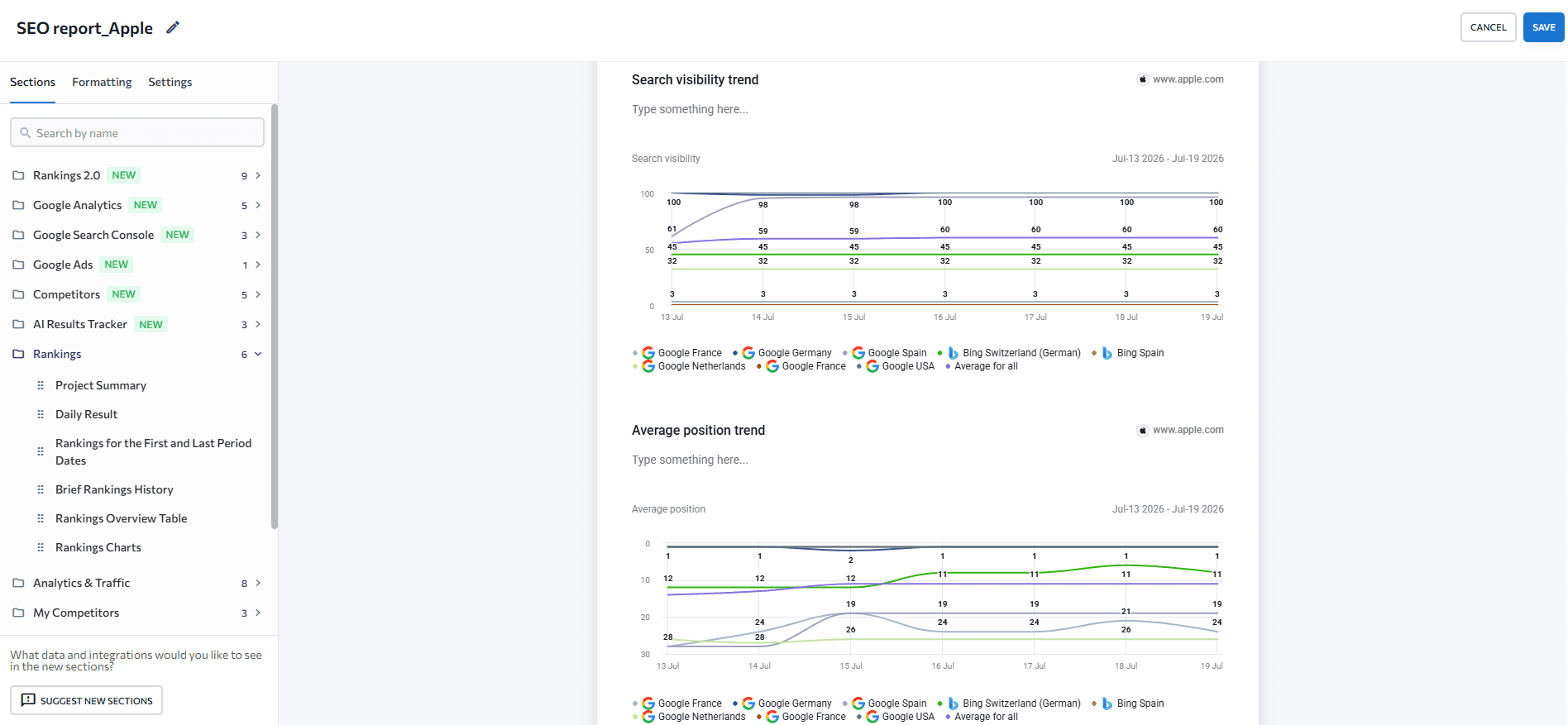
You can build reports modularly (selecting only the sections relevant to each client) or start from a pre-built template for common deliverables like Monthly Traffic and Rankings, Website Audit, or Competitor Overview.
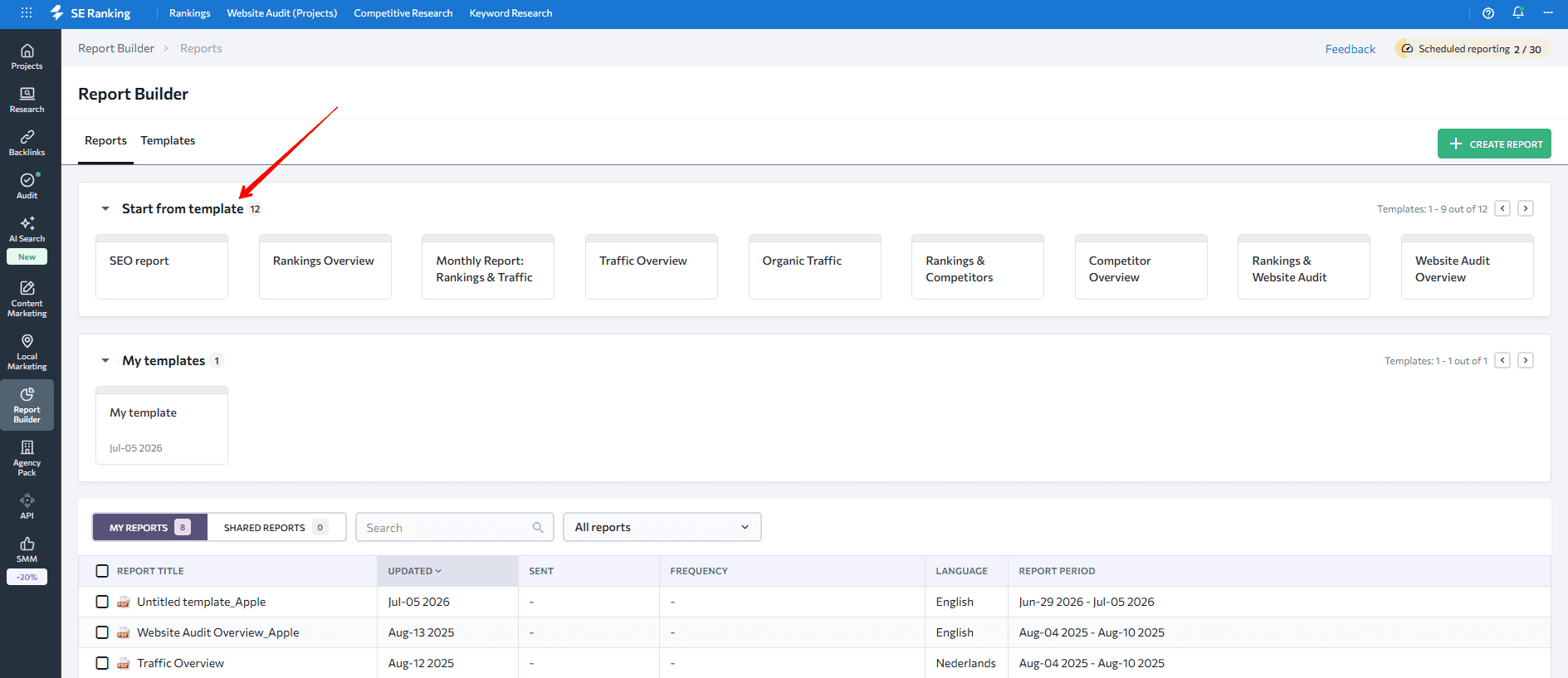
Scheduling lets you set a day, time, and frequency (daily, weekly, or monthly) and the report arrives in the client’s inbox without you touching it again.
For agencies on the Agency Pack, Report Builder now generates AI-powered summaries of each section — or the full report — with configurable length and tone. Instead of writing the executive summary paragraph from scratch each month, the AI drafts it from the underlying data. Agency Pack subscribers get 100 AI summary generations per month.
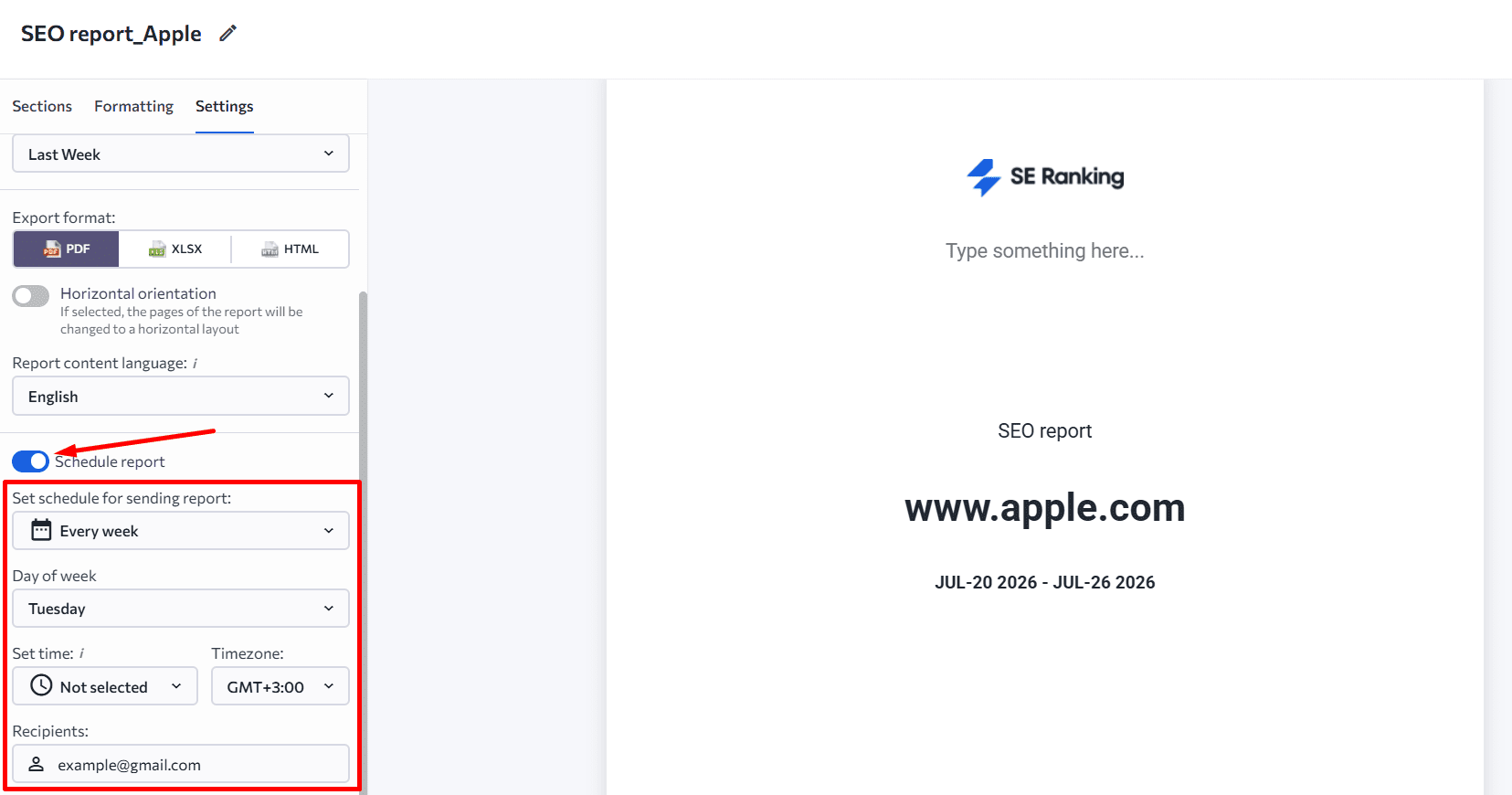
The white-label setup means reports go out under your agency’s branding, not SE Ranking’s. You can set a cover page, customize headers and footers, and adjust the color scheme to match the client’s expectations.
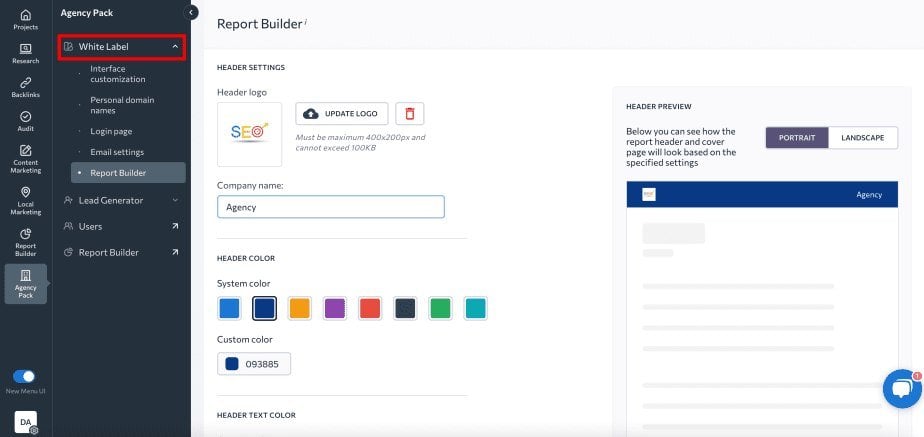
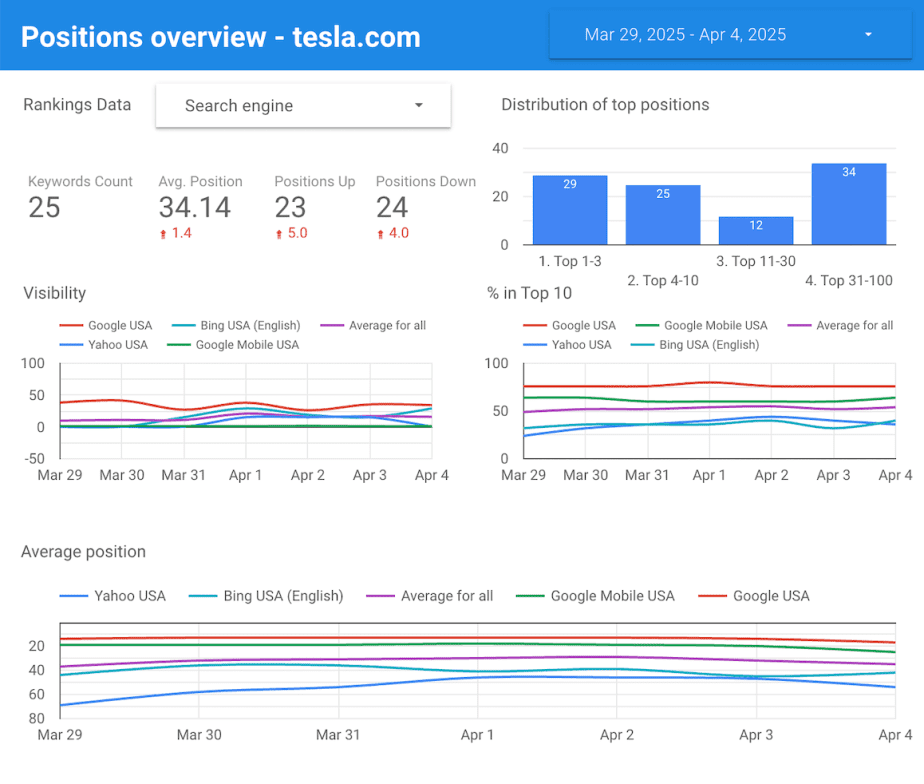
Google Data Studio
Google Data Studio is a free option for agencies that want full design control over their dashboards. It connects to GA4, Search Console, and SE Ranking, and it lets you build custom dashboards that update automatically without you generating them each month.
The trade-off is setup time. Google Data Studio is more flexible than Report Builder but takes longer to configure, and maintaining complex data blends requires familiarity with the tool. For agencies already comfortable with it, Google Data Studio templates can significantly reduce that overhead.
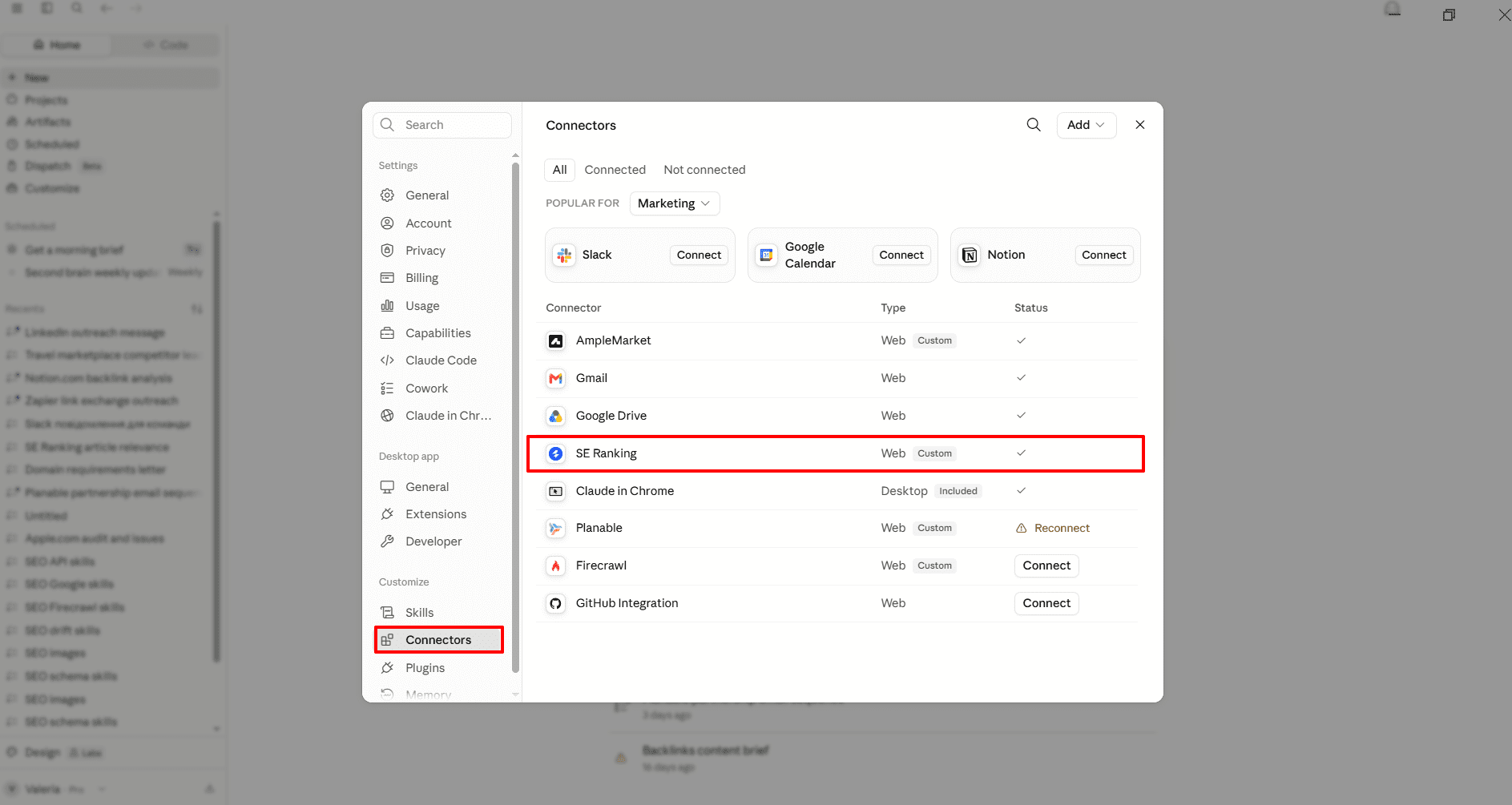
SE Ranking MCP
SE Ranking MCP helps agencies answer reporting questions with live SE Ranking data inside AI assistants like Claude, ChatGPT, and Cursor. It gives access to 180+ SEO and GEO tools, including those for rank tracking, keyword research, domain analysis, backlink analysis, website audits, competitor insights, and AI search visibility.
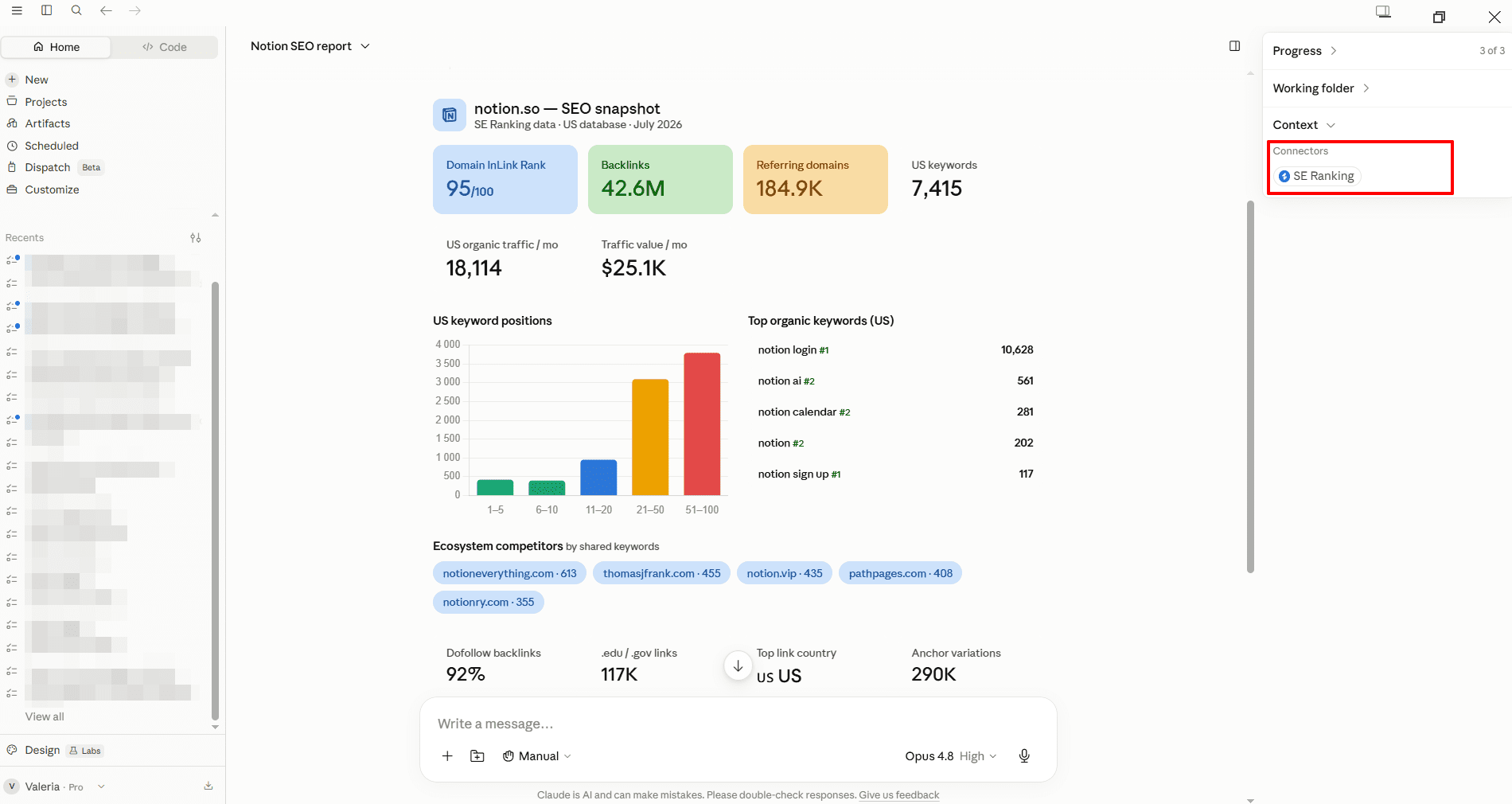
For reporting, MCP is useful when you need context between scheduled deliverables. Instead of building a full report for every client question, you can ask an AI assistant to compare ranking changes, backlink losses, audit issues, or AI visibility gaps and return a structured explanation based on SE Ranking data.
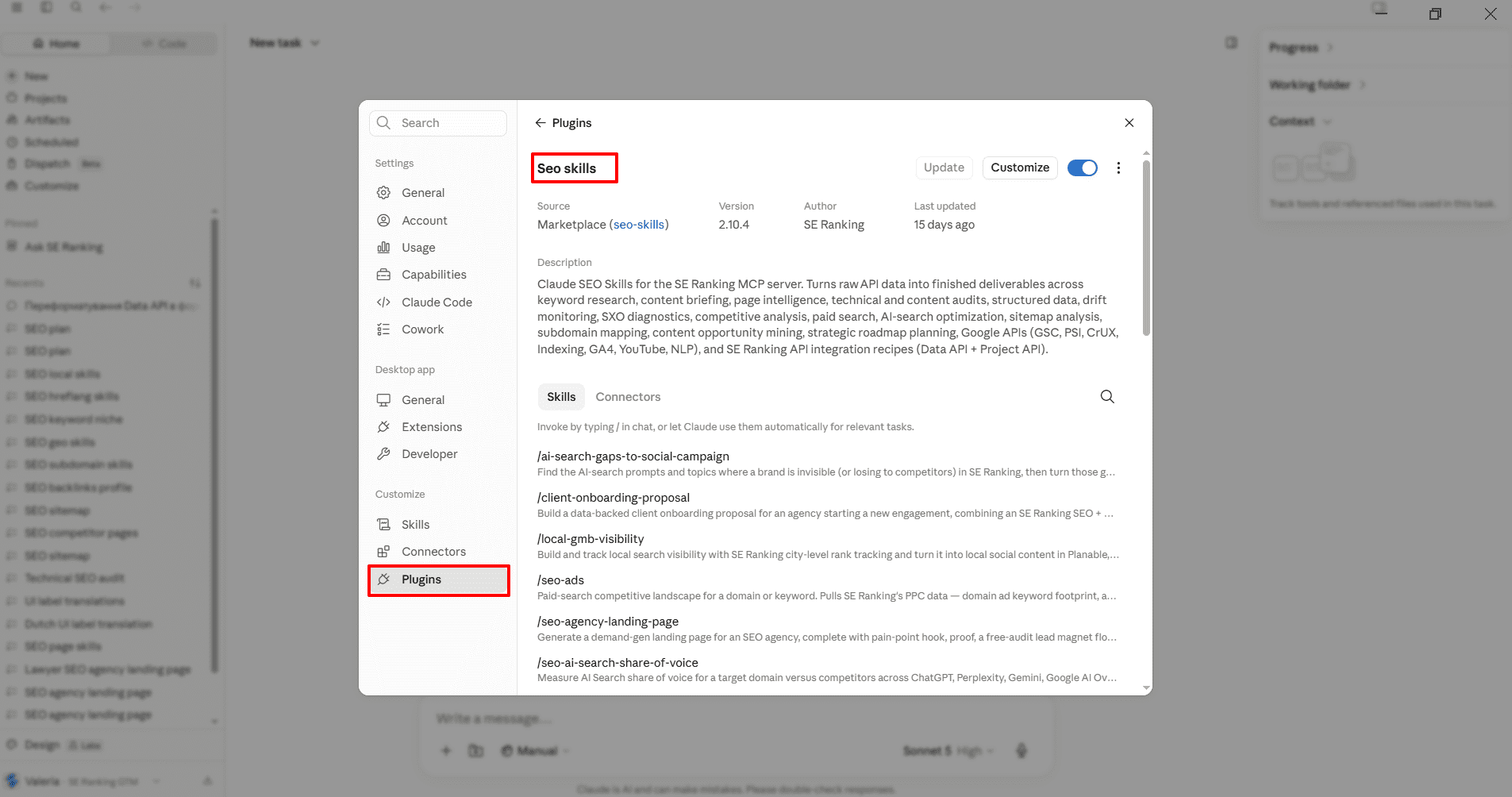
It also supports more advanced reporting workflows through SE Ranking’s Claude skills. These skills turn common SEO and GEO tasks into ready-made outputs, such as content audit summaries, AI search share-of-voice analysis, backlink profile reviews, competitor gap reports, and SEO roadmap recommendations. Teams don’t need to rebuild long prompts from scratch each time.
The right mental model: use Report Builder for scheduled monthly reports and anything that needs a polished client-facing format. Use MCP when you need fast analysis, supporting context, or structured reporting inputs inside an AI assistant (whether for a client follow-up, internal QA, competitive review, or a more detailed SEO or GEO analysis).
What to include in your SEO reports
Which data to include depends on the type of service you provide and the goals you’ve agreed on with each client. Most SEO reports cover keyword rankings, organic traffic, and technical site health as a baseline. From there, what you add — conversions, local signals, backlinks, AI visibility — should reflect what matters most to that client’s business.
Keyword rankings
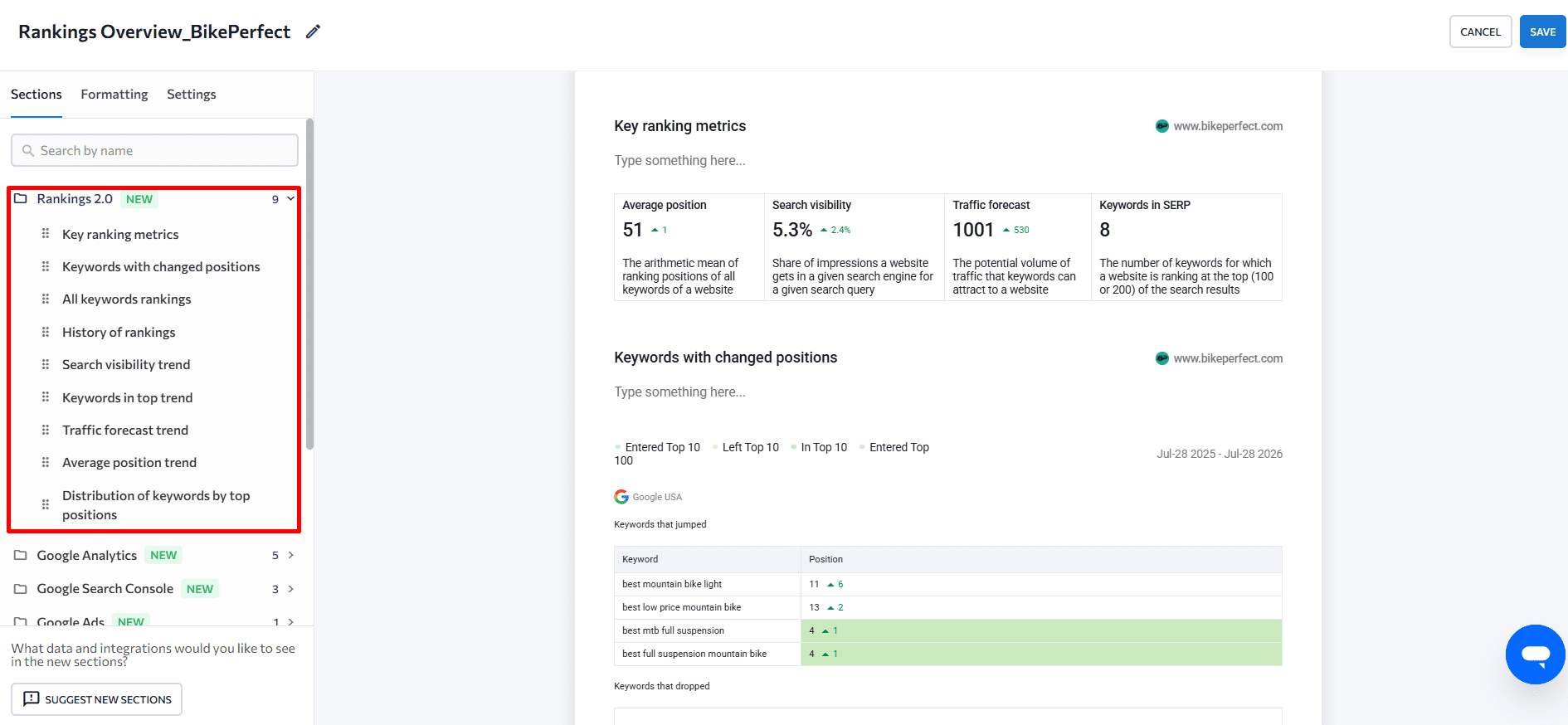
Include a section that shows how the client’s pages are currently ranking for their tracked keywords. Highlight average position, the number of keywords in the top 3-10 positions, and search visibility as a proxy for overall keyword health. Changes since the last report — keywords gained, lost, and moved significantly — are typically more useful than a static snapshot.
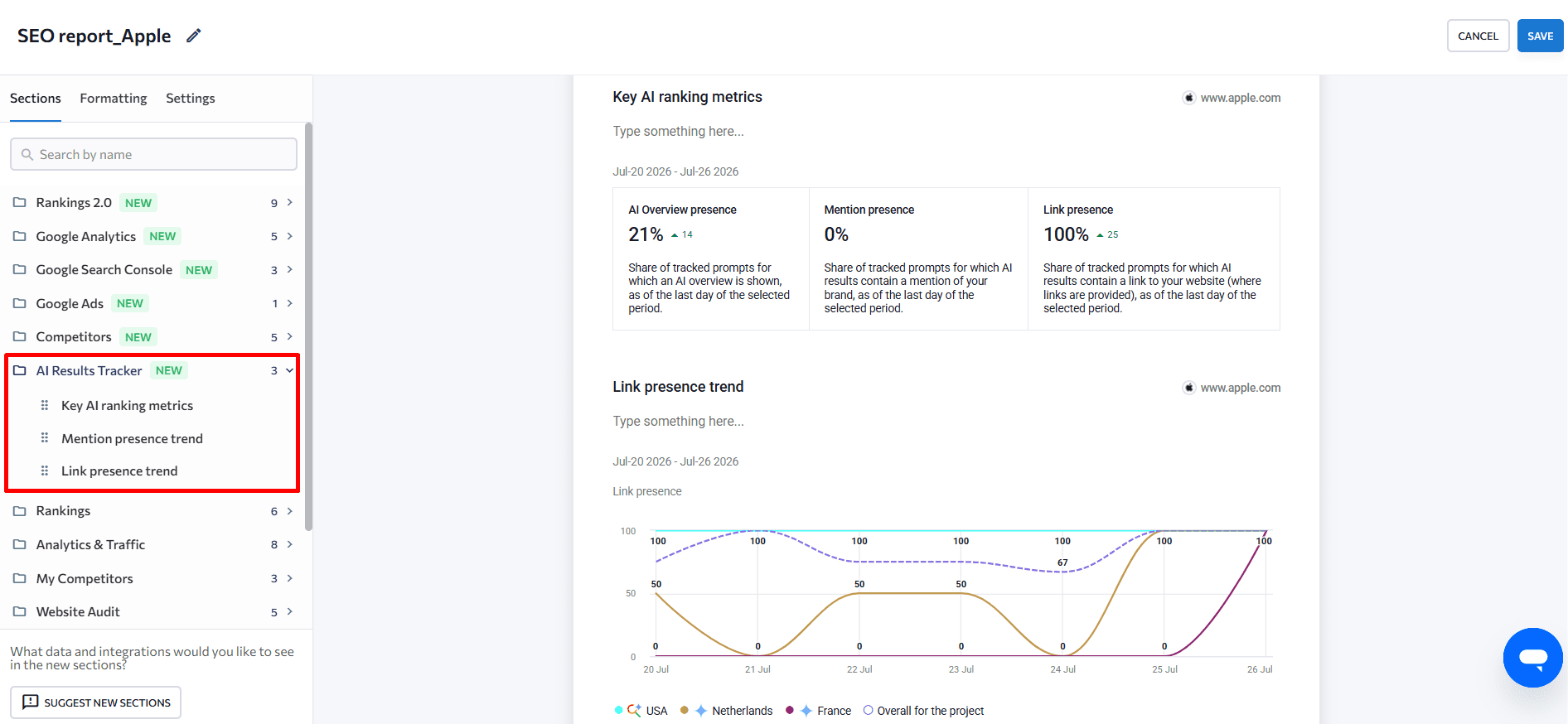
If the client is tracking AI Overviews, include which keywords trigger an AI Overview and whether the site is cited in those answers. This connects traditional ranking data to the AI visibility picture.
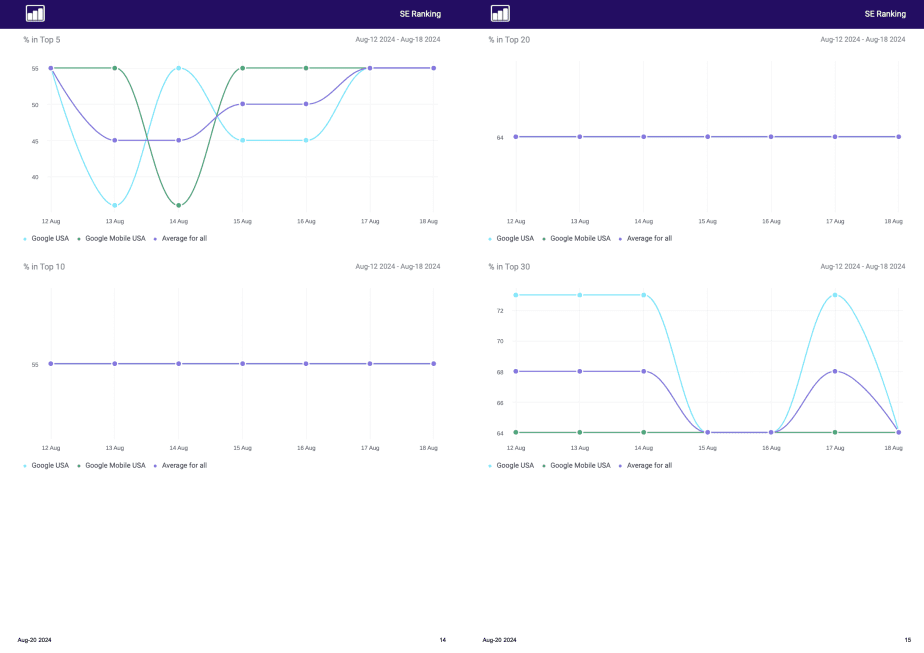
To show trend over time, include a rankings history view covering the full reporting period. You can use SE Ranking’s API to pull specific keyword position data programmatically if you’re building custom reporting workflows.
Organic traffic (GA4)
Make sure your SEO report connects GA4 data on organic traffic, not just session counts. What you’re looking for: organic traffic volume trends month-over-month, the top landing pages driving organic traffic, and engagement metrics (engagement rate, average engagement time, bounce rate) that signal whether visitors are finding what they came for.
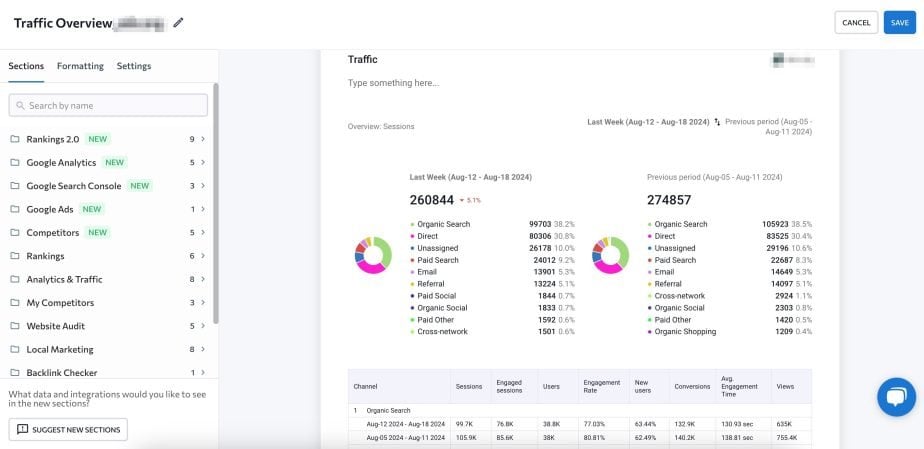
With SE Ranking, you can connect GA4 and pull organic and paid traffic data directly into your reports without a manual export step. The Google Analytics integration pulls traffic data into the same view as your ranking data, which makes it easier to show the relationship between position changes and traffic outcomes. For a full walkthrough of how to use GA4 alongside your SEO data, see our Google Analytics for SEO guide.
Also check the AI Assistant channel in GA4 (under Default Channel Group). If the site is being cited in AI answers, this channel shows the traffic that results. For most sites it’s still small, but it’s growing, and setting the expectation with clients now makes the conversation easier later.
Branded vs. non-branded traffic
Branded traffic (users who searched specifically for the client’s company or product name) tells a very different story from non-branded traffic, which represents users who found the site through generic category keywords.
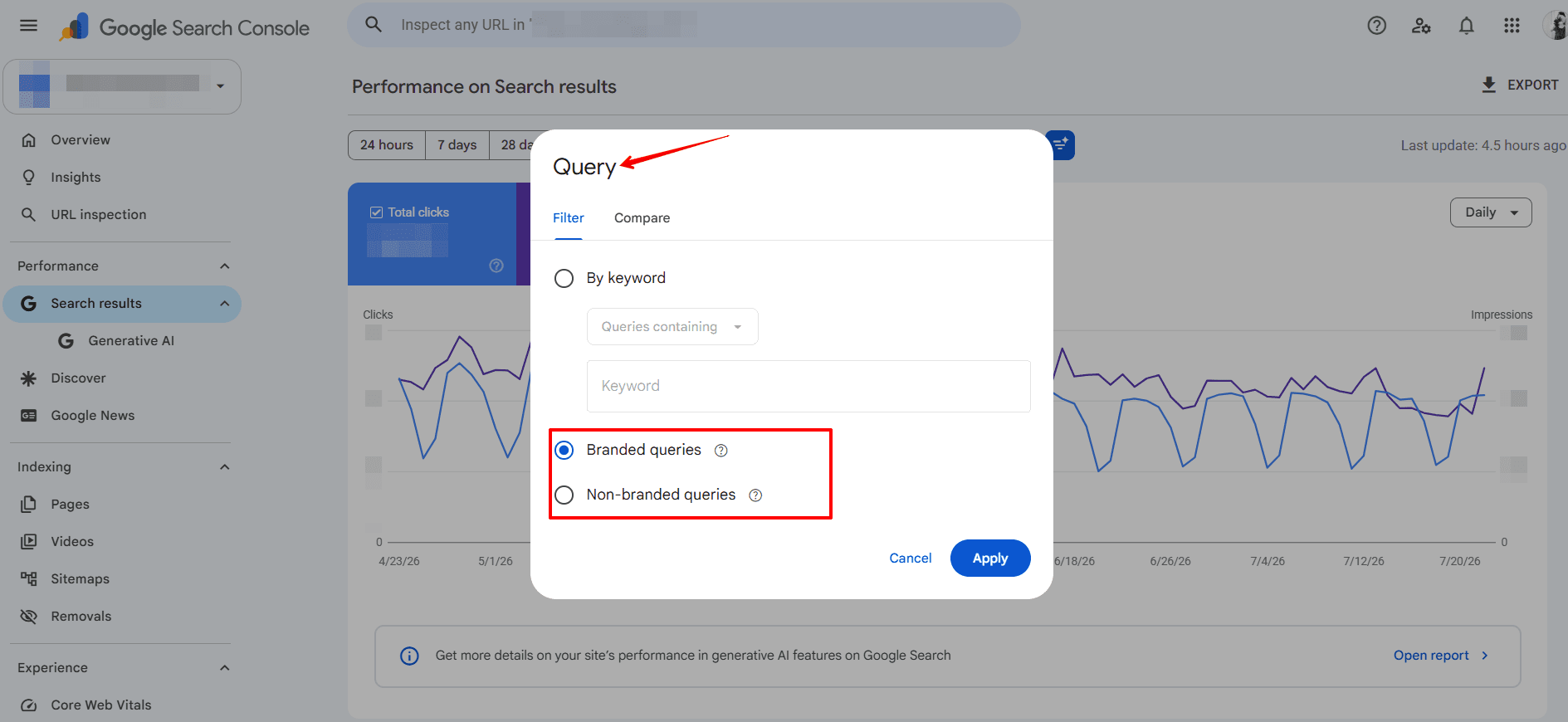
If non-branded traffic is growing, your content and SEO campaigns are reaching new audiences who didn’t already know the client. If it’s flat while branded grows, the work is supporting awareness but not yet expanding reach. GSC now has a built-in Branded / Non-branded queries filter that makes this split instant — no manual keyword sorting needed.
SE Ranking’s Rank Tracker allows breakdown per keyword across all tracked positions.
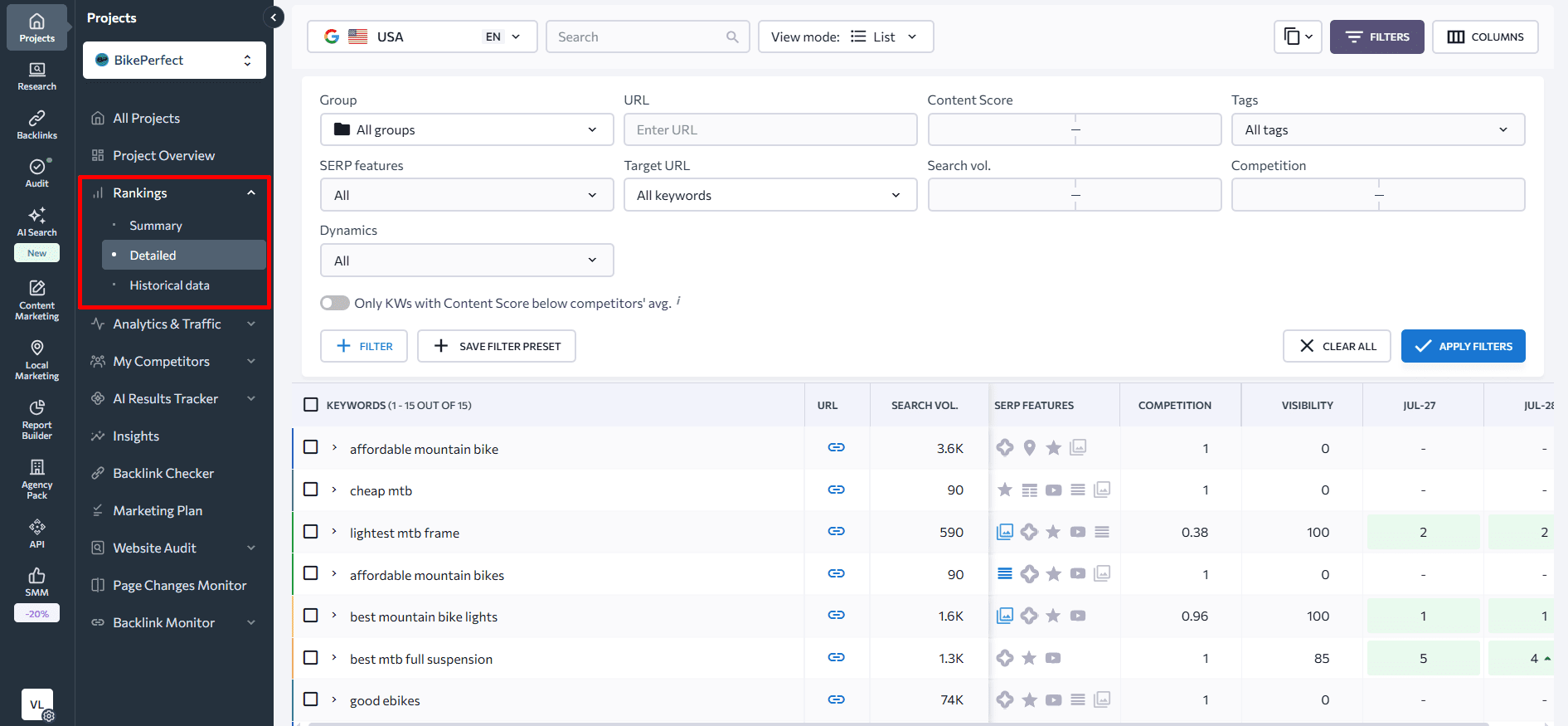
Include this data with a one-line interpretation: clients who understand their traffic composition are better equipped to connect SEO investment to business development conversations.
Website health score
Including the website health score in SEO reports gives clients a clear, trackable signal of technical SEO progress that doesn’t require them to understand crawl budgets or render-blocking JavaScript. SE Ranking’s Website Audit generates a numerical health score based on errors, warnings, and notices across crawlability, indexability, speed, mobile usability, structured data, and security.
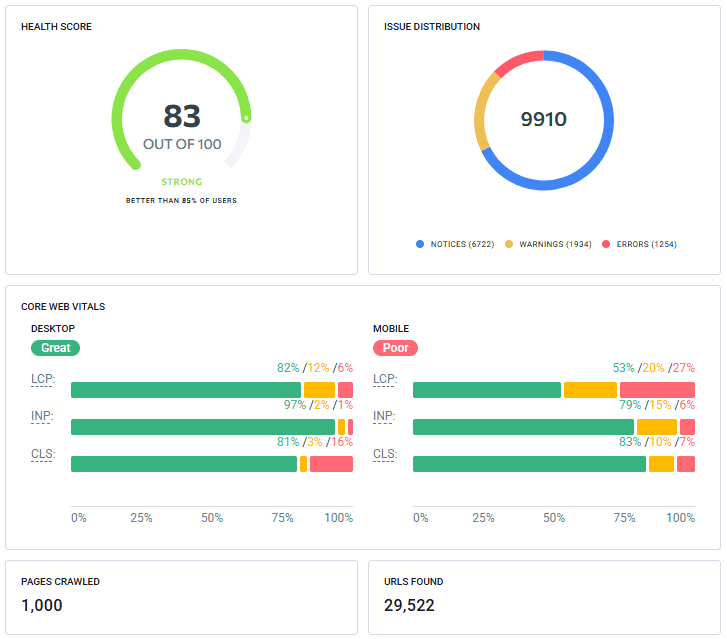
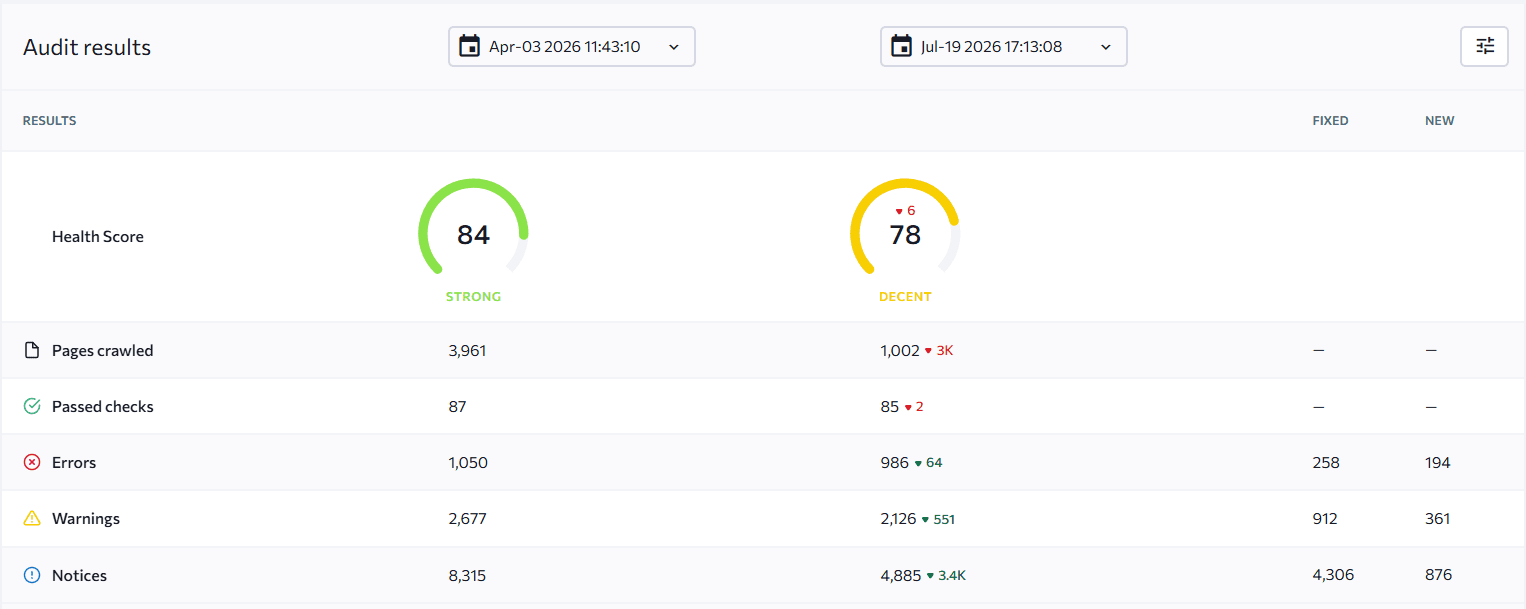
The most useful way to present this metric is as a trend: not just the current score, but how it’s changed since the last audit. If the score improved from 72 to 85, show which issue categories drove that improvement. If it declined, show what changed and what the remediation plan is. Comparing two crawls side-by-side — which Report Builder supports directly — makes this straightforward.
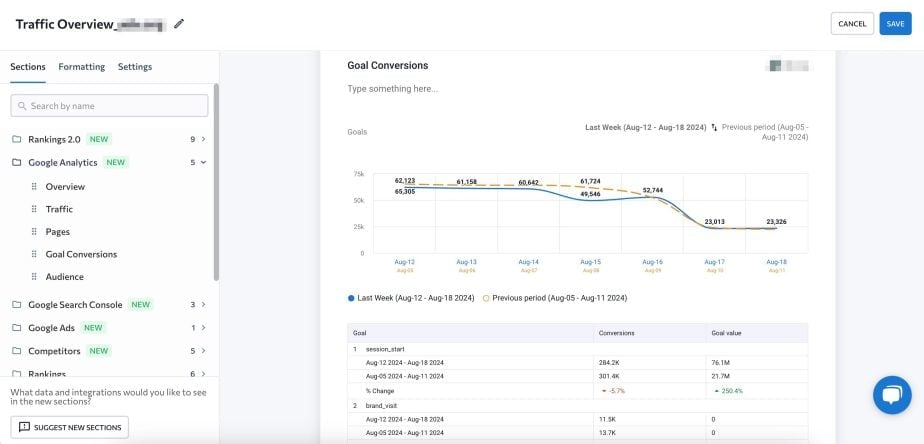
Conversions and business goals
If the client measures success by sales, form completions, downloads, or sign-ups, those conversions need to appear in the report. This is the data that connects SEO investment to business outcomes, and it’s the section clients care most about when the conversation turns to budget.
Pull organic conversion data from GA4 by filtering the landing page report to “Organic Search” as the traffic source. SE Ranking’s Report Builder can include this data automatically when GA4 is connected to the project. Adding conversion data also lets you identify which pages are performing well and which are bringing traffic without converting — which feeds directly into the next month’s SEO roadmap.
Backlinks
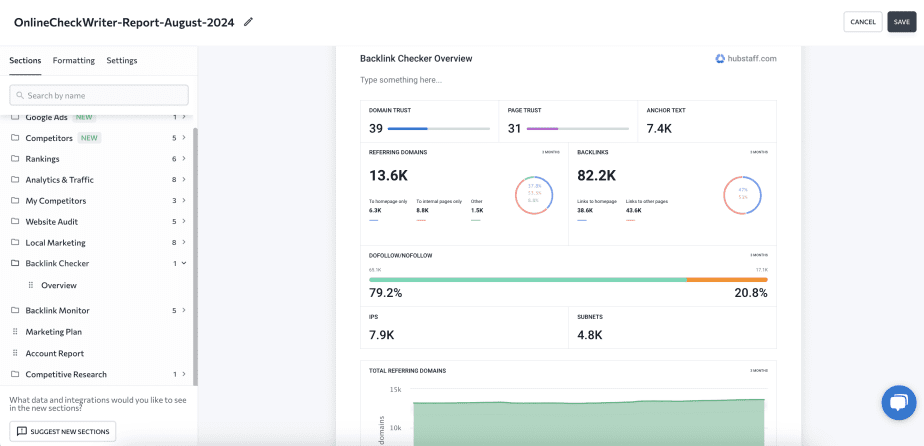
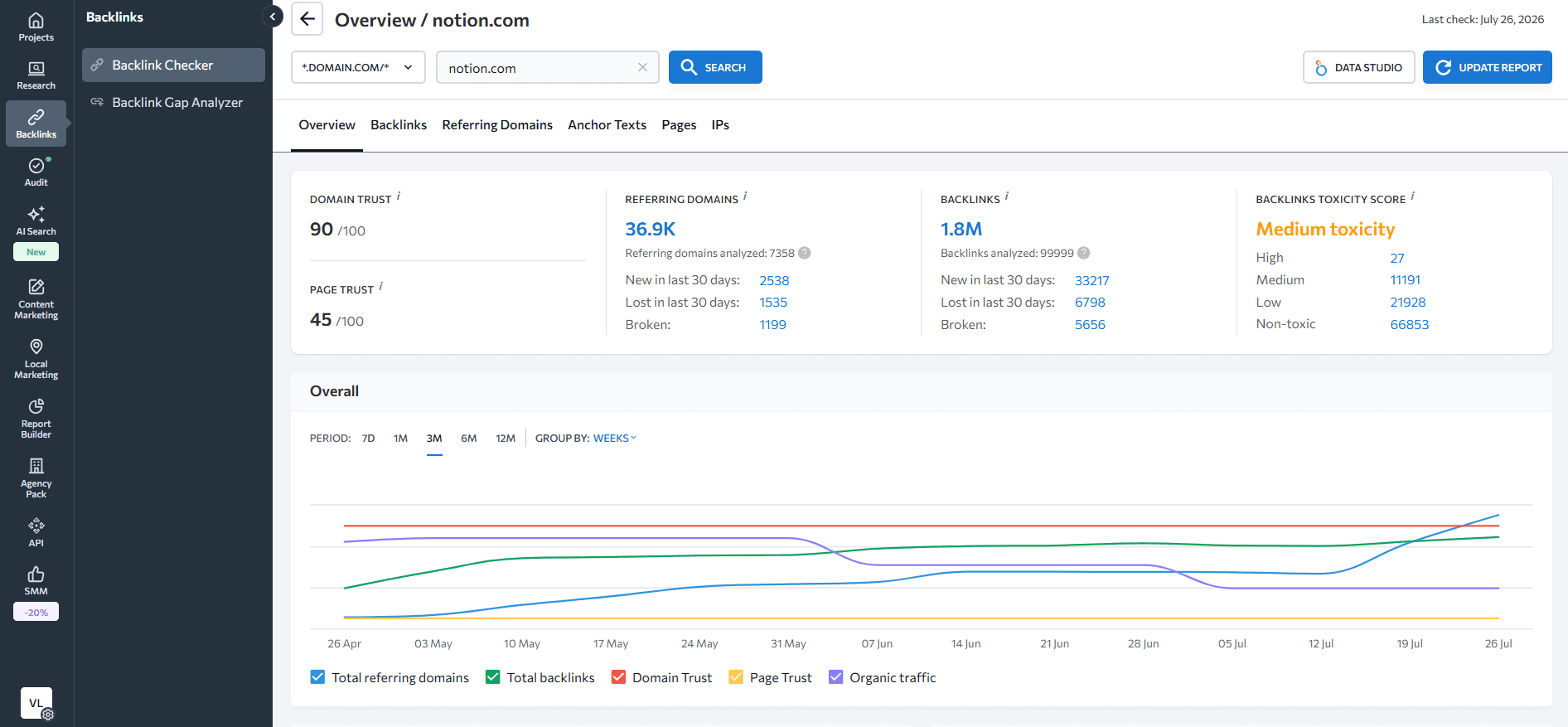
A backlink section demonstrates off-page SEO progress in terms clients can understand: new links earned, links lost, and the quality of the referring domains. You typically don’t need to present the full backlink list — a summary of new high-authority links acquired during the reporting period, combined with any notable changes in referring domain count, is usually sufficient.
SE Ranking’s Backlink Checker shows domain authority, new and lost referring domains, and anchor text distribution. Include a brief interpretive note — what the link gains mean for the client’s authority trajectory, and whether any lost links warrant investigation.
Google Business Profile metrics
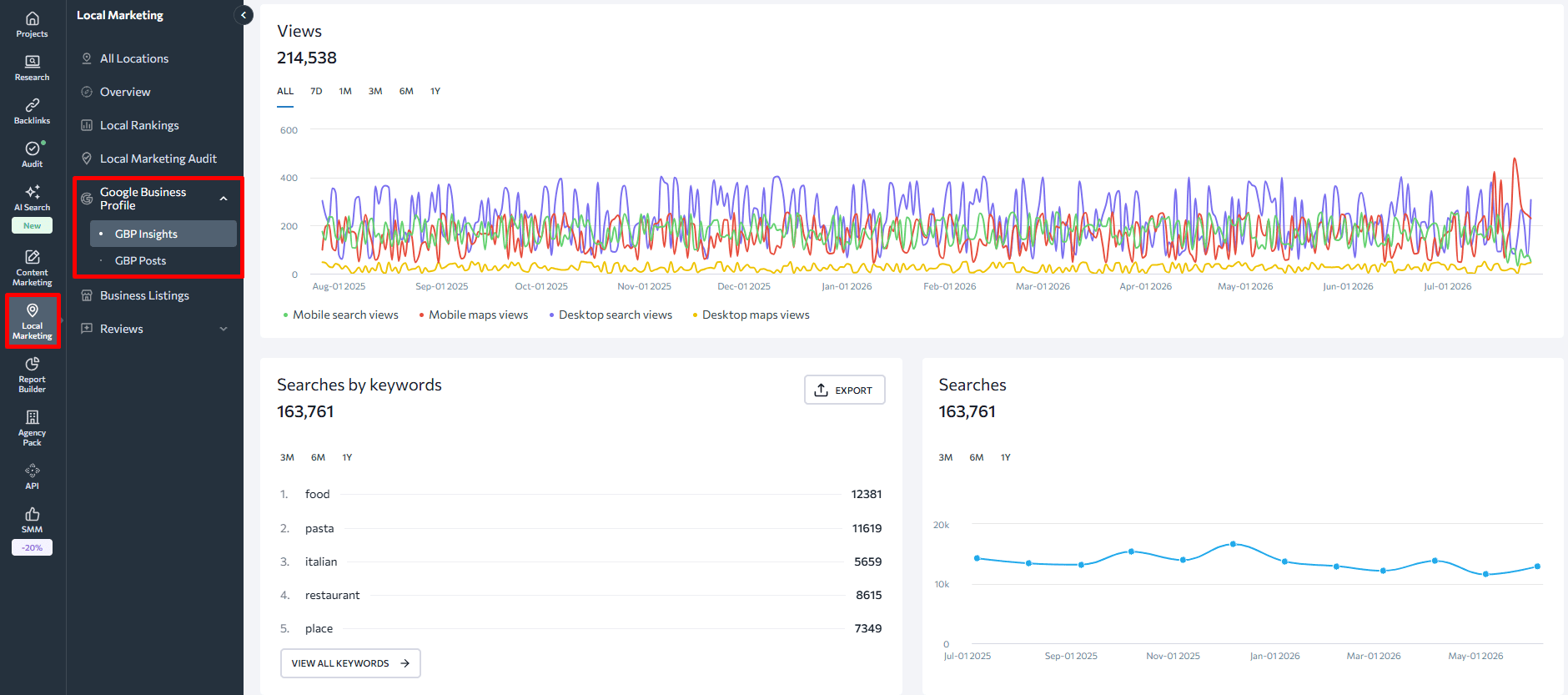
For clients with local SEO campaigns, Google Business Profile metrics are a meaningful addition: profile views, direction requests, calls, and review volume. These signals tell clients how their local presence is performing independently of their website traffic, which matters for businesses where foot traffic or phone inquiries are the actual conversion.
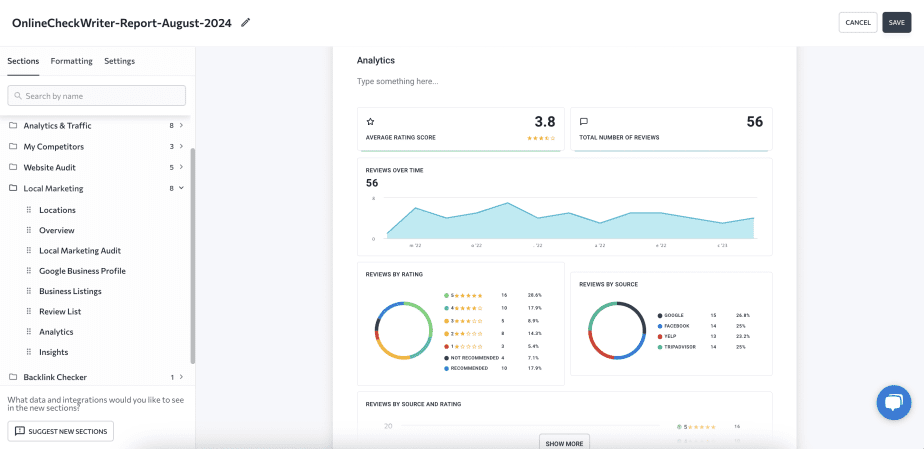
SE Ranking’s Local Marketing tool integrates GBP data into the same reporting environment as rankings and audit data, so you can include local performance without switching between platforms.
Steps to building an SEO report
Step 1: Set clear goals before you report on anything
Before building a report, align with the client on what success looks like. Their goals determine which metrics belong in the report and which are noise. Common client goals (like improving rankings for specific terms, increasing organic traffic in a target segment, generating more leads from search) each imply a different reporting emphasis.
Once goals are defined, conduct or reference a recent site audit to understand where the client currently stands. This gives the first report a baseline to measure against and makes subsequent reports comparative rather than just descriptive.
Common goal frameworks to work through with clients:
- Rankings-focused: which keywords, at what position threshold, in which locations
- Traffic-focused: total organic sessions, top landing pages, geography split
- Conversion-focused: leads, sales, form completions, or revenue from organic traffic
The goals section of your first report is where you state these commitments explicitly. Every subsequent report should reference them.
Step 2: Decide what tool or workflow fits the deliverable
Not every client request calls for the same approach. Before you build the report, decide which workflow fits what you’re delivering:
- For a scheduled monthly report — start in SE Ranking’s Report Builder. Choose your template, connect the project, set the sections, schedule delivery. Most of the work happens once at setup; from there, the report runs itself.
- For ad-hoc client questions — use SE Ranking’s MCP server with Claude or ChatGPT. Ask a natural-language question about the client’s performance and get a data-backed answer in seconds. This is the fastest path for questions that come in between reports.
- For a custom dashboard the client can check any time — build in Google Data Studio using the SE Ranking connector. Requires more initial setup but gives clients live data access without needing to generate a new report each time.
- For programmatic reporting at scale — use SE Ranking’s API integrated with n8n, Make, or a custom internal tool. This is the right choice when you’re managing dozens of clients and need data flowing into your own infrastructure automatically.
Building in Report Builder
Begin by finding the Report Builder in the side navigation in SE Ranking. Then choose one of two approaches:
Modular approach. Click “Create report” and select your project — the client’s website in SE Ranking. Set the date range, export format (PDF, XLS, or HTML), layout (vertical or horizontal), and language. Then open the Sections menu to add the data modules you need: Rankings, Analytics & Traffic, Website Audit, Backlinks, Competitor Overview, Marketing Plan.
The Rankings section lets you filter by keyword group and compare performance against tracked competitors in the same view. The Analytics & Traffic section integrates GA4 data directly. Add comments to each section to include your interpretation alongside the data — this is where the report becomes a communication document rather than a data export.
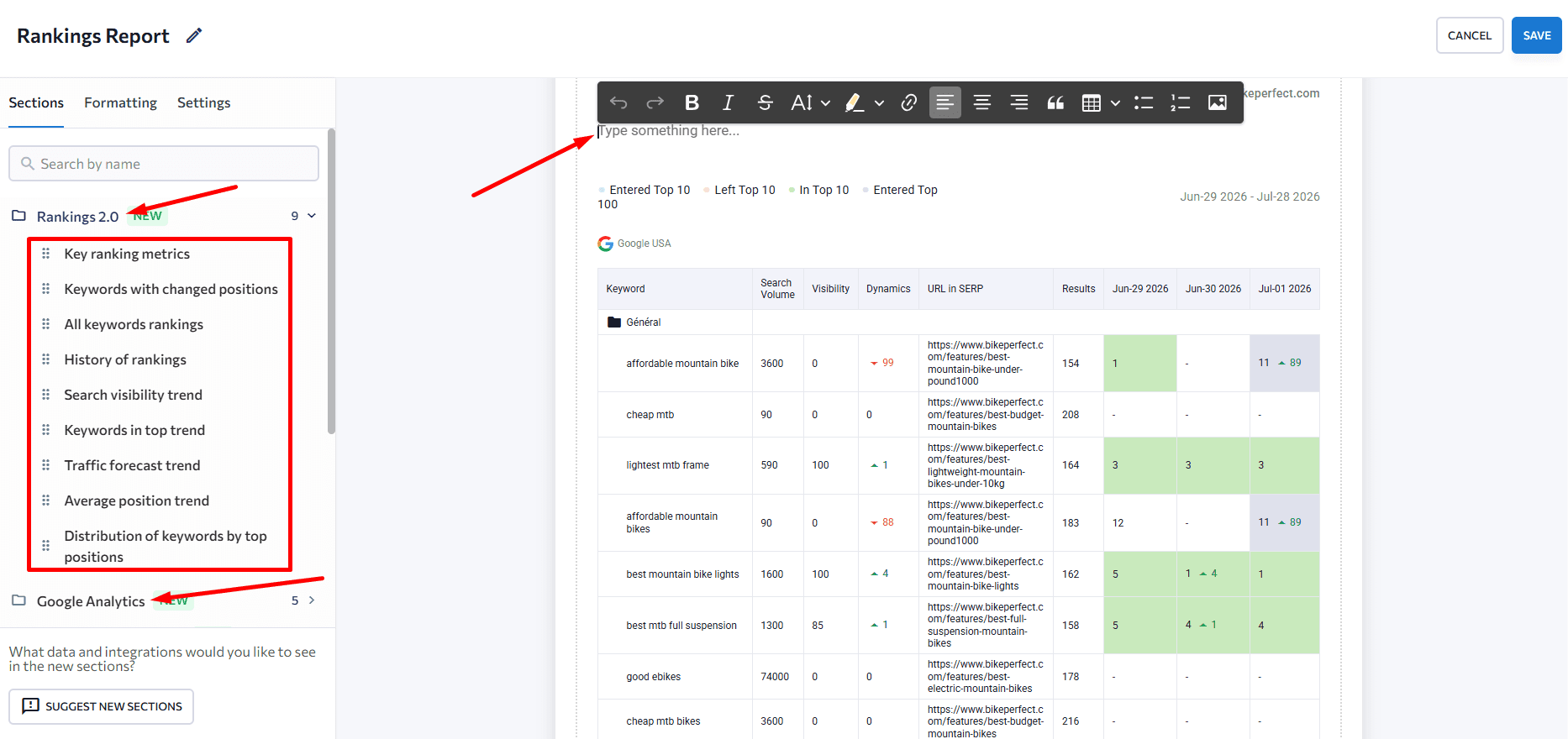
For white-labeled reports, the Formatting section lets you set a cover page, add a table of contents, configure headers and footers, and use your agency’s branding throughout. SE Ranking’s White Label functionality lets you customize reports so they appear under your agency’s brand entirely.
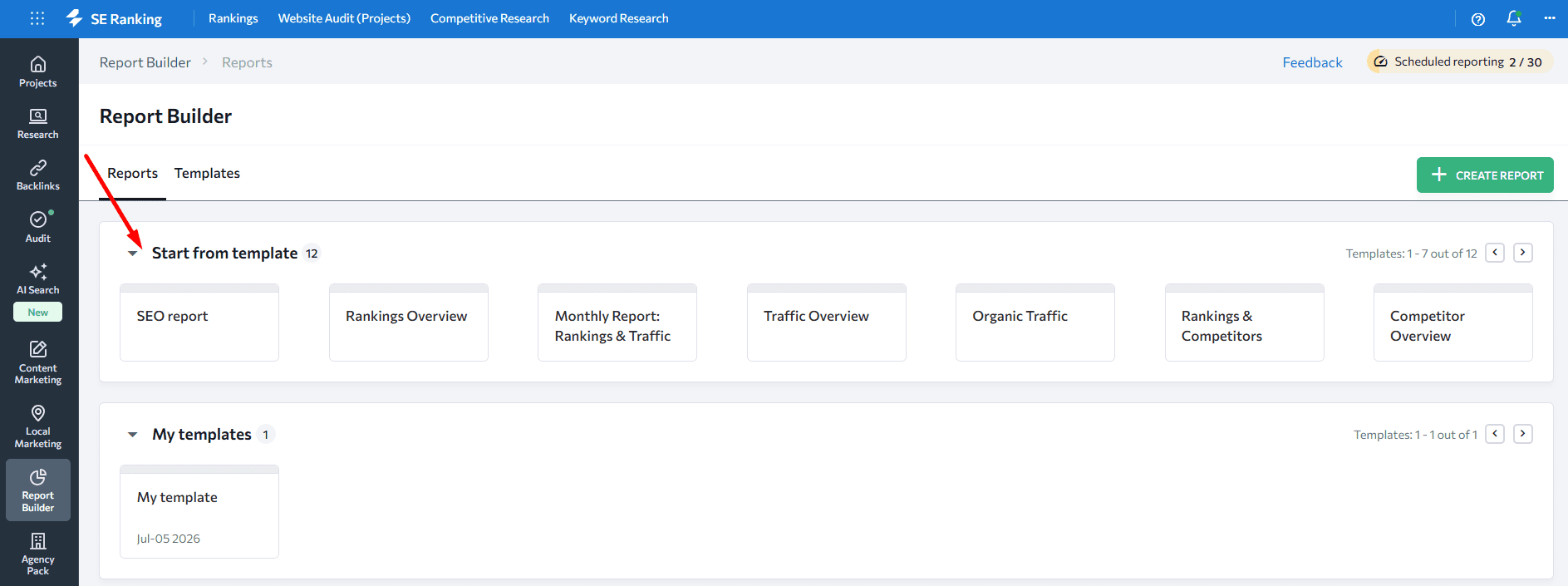
Template approach. SE Ranking offers pre-built templates for common report types: a general SEO report, Monthly Traffic and Rankings, Traffic Overview, Website Audit, Competitor Overview, and Google Ads. Start from a template when the client’s needs match a standard format, then customize the sections and branding. This is typically the fastest path to a first report — setup takes around 10–20 minutes.
Step 3: Share your report — manual, scheduled, or live access
If you’re using SE Ranking’s Report Builder, you have three options to deliver your reports.
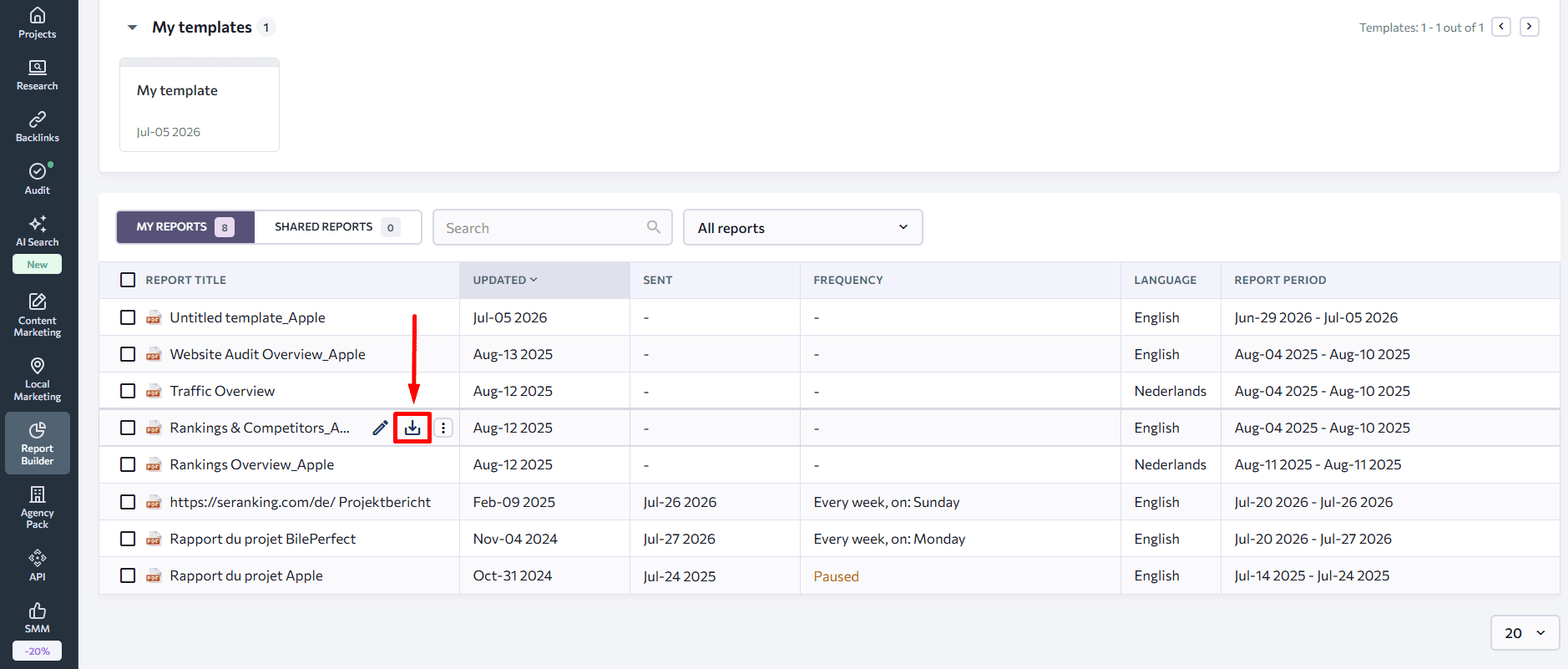
Manual delivery — download the PDF and email it. Best for one-time audits, prospect reports, or situations where you want to include a personal cover note.
Scheduled automated reporting — set the frequency (daily, weekly, or monthly), choose the delivery day and time, and enter up to five email addresses. The report generates and delivers automatically with no manual step required. Most agencies run monthly reporting this way for retainer clients.
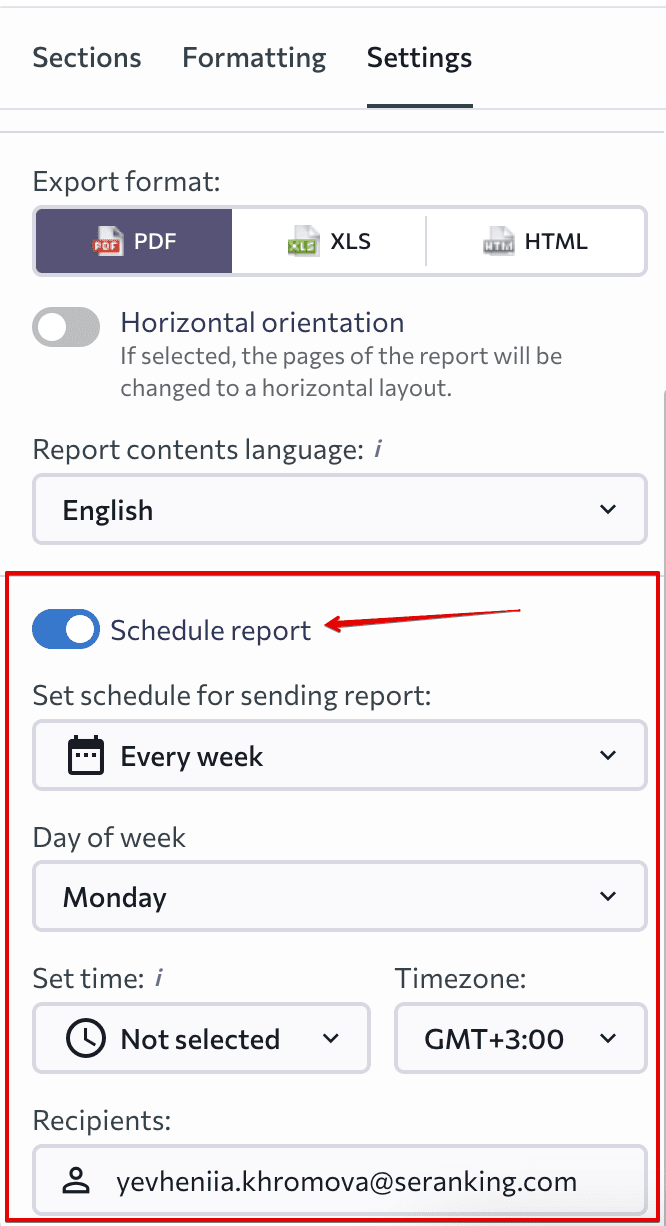
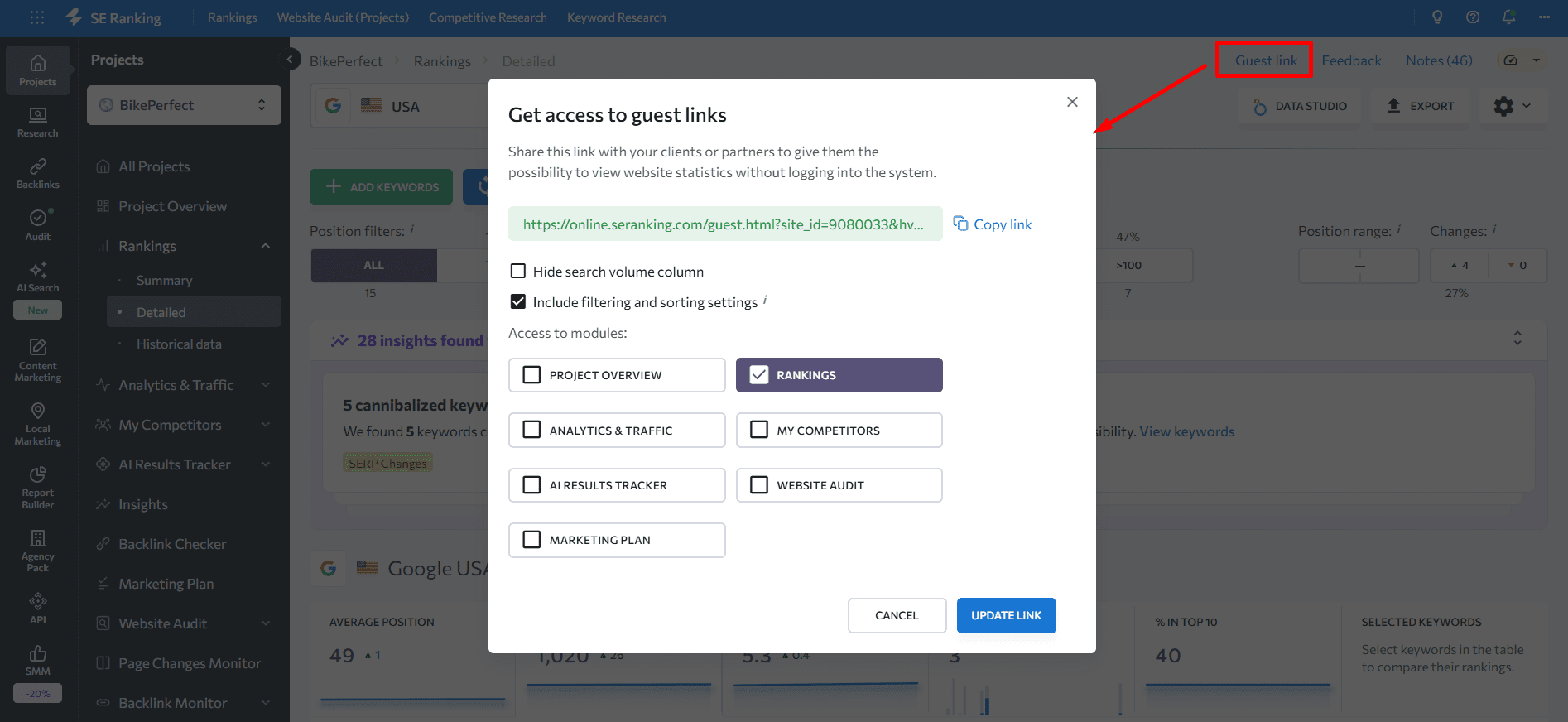
Guest links — SE Ranking lets you give clients view-only access to the Keyword Rank Tracker, Analytics & Traffic, Website Audit, and Competitors sections via a shareable link. Clients can check in on performance between reports without needing a login. If you need to revoke access, update the link.
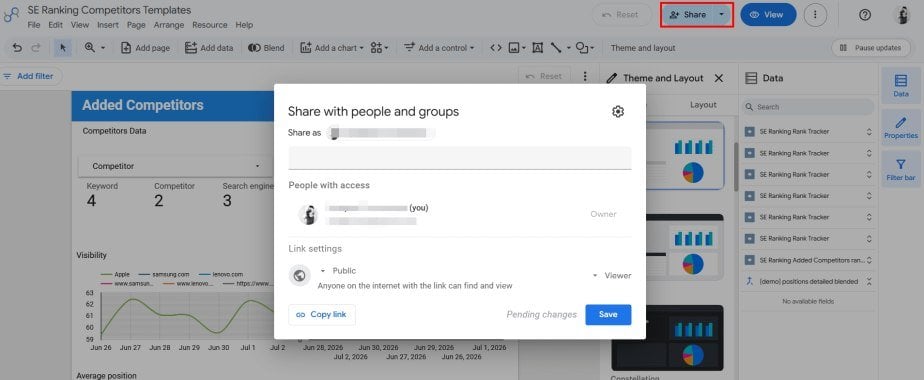
If you use Data Studio, you can share a live dashboard instead of sending a static report. This is useful for clients who want to check performance on their own schedule or monitor a few core KPIs between monthly updates.
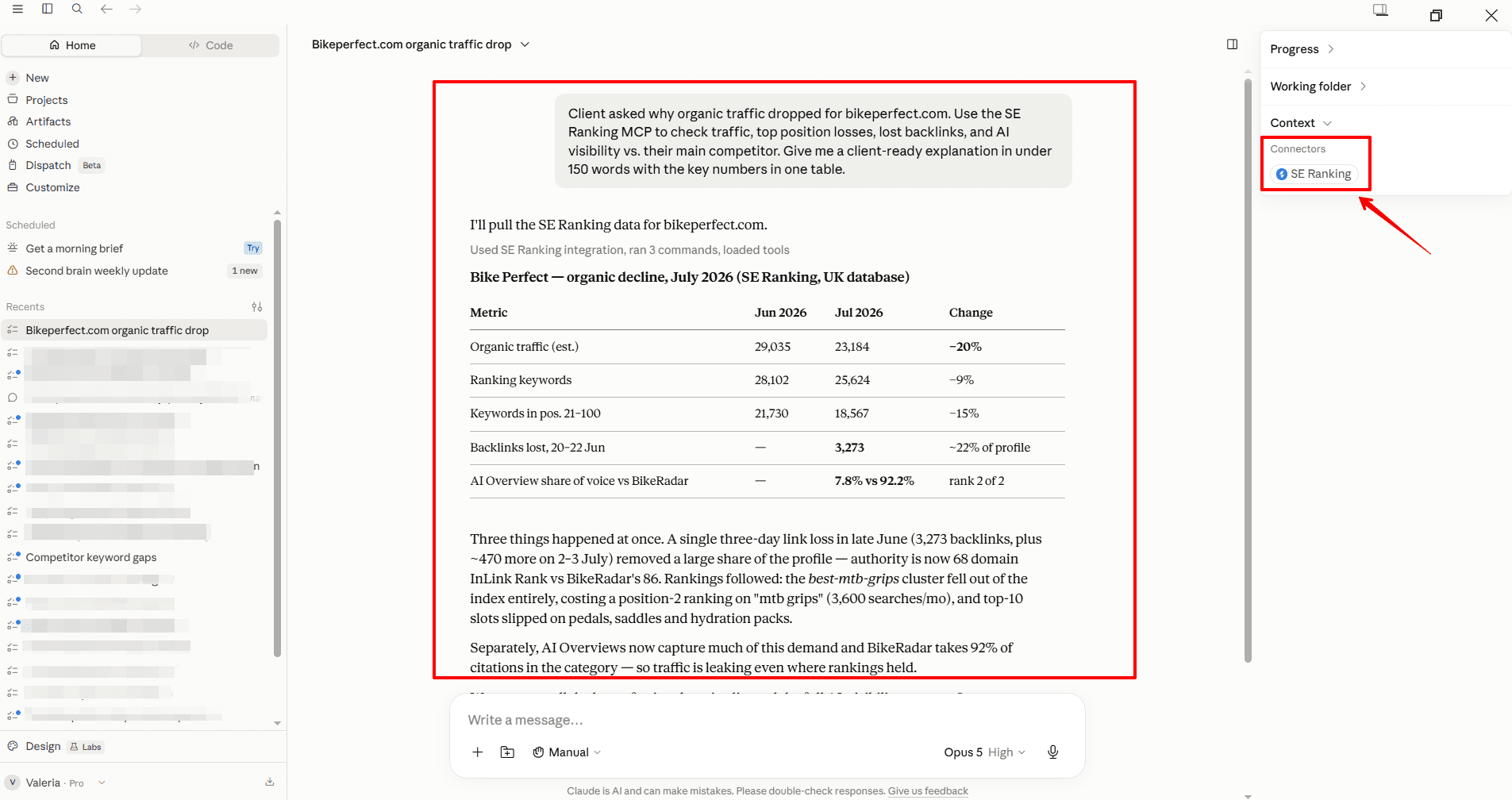
If you use SE Ranking MCP, you can handle reporting questions directly inside an AI assistant. For example, when a client asks about a traffic drop, ranking change, backlink loss, or AI visibility gap, MCP lets you pull live SE Ranking data and generate a quick, data-backed explanation without building a full report.
Tips for building effective SEO reports
Lead with the story, not the data
Start your reports with an executive summary that states the most important finding from the period in one or two sentences. “Organic traffic increased 12% month-over-month, driven by five new page-one rankings in the product category cluster” tells the client more in one line than three pages of rank data. Use the summary to frame what they should pay attention to and what it means for next month’s priorities.
Also include your interpretation in every section, not just the summary. Clients aren’t paying agencies to export data — they’re paying for the analysis that tells them what the data means for their business.
Match the report format to the client
Some clients want a detailed document they can read carefully. Others want a one-page visual summary with a clear traffic-light indicator on each metric. The best agencies have two or three standard formats and match the format to what each client actually reads.
SE Ranking’s horizontal layout option in Report Builder lets you put more data on a single page in a more scannable format — useful for clients who skim rather than read. For clients who prefer something closer to a live dashboard, the guest link approach gives them direct access without requiring you to generate a new document each time.
Design for your brand, not just for clarity
Using SE Ranking’s white-label reports to apply your agency’s branding to every report is both a client experience choice and a positioning one. Reports that look generic can inadvertently signal that your agency is template-dependent. Reports that look like they came from your agency communicate that you’ve built a real process.
The Agency Pack is worth considering for agencies at any meaningful scale: it includes white-label access, unlimited scheduled reports, AI-generated summaries, and an Agency Catalog listing — starting from $69/month on annual billing.
Be honest about setbacks
Progress isn’t linear in SEO, and clients who only hear good news eventually stop trusting the reporting. When something went wrong (for instance, a core algorithm update hit a key ranking page, a link was lost, a technical issue appeared) include it in the report with a clear explanation of what happened and what the response is.
Agencies that report transparently on challenges retain clients longer, because clients learn that the reporting is reliable rather than selectively positive. This is also how you build the credibility to defend the value of SEO in difficult conversations. When the client knows you’ve been honest throughout, they’re more likely to trust your read on a bad month.
How long does it take to create an SEO report?
It depends on the approach. Building a report manually — pulling data from GA4, Search Console, a rank tracker, and a backlink tool, then assembling it into a readable format — typically takes several hours, especially for comprehensive monthly reports.
Using SE Ranking’s Report Builder, creating a report from scratch takes roughly an hour the first time. Once the report is configured, automated delivery means you don’t touch it again — the client receives it on schedule, with updated data, each month.
Using a pre-built template, the initial setup is typically 10–20 minutes for standard report types.
For ad-hoc questions — the performance check a client asks about before a call — SE Ranking’s MCP server connected to an AI assistant returns the relevant data in seconds, without building a report at all.
For more complex reporting workflows, you can use SE Ranking’s pre-built SEO skills for Claude to save time. The instructions are already built into the skill, so you only need to state what you want — for example, a backlink profile audit, a phased SEO roadmap for a domain, or a competitor gap analysis. In a couple of minutes, you get a structured reporting output based on SE Ranking data.
How frequently should you send SEO reports?
Monthly is the standard for most agency retainers and provides a long enough window for meaningful trends to emerge without losing the narrative thread between reports. Weekly reporting is appropriate for high-velocity campaigns, new website launches, or situations where a client needs to report internally to stakeholders on a short cycle. Quarterly deep-dives can supplement monthly reporting for clients who want a strategic review alongside the operational data.
The right cadence is ultimately a client agreement question. Some businesses want weekly touchpoints, others are happy checking a live dashboard and receiving a monthly summary. What matters is that whatever frequency you commit to, the reports arrive on time and contain the metrics the client agreed to track. Missed or delayed reports signal operational problems regardless of how good the underlying SEO work is.
FAQ
What should an SEO report include?
At minimum: keyword rankings (positions and changes), organic traffic from GA4 (sessions, top landing pages, engagement), website health score from a technical audit, backlinks (new, lost, and domain authority trends), and conversions tied to organic traffic. In 2026, comprehensive reports should also include AI visibility data — how often the site appears in AI Overviews, AI Mode, ChatGPT, and whether it earns citations in AI answers.
What’s the difference between a manual and automated SEO report?
A manual report requires you to pull data from each source, assemble it, and send it on your own schedule. An automated report is configured once (the data sources, sections, branding, and delivery schedule) and then generates and delivers itself. SE Ranking’s Report Builder handles both; scheduled delivery is available for recurring clients.
What’s the easiest way to answer a client’s ad-hoc SEO question?
Install SE Ranking’s MCP server and connect it to Claude or ChatGPT. You can ask a natural-language question — “How did this domain perform last month versus the month before?” — and the platform returns a data-backed answer in seconds, without navigating the platform or building a report.
Should SEO reports include AI visibility data in 2026?
Yes, and the infrastructure to do it is now in place. Google Search Console launched a dedicated Search Generative AI performance tab in June 2026. GA4 added a dedicated “AI Assistant” traffic channel in May 2026. SE Ranking’s AI Results Tracker shows keyword-level AI Overview and AI Mode citation data across Google, ChatGPT, Gemini, and Perplexity. Most clients aren’t demanding this data yet, but setting up the reporting layer now means you’ll be ahead of the question when they start asking.
Wrapping up
Regular SEO reporting keeps clients aligned and helps your team see whether the strategy is working. The best reports connect what was done with what changed, what it means, and what should happen next.
There are different ways to report, depending on your client agreement and how they prefer to receive updates. Use SE Ranking’s Report Builder for scheduled client reports, MCP for ad-hoc analysis, and Data Studio for live dashboards.
Start with a free 14-day trial to explore Report Builder and set up your first automated report.