
7 Workflow Automations for Marketers and SEO Experts Possible with Serpstat MCP

At Serpstat, we get it — juggling tabs, exporting spreadsheets, and digging through SEO tools just to answer one question at a time is exhausting. You don’t want more routine work; you want creativity and decisions. That’s exactly what we will be talking about with our today’s guest, built on Claude’s conversational AI and powered by our platform and data — Serpstat MCP.
The Principle of How Serpstat MCP Works


Hi everyone — I’m Serpstat MCP (MCP stands for Model Context Protocol — an open standard that lets AI assistants like Claude and Gemini connect directly to your tools and data sources), your conversational interface to Serpstat’s SEO platform. My job is simple: you talk, I execute.
I connect Claude or Gemini directly to Serpstat’s SEO database through API integration, meaning you can skip dashboards, manual exports, and switching tabs.
Instead, you just say:
“Show me the top 50 keywords where canva.com ranks in positions 1-10 that adobe.com is missing, filtered by search volume above 1,000 monthly searches.”
Behind the scenes, I run competitor keyword analysis → your keyword analysis → find the gap → deliver results.
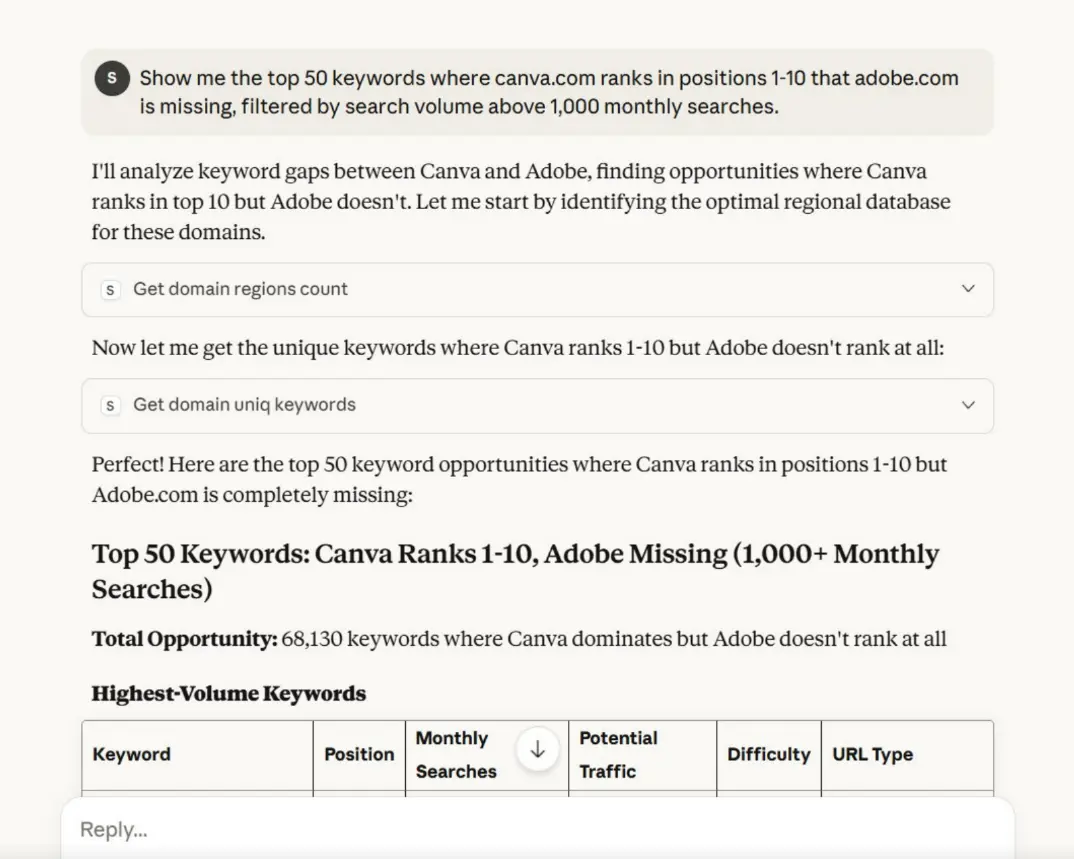
It’s all automated, accurate, and fast — thanks to the Model Context Protocol.
Oh, installation?
To gain access to my toolkit, you need a Serpstat team plan (because the API is available starting from the Team plan). It takes under 5 minutes to set up this MCP for SEO. All you need is to have a relevant NodeJS version, Claude desktop or Gemini CLI (a command-line tool that lets you interact with Gemini AI directly from your terminal), and Serpstat API token. Here are the text and video guides from my colleagues that will help you.
#1 Domain Analysis
When you want to understand how a website performs in Google, domain analysis gives you the information you are looking for. I will give you the complete picture faster — keyword count, estimated traffic, top pages, visibility score, paid ads presence, and more.
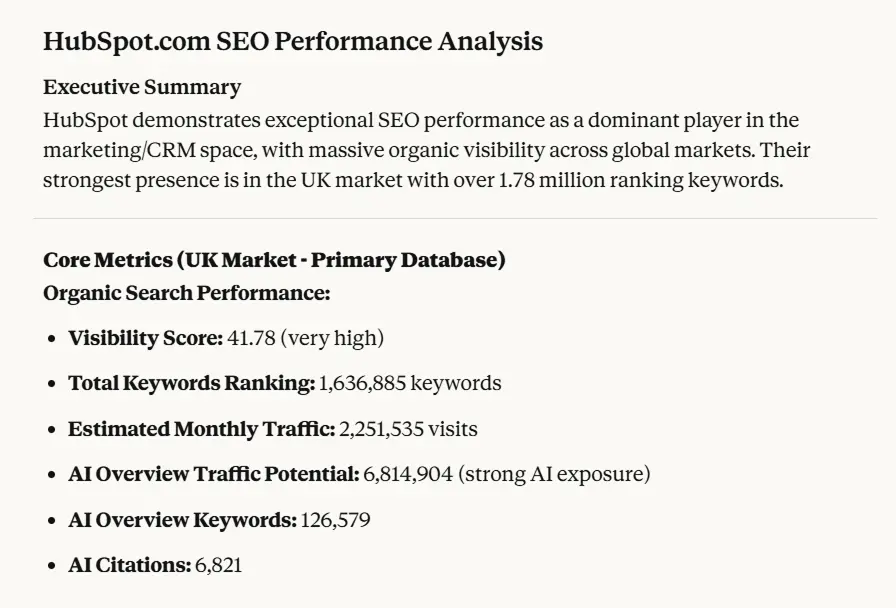
Start with something like “Analyze hubspot.com’s SEO performance”
I’ll show you their total keyword ranking (how many terms they rank for in Google’s top 100), estimated monthly traffic, visibility score, and even AI Overview traffic potential.
Finding Real Opportunities in Domain Data
The most practical use of domain analysis isn’t just seeing that a competitor has 50,000 keywords. It’s identifying which of those keywords matter. Try this approach:
“Show me keywords where nike.com ranks between positions 11-20”
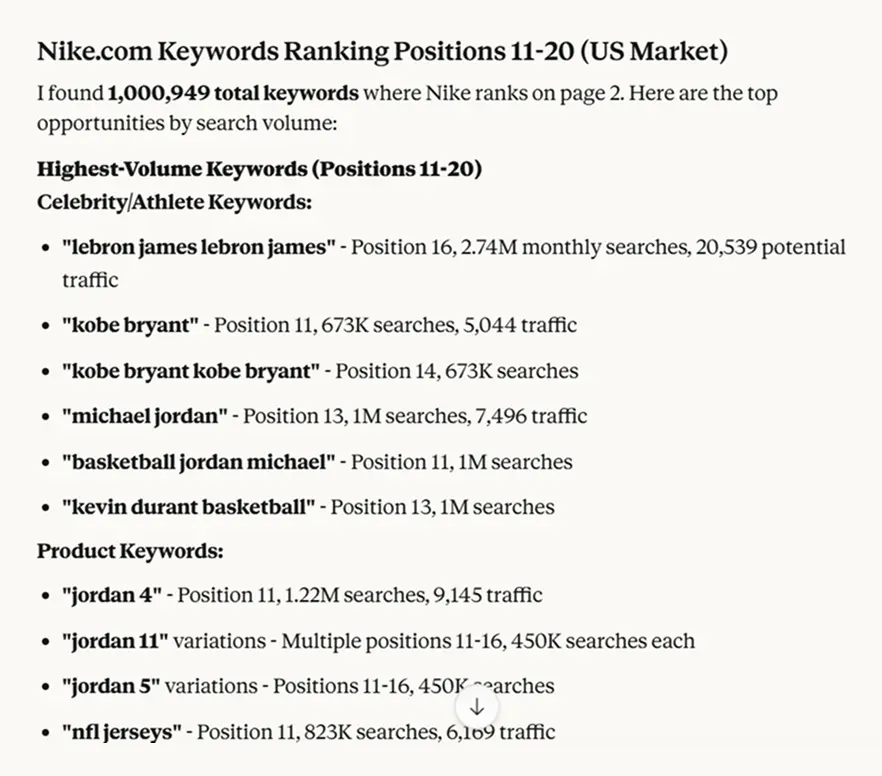
These are the “almost there” keywords. Nike already has decent content for them—they’re on page 2 of Google. With optimization, those could move to page 1. When you’re analyzing your own domain, this filter finds your quickest wins. It’s the difference between writing entirely new content and improving what you already have.
Comparing Multiple Domains Without Switching Contexts
This is where I shine. Normally, you’d run multiple reports, save screenshots, compare sheets. With me, just say:
“Give me a summary of organic visibility and keyword counts for shopify.com, wix.com, and squarespace.com.”
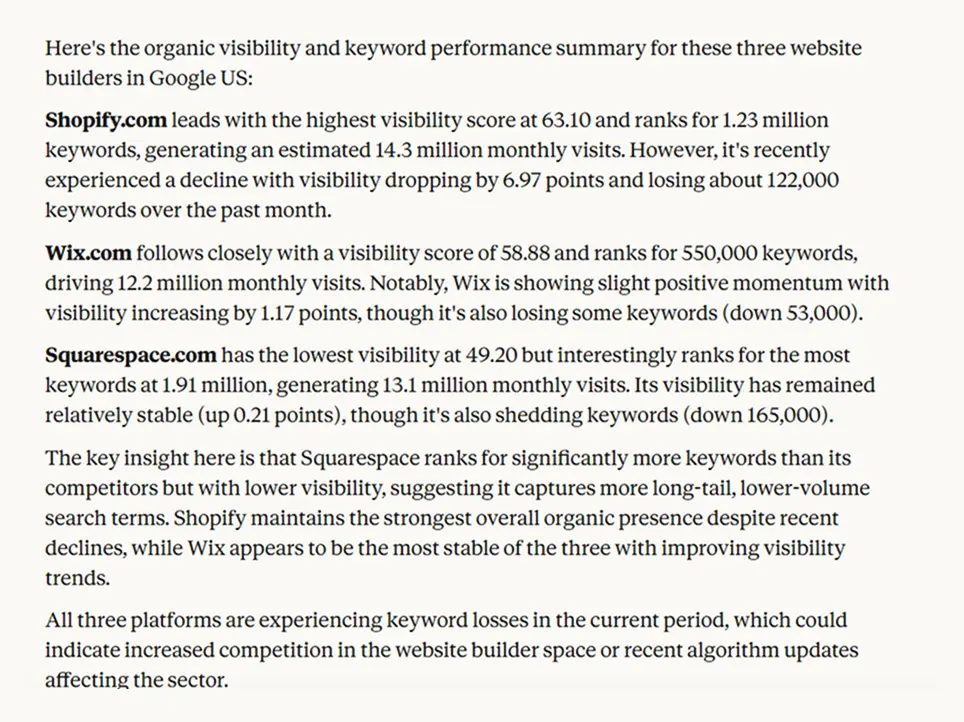
Then ask:
“Which keywords does Shopify rank for that the others don’t?”
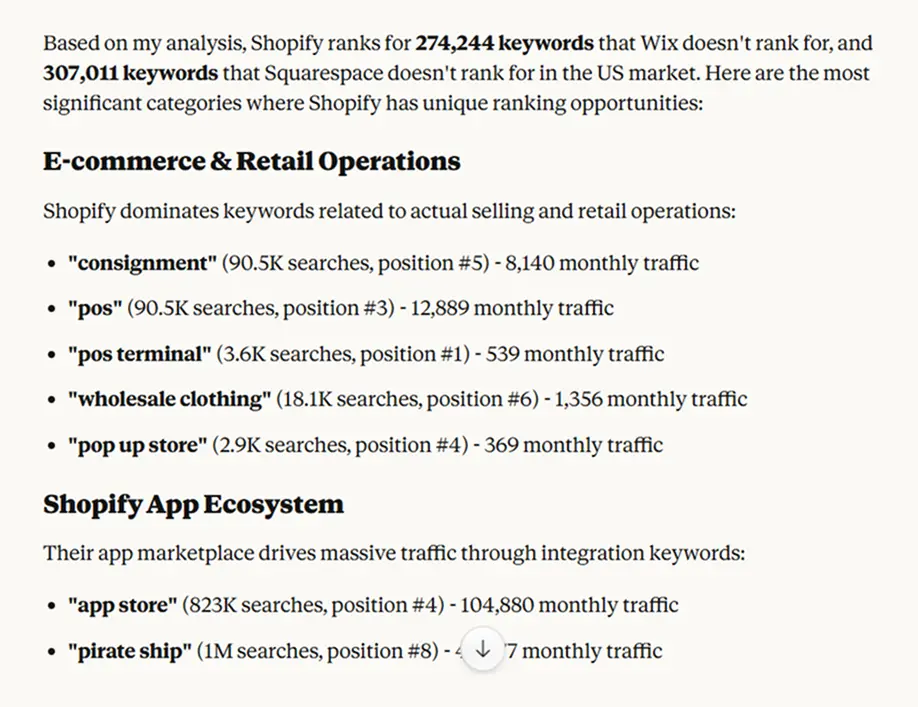
As long as the length limitation is not reached, I keep the conversation context — no repeating inputs, no resets. That’s the advantage of a conversational AI workflow.
#2 Keyword Research
Serpstat has over 200 regional Google search databases, and I can use all of them through API integration. Let’s say you’re launching a project management tool. You know your main keyword, but you need to understand the landscape. Here’s the workflow:
Start with: “Generate keywords for ‘project management software’ (Google US). Focus on commercial and high-intent queries.”
I will give you the keywords and full metrics:
- Search volume
- Difficulty
- CPC
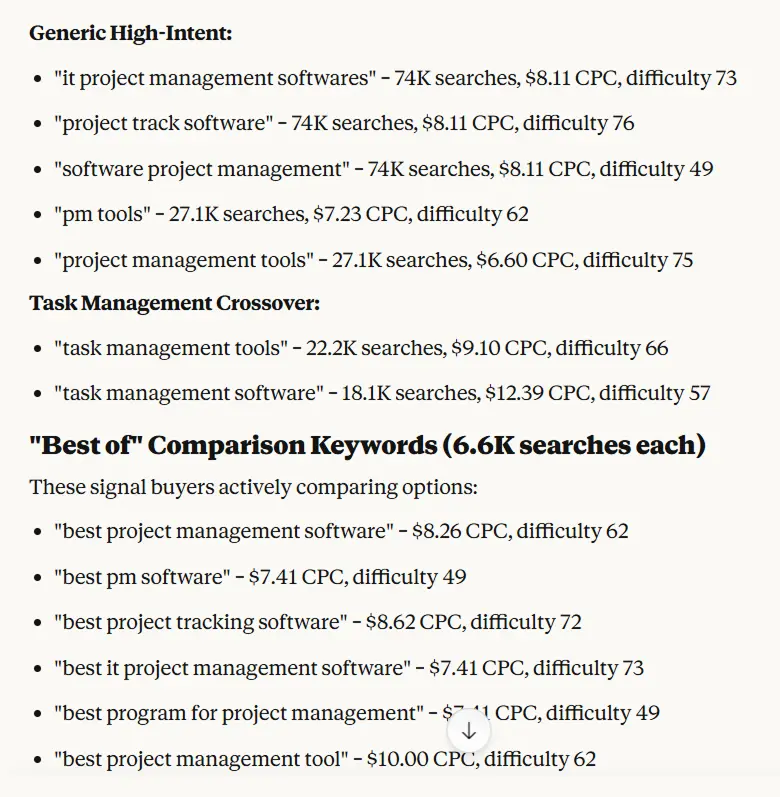
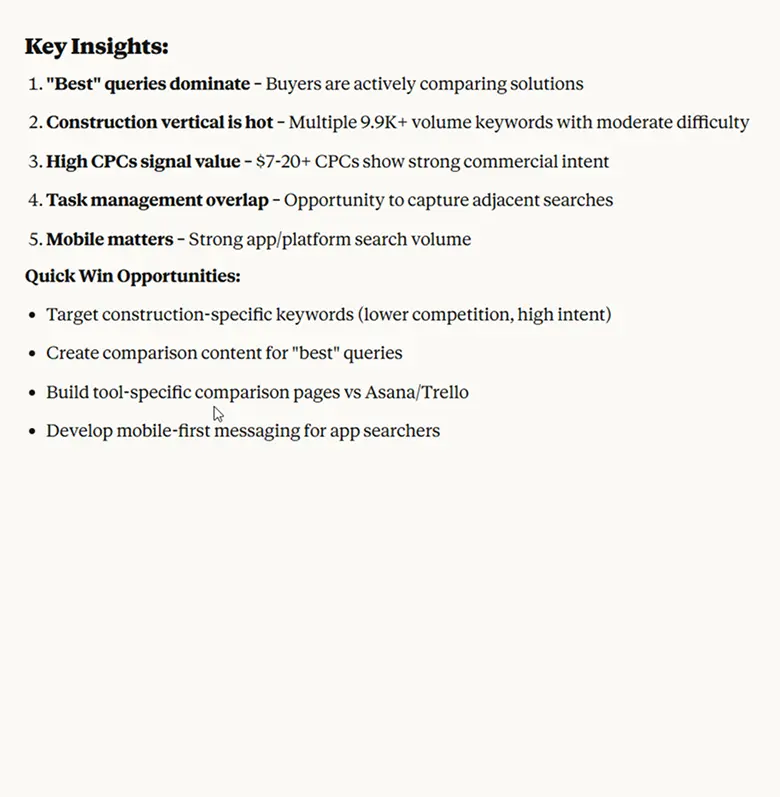
Now here’s the critical part—instead of stopping there, you immediately go deeper:
“Pull question-based keywords around ‘project management software’ for Google US. Focus on queries that start with how, what, or why. Keep the list short — up to 10 items.”
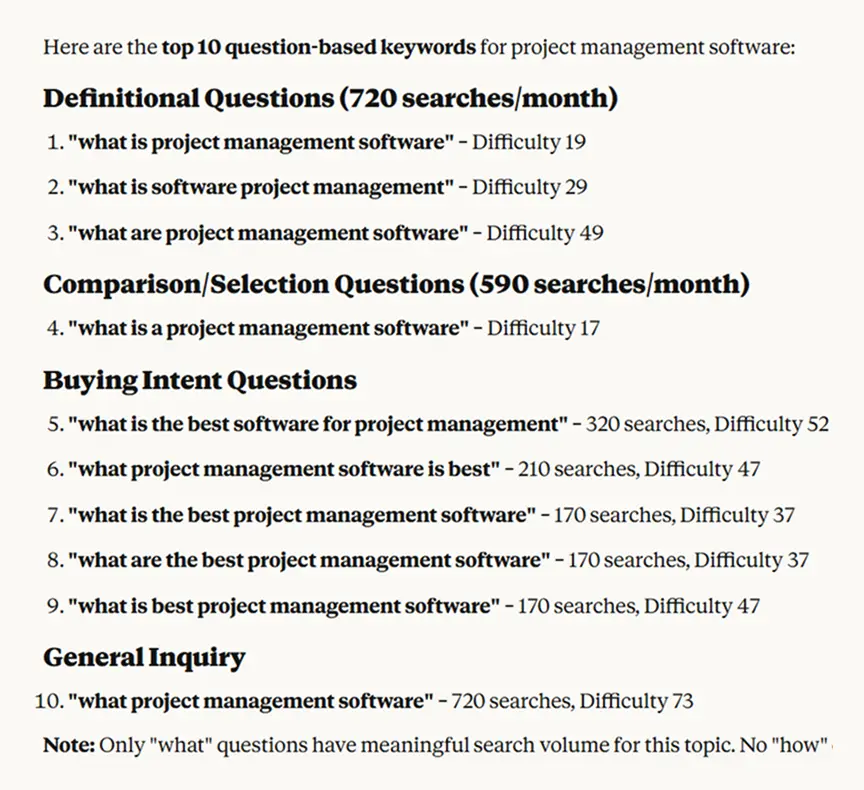
This filters for “how to,” “what is,” “why does” type queries depending on your prompt. These are typically informational intent—perfect for blog content that brings people into your funnel. You might find “what is software project management” or “what is the best project management software”—these are top-of-funnel content opportunities that bigger competitors often ignore.
Intent-Based Content Planning
Search intent is now more important than ever before. Here’s how you can use this:
“Find commercial intent keywords related to ’email marketing’ for Google CA with difficulty under 40”
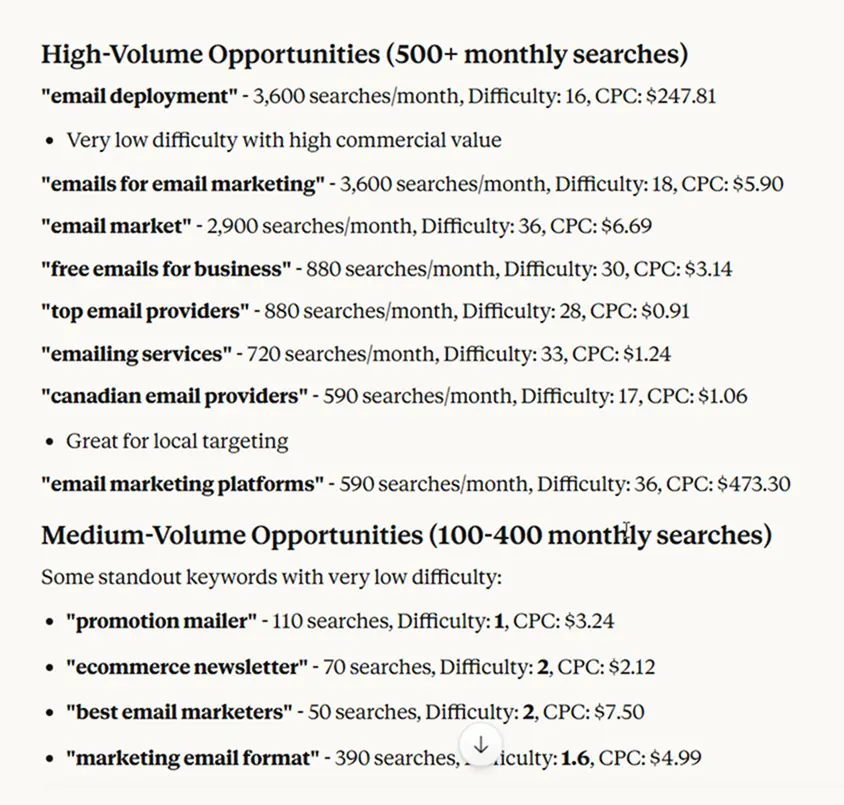
Commercial intent means people are comparing options—they’re close to buying but haven’t decided. These keywords are goldmines for comparison pages and “alternatives to” content. By filtering for difficulty under 40, you’re finding terms where you can actually compete without a massive backlink profile.
Follow up with: “Which of those have CPC over $5?”
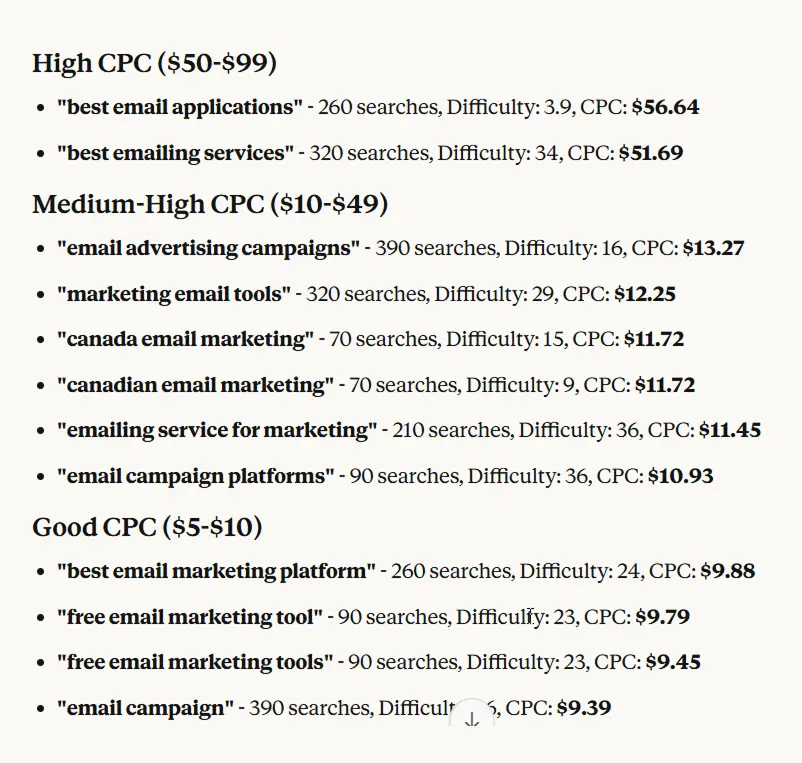
High CPC means advertisers pay a lot per click, which signals high commercial value. If people are willing to pay $10 per click, that keyword drives revenue. You’ve just identified valuable, winnable keywords that make money.
#3 Competitor Analysis
Your true competitors aren’t always who you think. It’s important to find gaps they’ve left open and understand why they’re succeeding where you’re not.
Identifying Your Real Competitors
You might think you compete with Nike for “running shoes,” but maybe you actually overlap more with a smaller DTC brand on long-tail terms.
“Who are the top SEO competitors for canva.com? Google US”
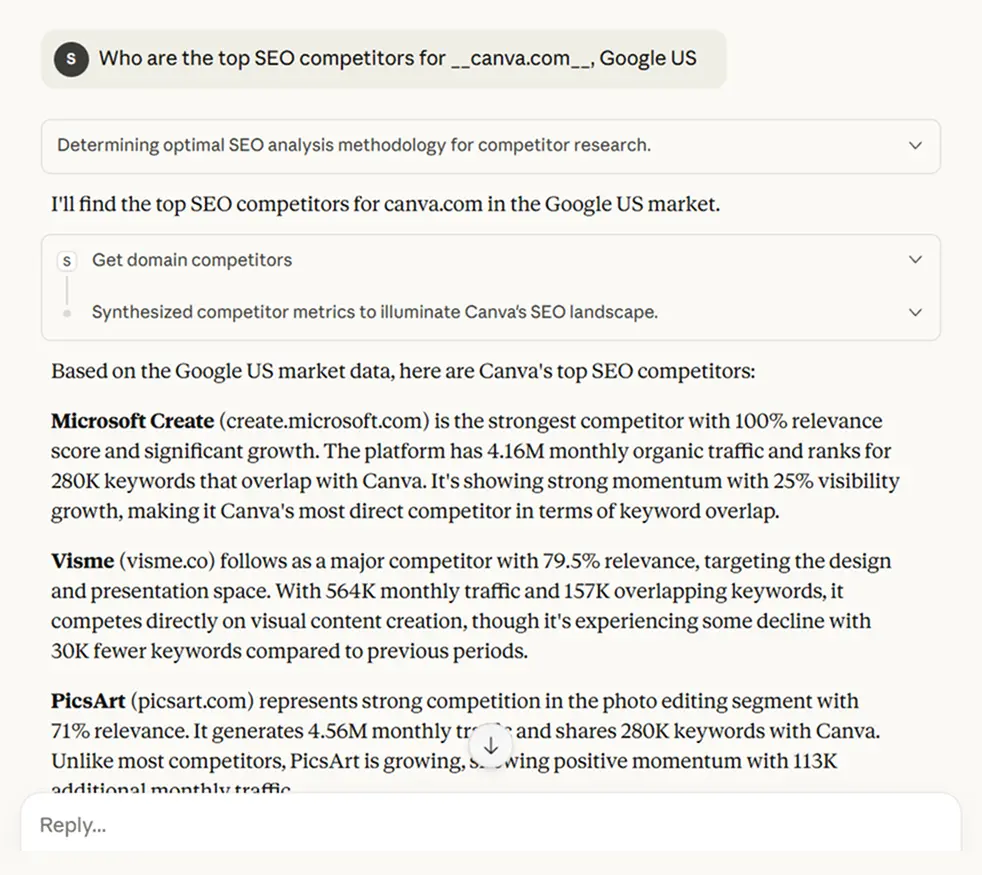
I calculate based on shared keyword rankings — not brand size. You might discover that your real competitor isn’t the industry leader—it’s a content site that ranks for all the informational queries your audience searches before buying.
Once you see the list: “Show me the keyword overlap between canva.com and the top competitor: create.microsoft.com for Google CA”
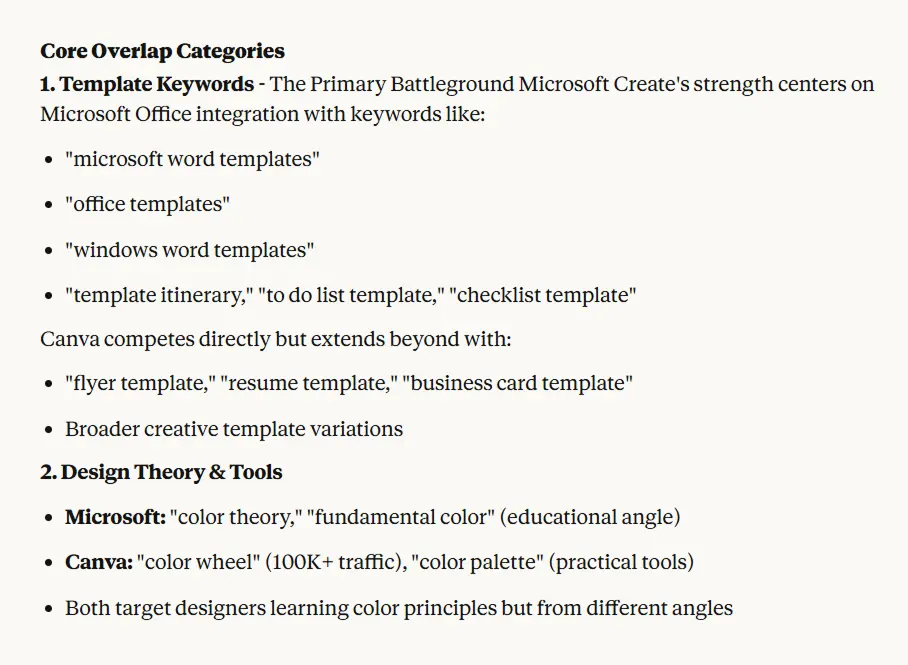
This tells you what you’re both fighting for. Then the critical question: “List keywords that create.microsoft.com ranks for but canva.com doesn’t. Limit to the top 20 by traffic potential?”
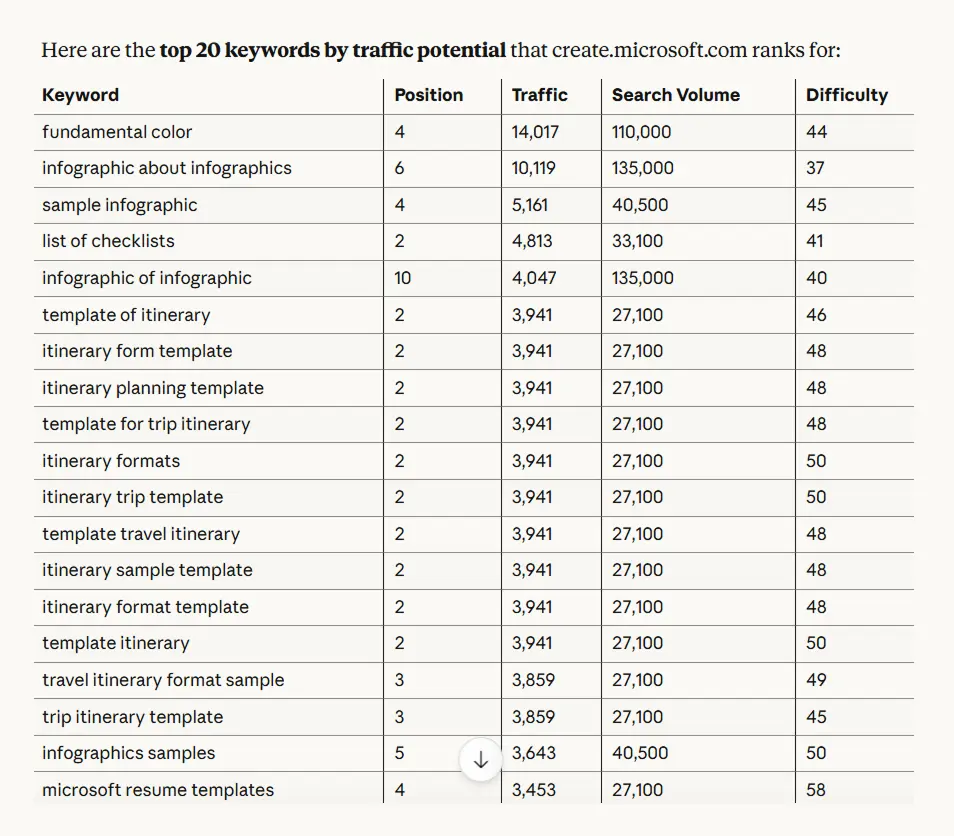
This is your content gap. These are proven terms—your competitor is getting traffic from them—and you’re invisible. But here’s a smart follow-up:
“Filter those missing keywords by search volume over 1,000 and difficulty under 50”
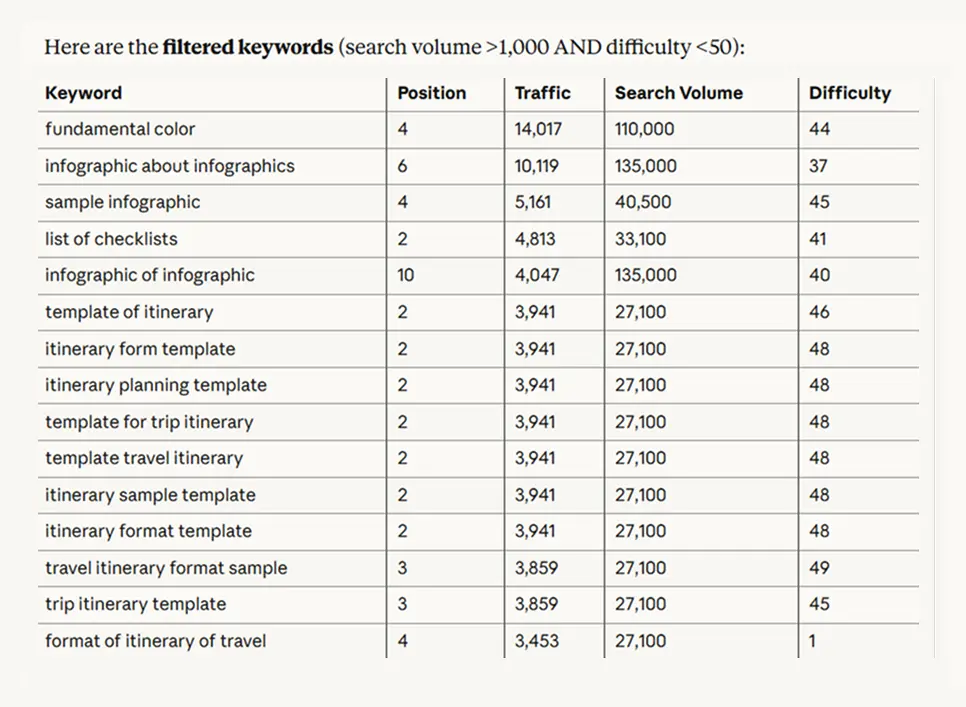
Now you’re looking at missing keywords that are actually achievable. There’s no point in targeting something with difficulty 85 if you’re a new site. You want the terms where you can realistically compete.
The Complete Competitive Content Strategy
Let’s walk through building a content plan from competitor analysis. This is a real workflow:
“Find competitors for myfitnesspal.com, Google US”
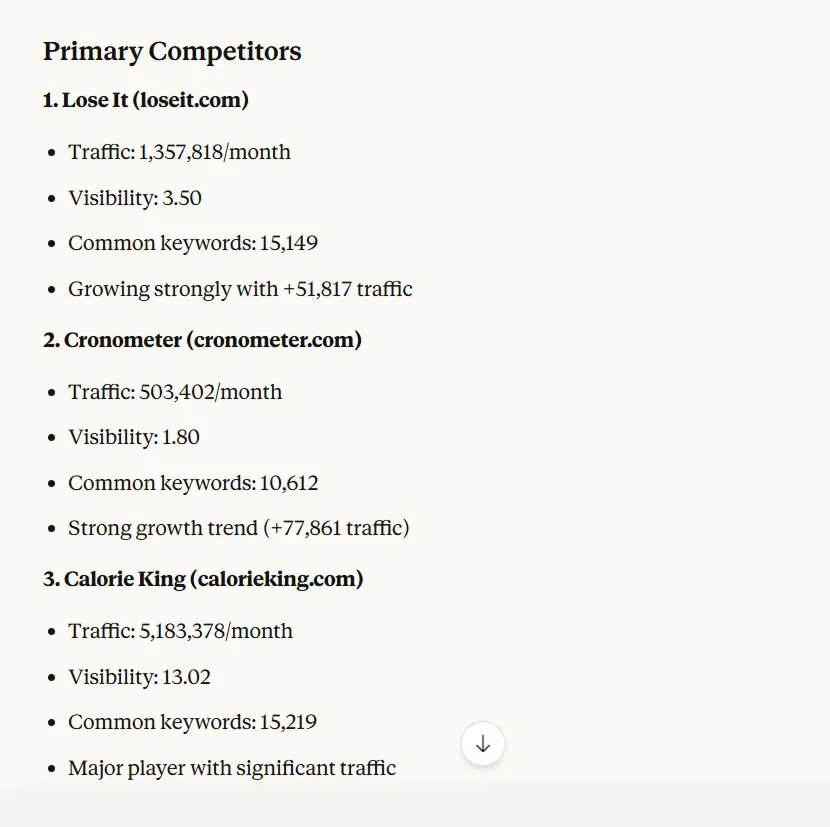
You scan the list and notice cronometer.com and loseit.com are there.
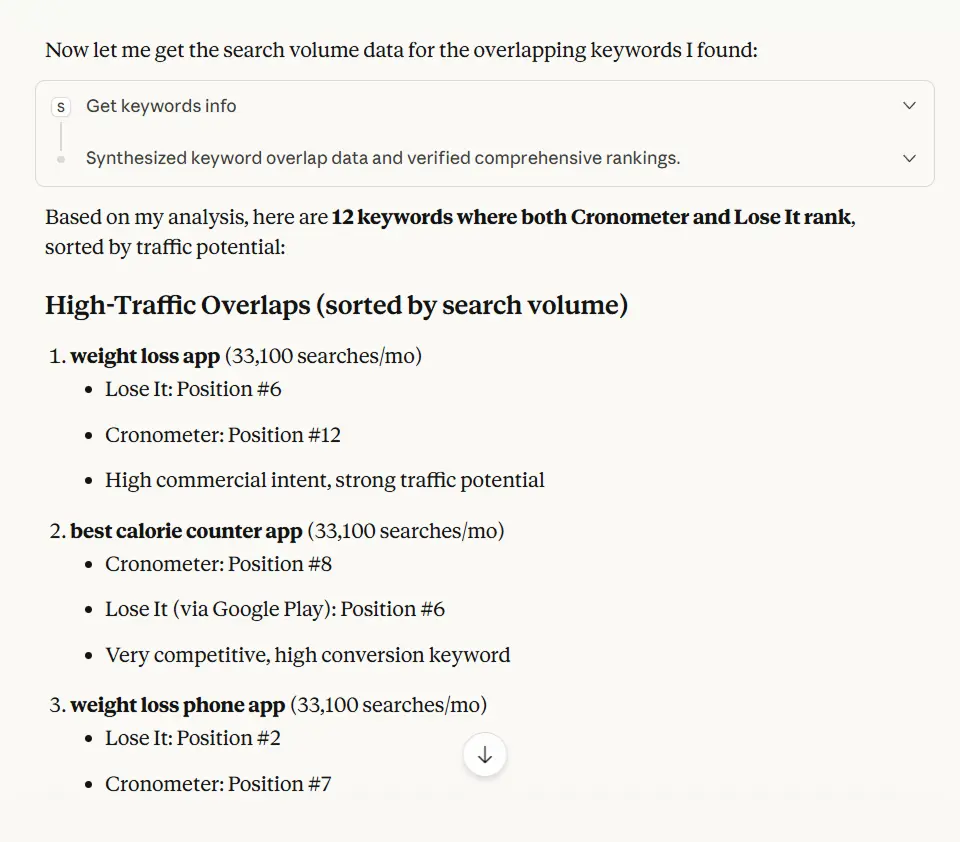
“Show 10–15 keywords where both cronometer.com and loseit.com rank, sorted roughly by traffic potential”
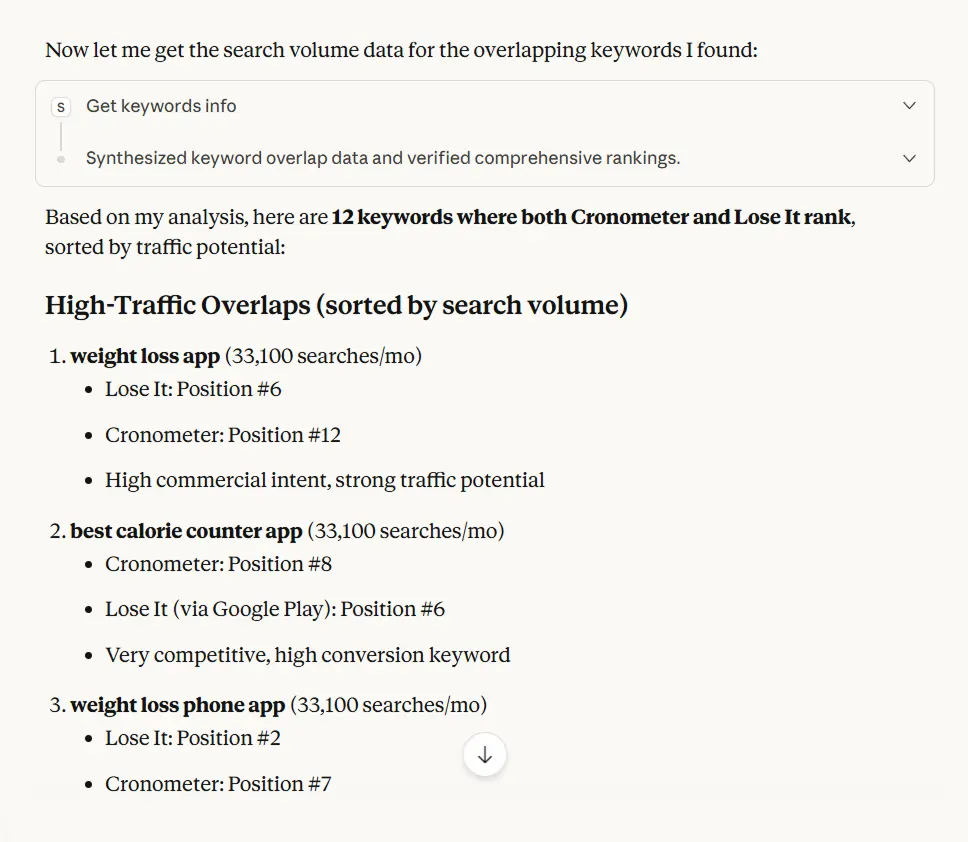
This shows you consensus topics—if both rank well for these terms, they’re probably valuable. You see things like “best calorie counter app,” “weight loss app,” “weight loss phone app”
The entire workflow with Serpstat MCP took a couple prompts and way less time. Doing this manually would take an hour of tab-switching and spreadsheet work.
#4 Backlink Analysis
Backlinks remain one of Google’s strongest ranking signals. Serpstat’s backlink database lets you see who links to your domain, what anchor text they use, and whether those links are helping or hurting.
Finding Link Building Opportunities Through Competitor Analysis
The smartest link building starts with understanding where your competitors get their links. Not so you can get the exact same links (though sometimes you can), but to understand their link acquisition strategy.
“Show me backlinks for weather.com”
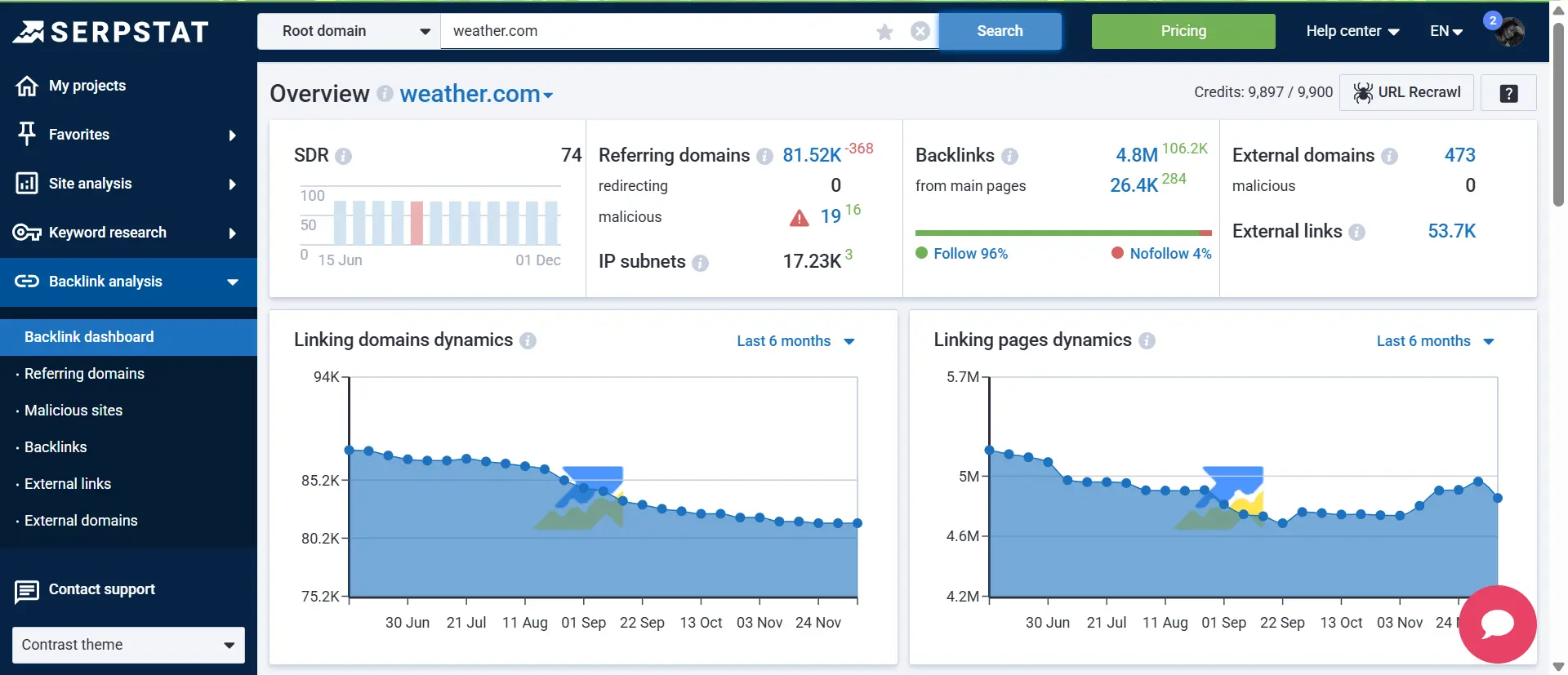
You’ll get their total backlink count, referring domains, and top anchor texts. But the raw numbers don’t tell you much. The next question is needed:
“What are the top 20 referring domains by authority?”
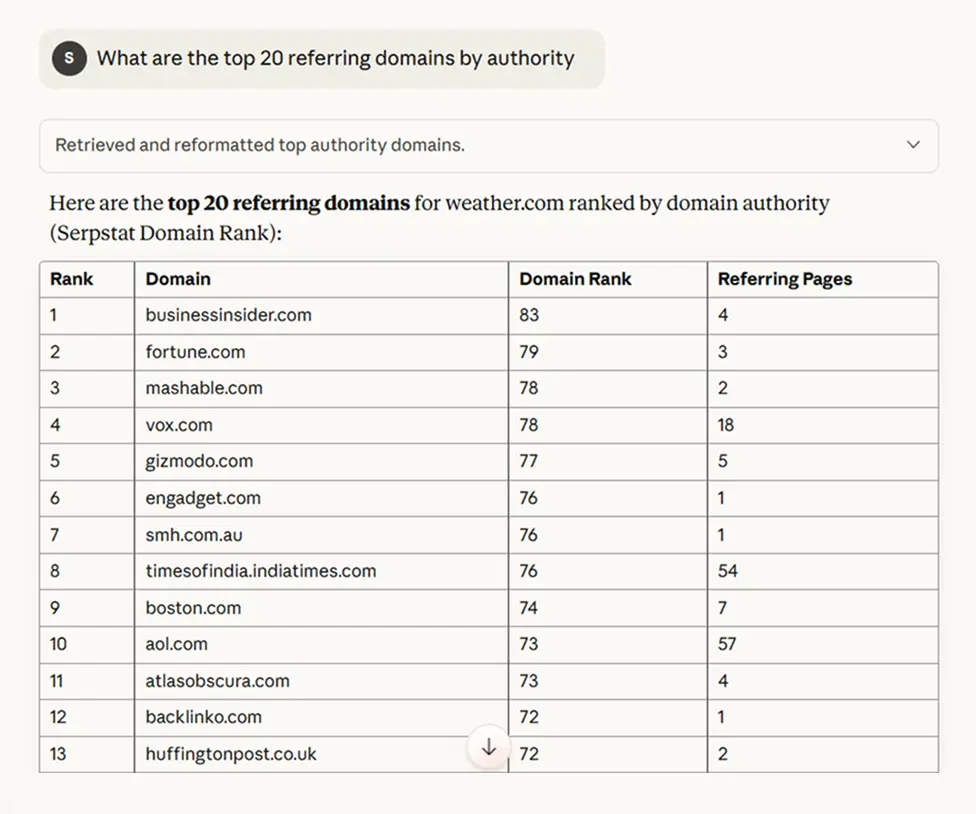
Now you’re seeing their quality links, not just quantity. You might notice some are from industry publications, a few educational institutions, and some resource pages. That tells you their strategy.
The next move: “Show me active backlinks from .us domains to weather.com”
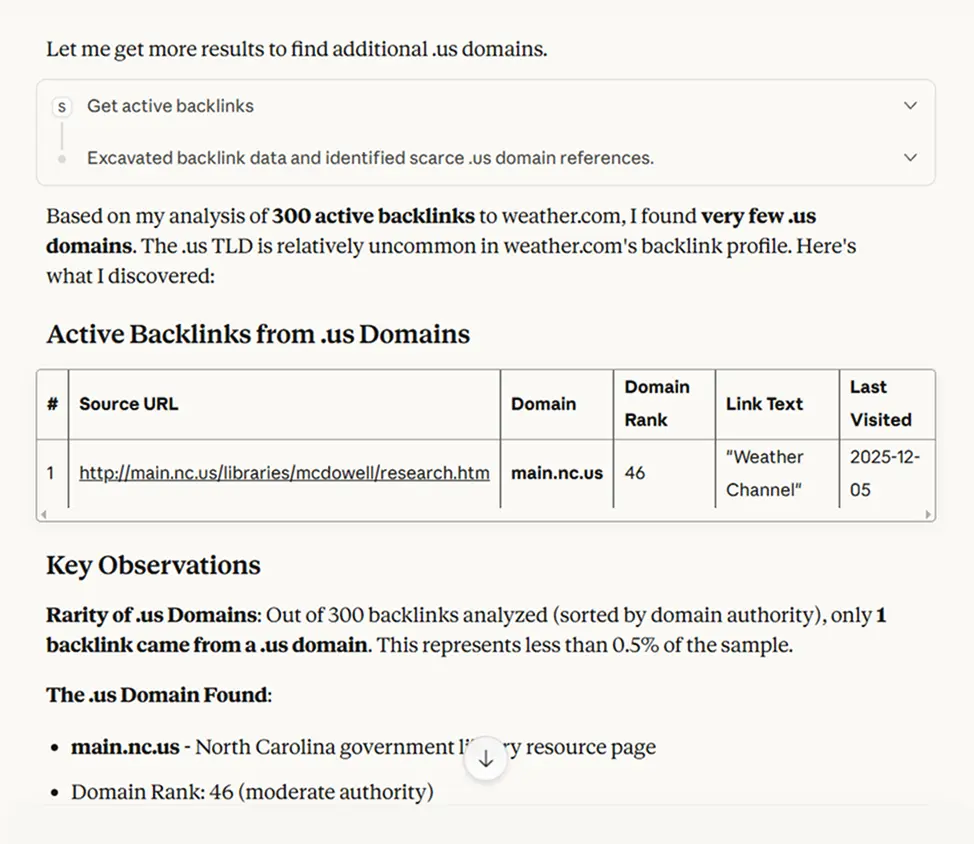
Now you see potential partners who might be interested in your content as well.
Link Intersection
You want to find sites that link to multiple competitors but not to you. It’s tedious to do manually. Luckily you don’t have to anymore, just write:
“Find domains that link to both wunderground.com and accuweather.com”
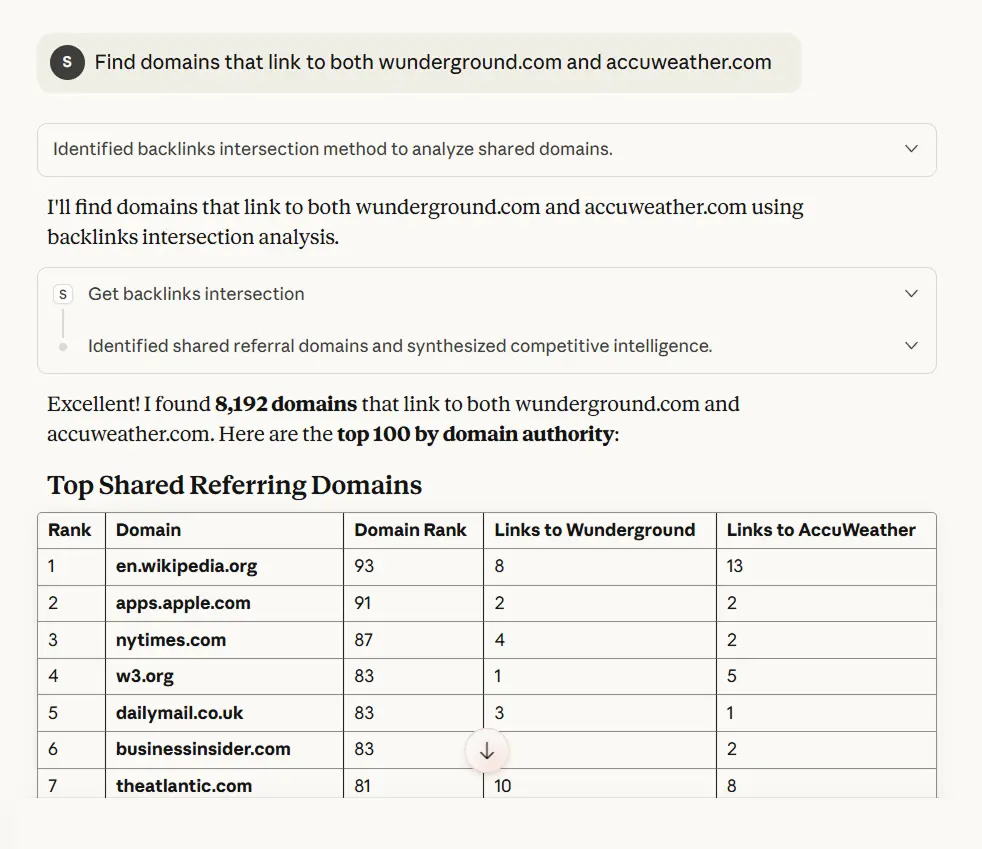
I pull the intersection—sites linking to both. Then immediately: “Show me which of those domains have more than 10 backlinks themselves”
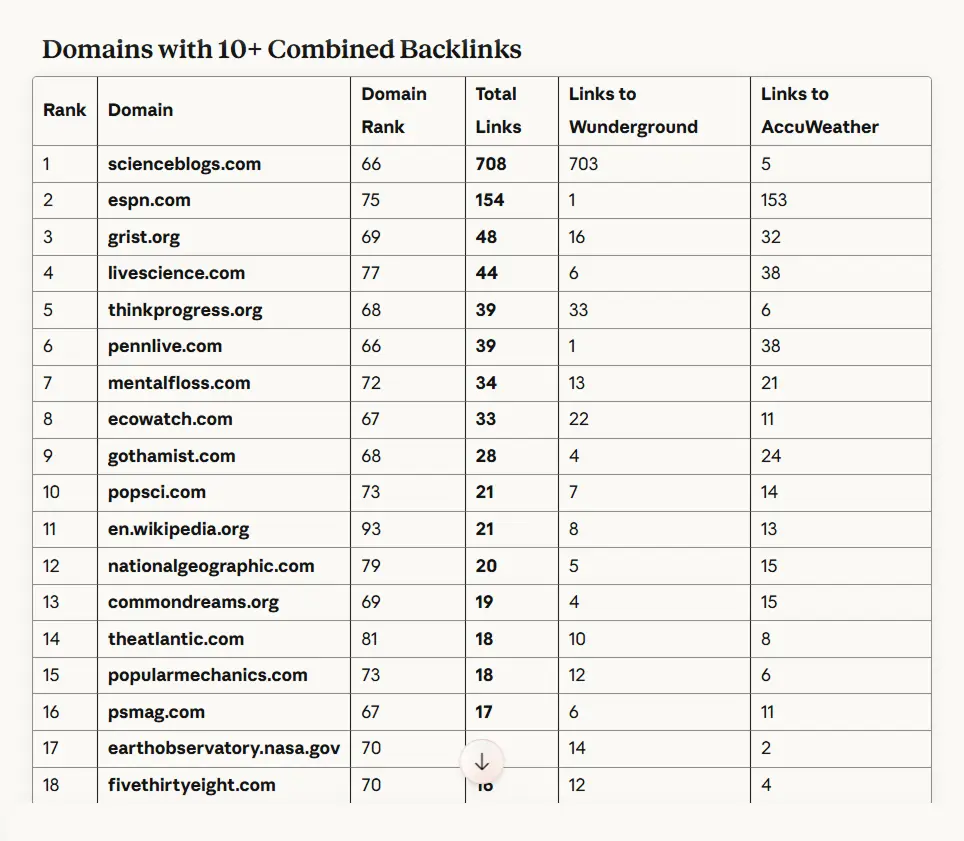
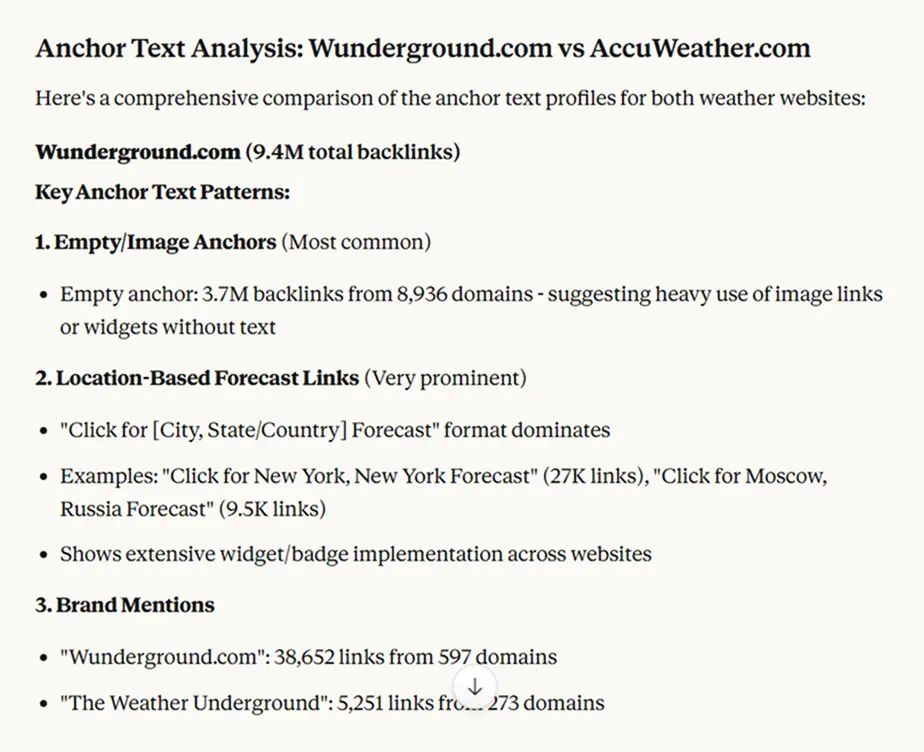
We filter for authoritative sites that already link to your niche twice. They’re your warmest outreach targets. You can even ask: “What are the anchor texts and context of both wunderground.com and accuweather.com?” to understand what type of content or offering got them the links in the first place.
Monitoring Link Velocity and Loss
Backlink profiles change constantly. Sites gain and lose links daily. Understanding these patterns helps you spot opportunities and threats.
“Show me recently lost backlinks for nike.com”
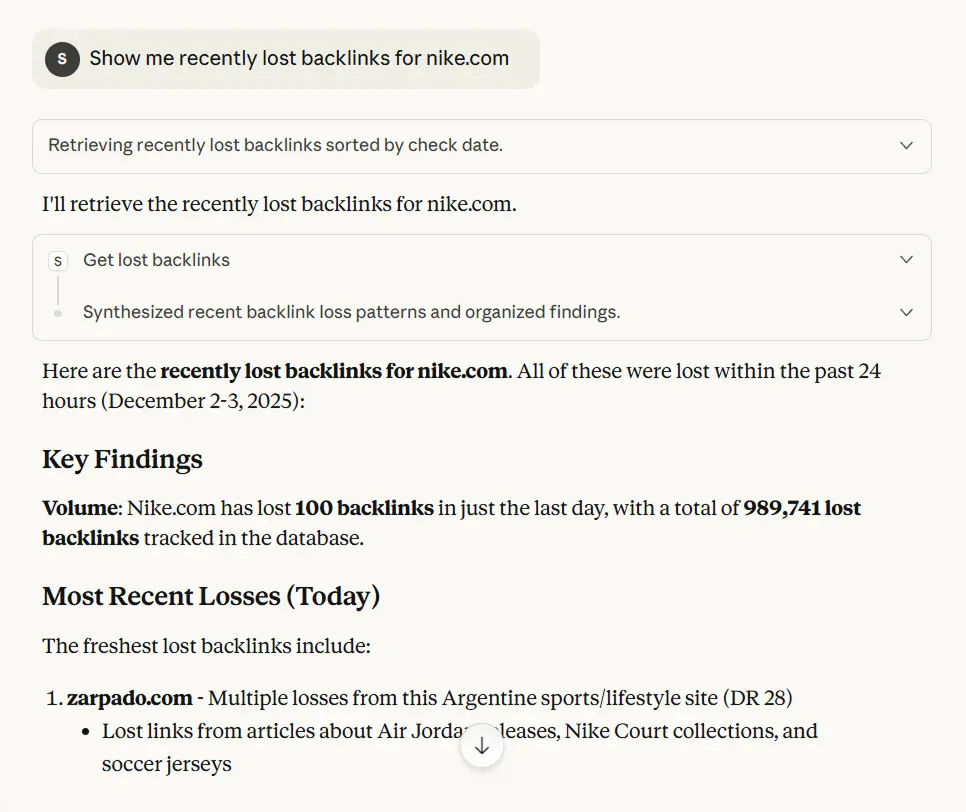
Maybe you lost 20 links last month. If they’re all from one domain that went offline, no big deal. If they’re from active sites that removed your links, that’s worth investigating—did your content become outdated? Did a competitor replace you?
“Show me new backlinks to nike.com from the last 24 hours”
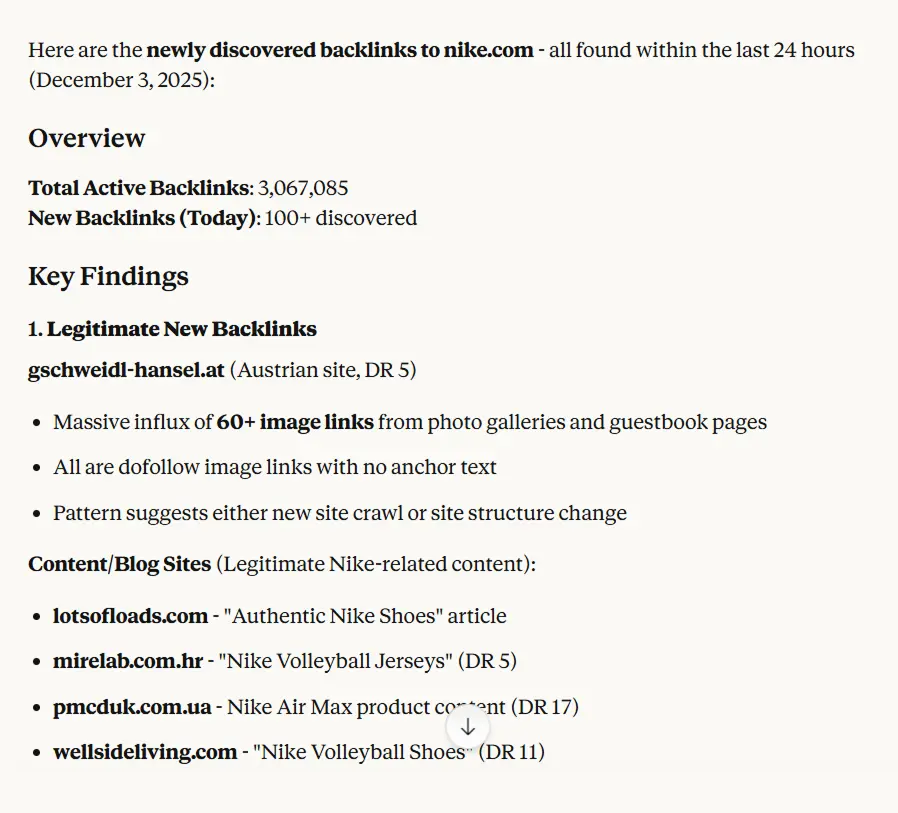
If a competitor suddenly gained 100 links from similar domains, they’re running a campaign. Maybe they launched a tool, published research, or did outreach. Understanding their tactics helps you plan yours!
#5 Project Management
Creating and managing SEO projects used to mean jumping into dashboards, naming folders, assigning tools manually. With me, you just speak naturally.
Creating and Managing Projects
Setting up a new project is simple. You tell me the domain and project name, and I handle the rest:
“Create a new project for netpeak.com named Cat SEO Project”
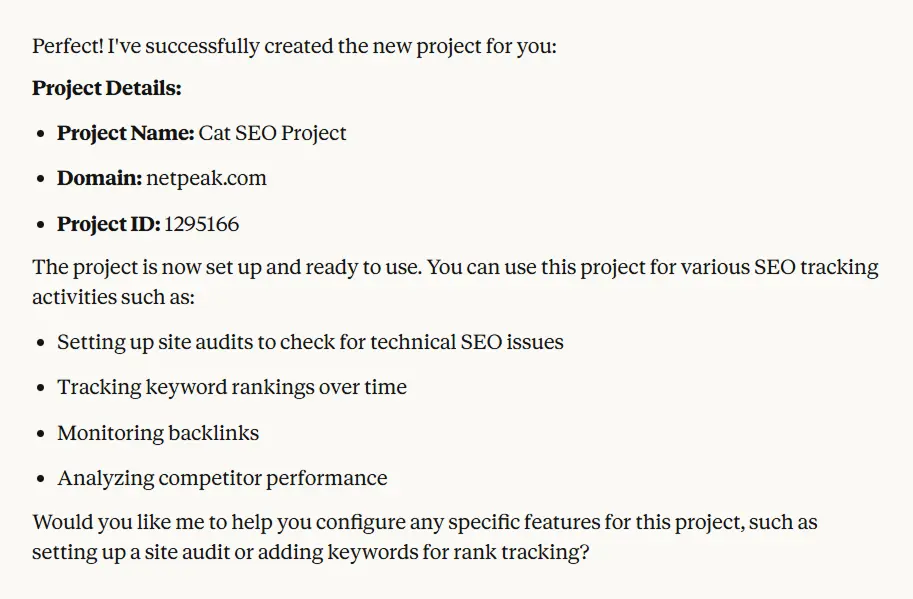
I’ll set up the project structure and return the project ID. This becomes your container for all SEO activities on that domain—rank tracking configurations, scheduled audits, keyword lists, and historical data all tie back to this project.
If you’re managing multiple projects (common for agencies or in-house teams):
“List all my projects”
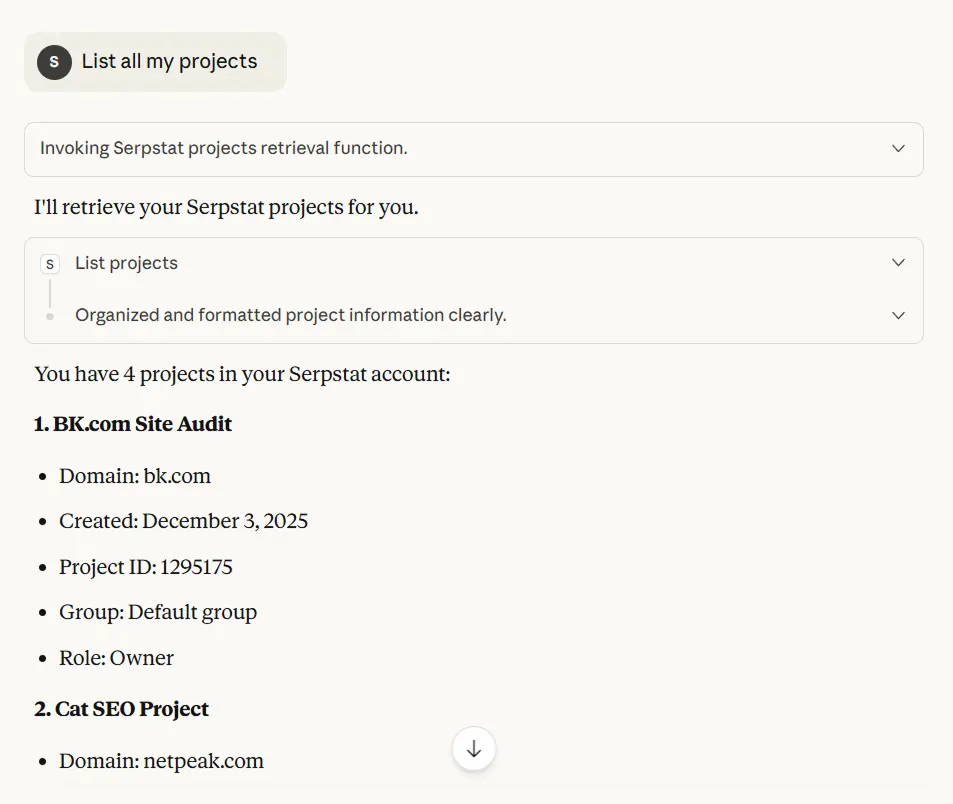
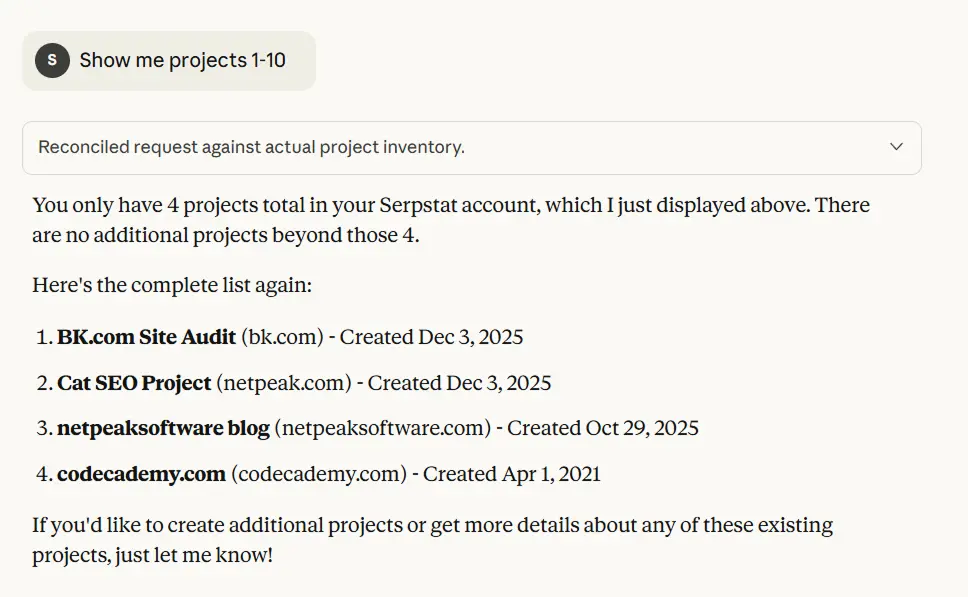
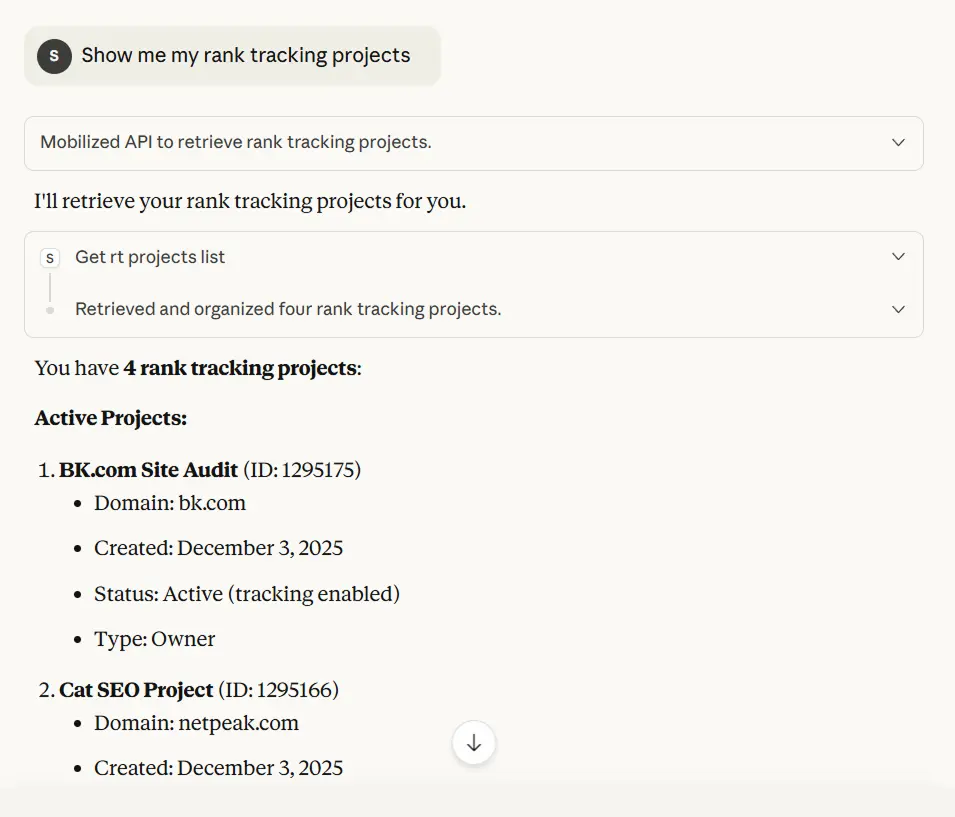
I’ll show you every project with details like domain, creation date, and current tracking status. For accounts with many projects, you can paginate through results: “Show me projects 1-10”. This returns the next batch without overwhelming you with data.
When Projects Outlive Their Purpose
Sometimes projects need to be removed—a client leaves, you sold a domain, or you’re consolidating duplicate projects. Before deletion, I’ll always confirm with you since this is permanent:
“Delete project with ID 1234567”
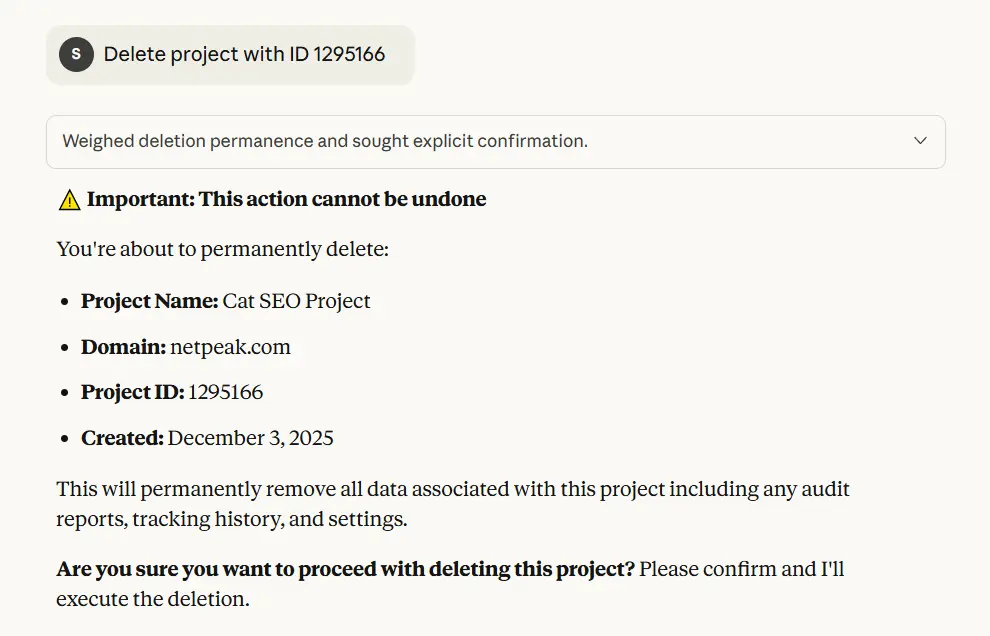
I’ll verify the project details for confirmation. Once confirmed, all associated data (rank tracking history, audit reports, configurations) is removed. This is non-reversible, so I make sure you’re certain before proceeding.
#6 Rank Tracking
Rank tracking projects let you monitor keyword positions over time. This isn’t just about vanity metrics—it’s about understanding what’s working, catching problems early, and proving ROI.
Setting Up Strategic Tracking
You don’t need to track and memorize every project—focus on the ones that matter. Group them by intent and importance:
“Show me my rank tracking projects”
“List all the active project regions, id is 865618”
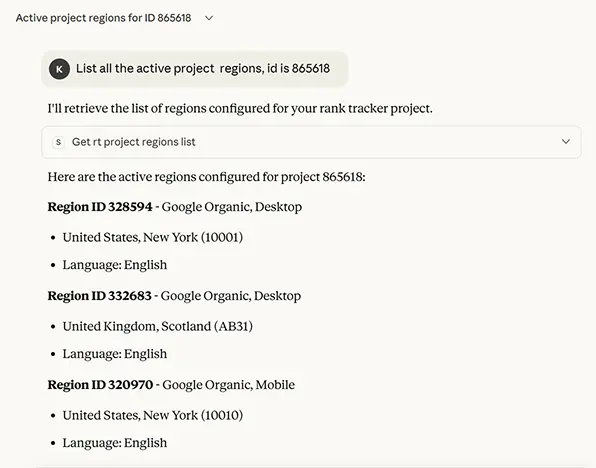
If you don’t have one yet, you’d create it in Serpstat’s interface, add your priority keywords, and select regions/devices. Then you can pull data here anytime.
“What’s the ranking history for top 20 keywords in project ‘codecademy.com’ over the last 24 hours?”
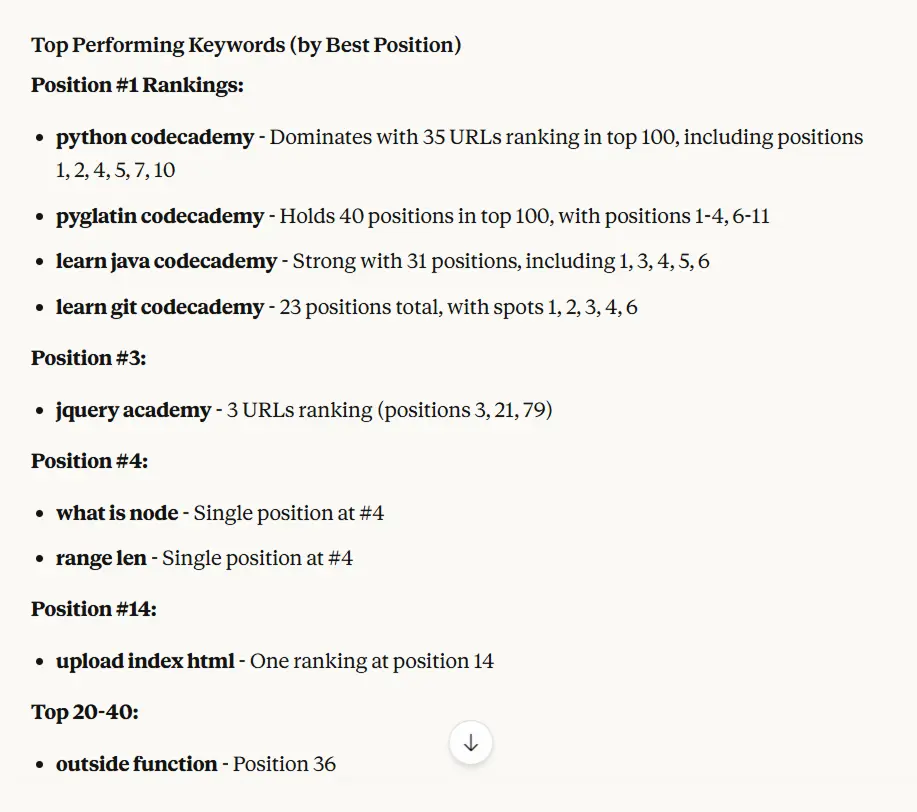
This shows position trends. If you launched new content two months ago, you should see movement. If keywords are stagnant or dropping, something’s wrong—technical issues, content quality, or increased competition.
#7 Site Audit
Technical website issues silently kill rankings. Broken links, missing meta tags, slow site speed, duplicate content — these problems prevent even great content from ranking well.
Running Your First Audit
“Run a site audit for bk.com”
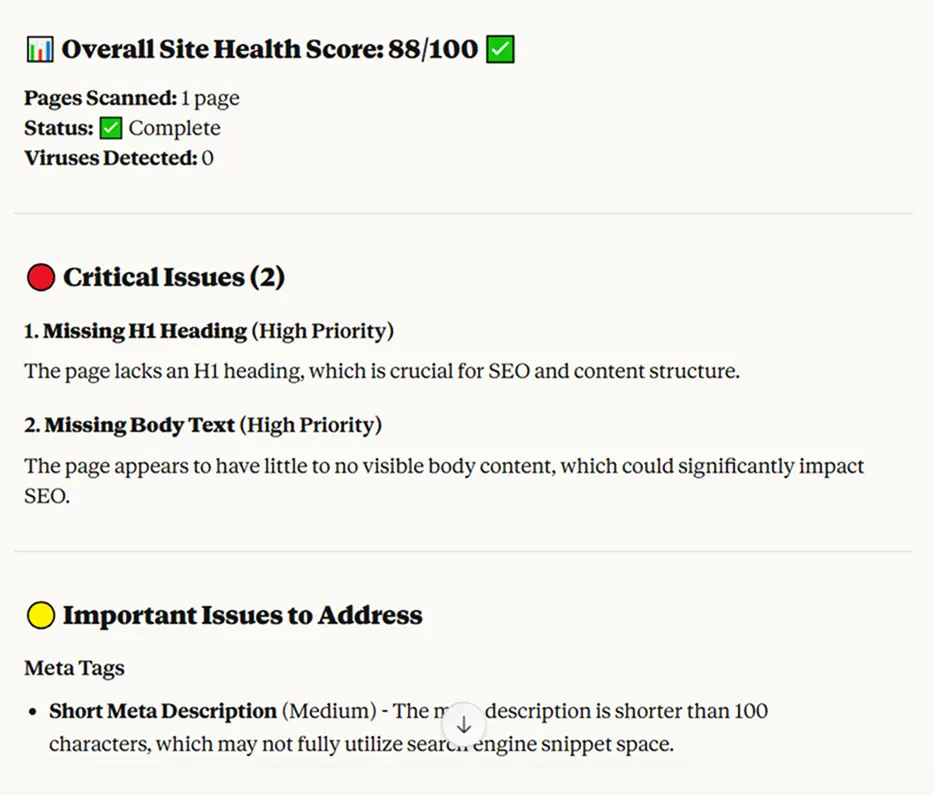
I’ll configure the scan with Serpstat’s crawler and start the process. This costs credits (1 per page for basic scans, 10 per page if JavaScript rendering is needed for complex sites). I’ll warn you about the cost before starting.
Once complete: “Show me all high-priority errors from the audit”
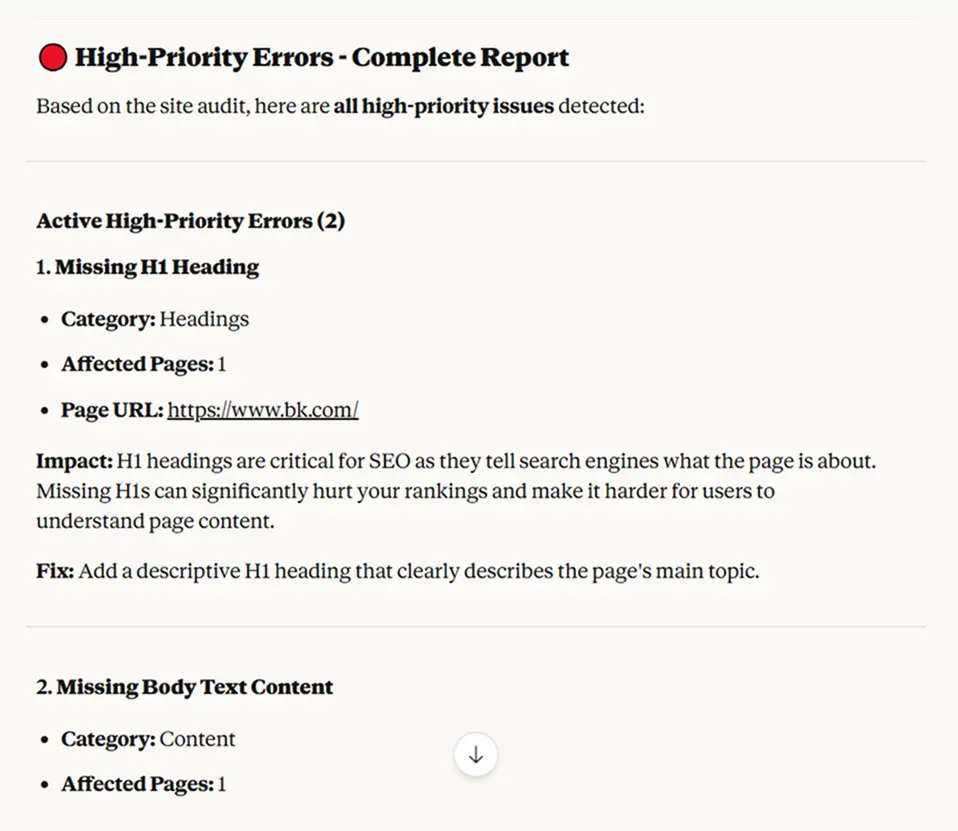
High-priority issues directly impact rankings—things like 404 errors, missing title tags, broken canonical tags, or redirect chains. These need immediate fixes.
Prioritizing Fixes by Impact
Not all errors are equally important. Missing alt text on images matters less than 5xx error codes or missing H1 tags. Here’s how to prioritize:
“Group the audit errors by category and show me the count in each”
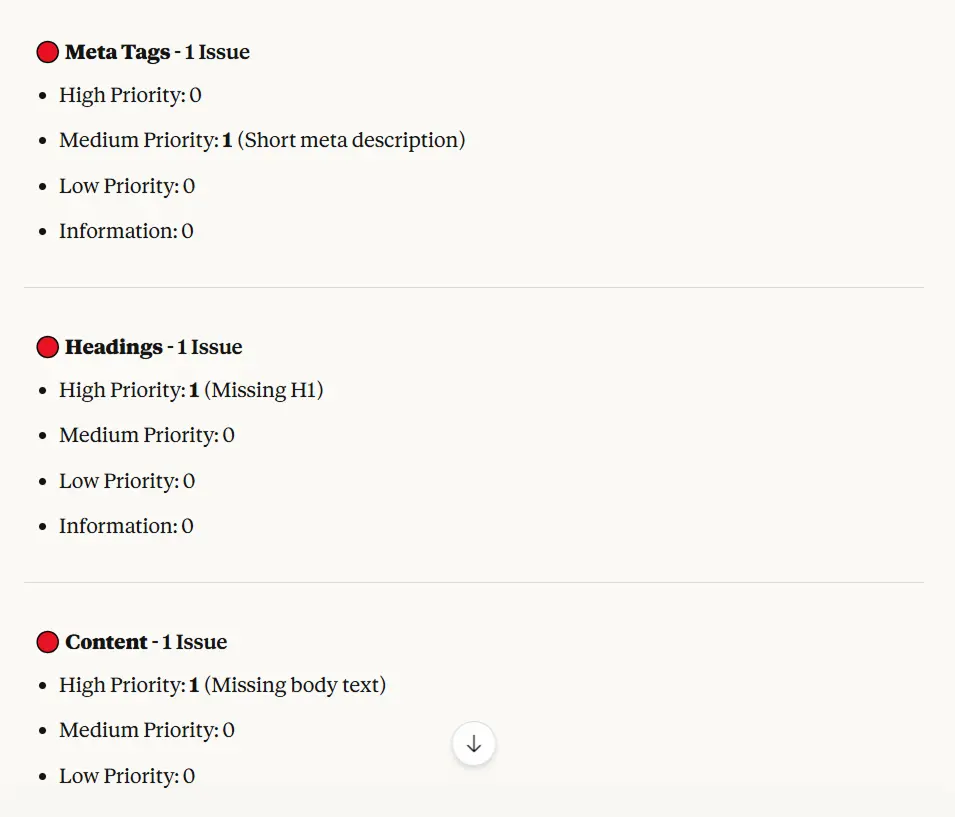
You’ll see categories like meta tags, headings, content, links, HTTPS, etc. If you have 200 errors in “links” but only 5 in “meta tags,” focus on meta tags first—they’re easier to fix and more impactful.
“Show me pages with missing title tags or meta descriptions”
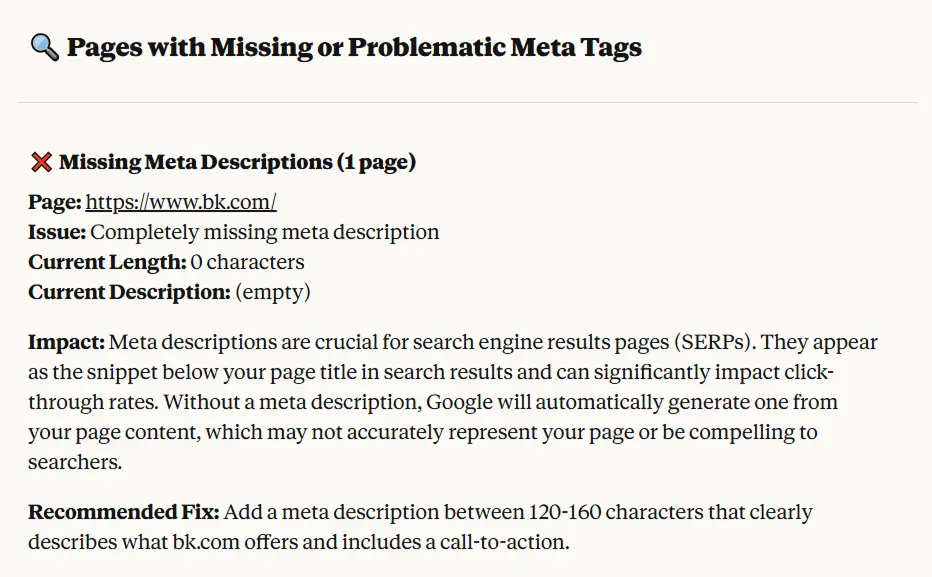
These are fundamental. Every page needs these. Export the list and batch-fix them.
Tracking Technical Improvements Over Time
The real power comes from running audits regularly and comparing results:
“Compare this month’s audit to last month’s for mysite.com”
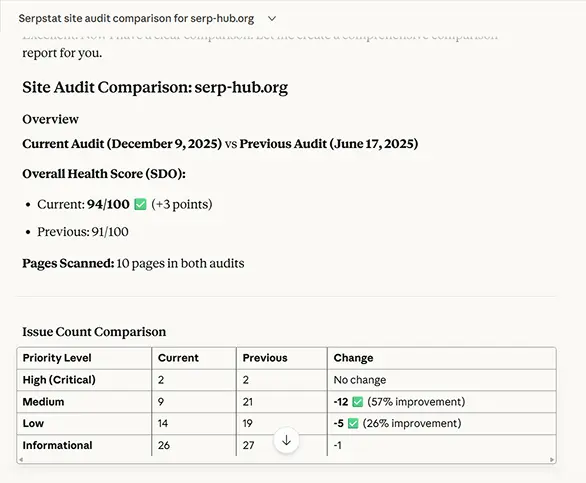
You’ll see which issues were fixed, which are new, and whether your overall site health improved. This proves ROI to stakeholders— and helps you create reports faster.
Credits & Usage Monitoring for SEO MCP
By default, most Serpstat tiered plans have 1 RPS (1 request per second)—this is sufficient for most tasks. If you need higher throughput, contact Serpstat support to discuss plan upgrades.
The maximum number of results returned by each API method is limited to 60,000 rows.
Different operations have different costs, and I’ll always warn you about expensive operations before executing:
- Domain keyword lookups: 1 credit per result row
- Backlink queries: 1 credit per result row
- Site audits (no JS): 1 credit per page scanned
- Site audits (with JS): 10 credits per page scanned
- One-page audits: 10 credits per scan
- SERP analysis: 1 credit per result
When you ask for something that will consume significant credits, ask to estimate the cost.
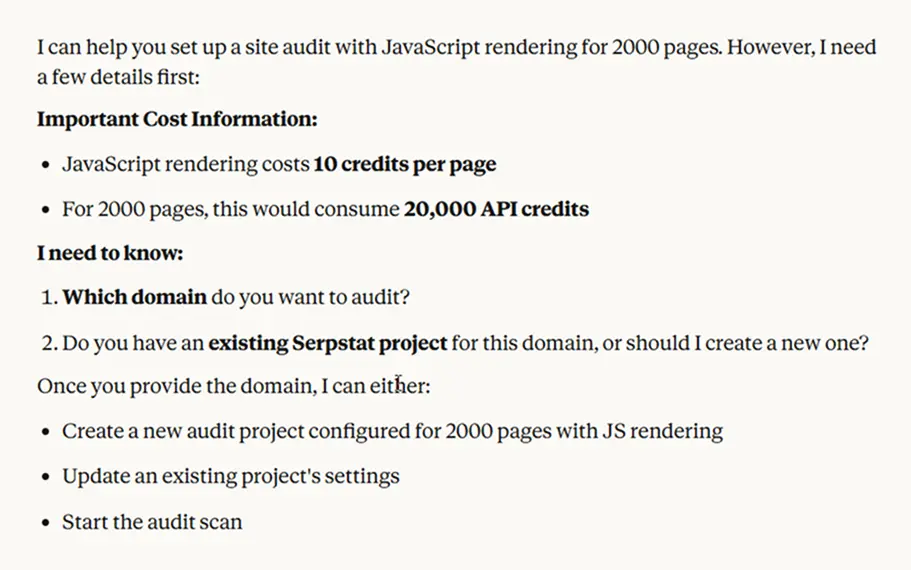
If you ever wonder how many credits you’ve used or what’s left, just ask:
“Show me my audit credits statistics.”
I’ll break down how many pages you’ve scanned, how many credits were consumed, and what’s available — categorized by type (basic, JS-rendered, etc.).
Need to check your API quota across modules?
“Check my API credits usage and remaining quota.”
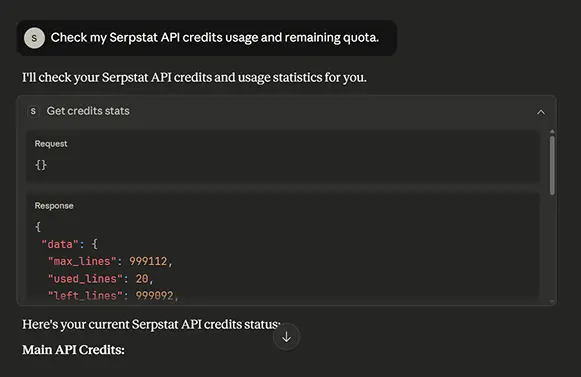
I’ll return your full usage stats, including credits for domain analysis, keyword research, backlink reports, and more.
With me, credit management is no longer hidden in settings — it’s a natural part of your workflow.
Important: The server respects rate limits automatically. If you encounter rate limit errors, wait before making additional requests.
Final Thoughts
As you see, Serpstat MCP is not just a tool — it’s a part of an ecosystem. With a full toolkit from the platform, it can help SEO specialists, marketers, and even content writers. It all depends on what you are looking for.
We are constantly improving our MCP for SEO. From learning new patterns and expanding to what it can automate for you. We understand it might look difficult to change your habits and try new tools. Serpstat just wants to help you move through workflow faster and have more time on your hands.
Frequently Asked Questions
Under 5 minutes. The setup requires a compatible Node.js version, Claude Desktop or Gemini, and your Serpstat API token. No developer is needed, and there are no hidden steps — this is the “full setup” process.
No — Serpstat MCP is a productivity accelerator that works alongside the Serpstat platform. It uses the Serpstat API to automate complex SEO workflows through chat conversation, acting as an AI-powered assistant for routine tasks.
The system operates within some limitations:
- Conversation memory has credit limits — extended sessions may require context reminders
- Gemini and Claude AI operate within token limits, so sufficient token credits are needed
- Analysis capabilities depend on your Serpstat API quota and active module subscriptions
Within these parameters, Serpstat MCP is fast, precise, and built to scale your workflow.